<?xml version="1.0" encoding="utf-8"?><feed xmlns="http://www.w3.org/2005/Atom" ><generator uri="https://jekyllrb.com/" version="3.10.0">Jekyll</generator><link href="https://alessiodevoto.github.io/feed.xml" rel="self" type="application/atom+xml" /><link href="https://alessiodevoto.github.io/" rel="alternate" type="text/html" /><updated>2026-08-08T11:21:44+02:00</updated><id>https://alessiodevoto.github.io/feed.xml</id><title type="html">Alessio Devoto</title><subtitle>Alessio Devoto&apos;s PhD Data Science personal website</subtitle><author><name>{&quot;name&quot;=&gt;nil, &quot;avatar&quot;=&gt;&quot;/assets/images/alessio_pp_standard.jpg&quot;, &quot;bio&quot;=&gt;&quot;Building AI agents @ NVIDIA &lt;br&gt; PhD in Data Science &lt;br&gt; &lt;br&gt; &lt;a href=&apos;https://classicalanthology.theclassicslibrary.com/2012/05/30/odyssey-1-1-6/&apos;&gt; 📖 &lt;u&gt; Ἄνδρα μοι ἔννεπε, Μοῦσα, πολύτροπον &lt;/u&gt; &lt;a&gt;&quot;, &quot;location&quot;=&gt;&quot;Zurich, Switzerland&quot;, &quot;email&quot;=&gt;nil, &quot;links&quot;=&gt;[{&quot;label&quot;=&gt;&quot;X&quot;, &quot;icon&quot;=&gt;&quot;fab fa-fw fa-square-x-twitter&quot;, &quot;url&quot;=&gt;&quot;https://x.com/devoto_alessio&quot;}, {&quot;label&quot;=&gt;&quot;Email&quot;, &quot;icon&quot;=&gt;&quot;fas fa-fw fa-envelope-square&quot;, &quot;url&quot;=&gt;&quot;mailto:devoto.alessio@gmail.com&quot;}, {&quot;label&quot;=&gt;&quot;GitHub&quot;, &quot;icon&quot;=&gt;&quot;fab fa-fw fa-github&quot;, &quot;url&quot;=&gt;&quot;https://github.com/alessiodevoto&quot;}, {&quot;label&quot;=&gt;&quot;LinkedIn&quot;, &quot;icon&quot;=&gt;&quot;fab fa-fw fa-linkedin&quot;, &quot;url&quot;=&gt;&quot;https://www.linkedin.com/in/alessio-devoto/&quot;}, {&quot;label&quot;=&gt;&quot;Semantic Scholar&quot;, &quot;icon&quot;=&gt;&quot;fa-solid fa-magnifying-glass&quot;, &quot;url&quot;=&gt;&quot;https://www.semanticscholar.org/author/Alessio-Devoto/2172309361&quot;}, {&quot;label&quot;=&gt;&quot;Google Scholar&quot;, &quot;icon&quot;=&gt;&quot;fa-brands fa-google-scholar&quot;, &quot;url&quot;=&gt;&quot;https://scholar.google.com/citations?user=er31rp0AAAAJ&amp;hl&quot;}, {&quot;label&quot;=&gt;&quot;Bluesky&quot;, &quot;icon&quot;=&gt;&quot;fa-brands fa-bluesky&quot;, &quot;url&quot;=&gt;&quot;https://bsky.app/profile/alessiodevoto.bsky.social&quot;}]}</name></author><entry><title type="html"></title><link href="https://alessiodevoto.github.io/2023-05-12-Customer-churning-for-telecom/" rel="alternate" type="text/html" title="" /><published>2026-08-08T11:21:44+02:00</published><updated>2026-08-08T11:21:44+02:00</updated><id>https://alessiodevoto.github.io/2023-05-12-Customer%20churning%20for%20telecom</id><content type="html" xml:base="https://alessiodevoto.github.io/2023-05-12-Customer-churning-for-telecom/"><![CDATA[<p>In this short tutorial, we will use our company’s dataset to predict whether a customer will churn or not.</p>

<p>For a better experience, open in Colab:  <a href="https://colab.research.google.com/github/alessiodevoto/notebooks/blob/main/intro_to_ml.ipynb" target="_parent"><img src="https://colab.research.google.com/assets/colab-badge.svg" alt="Open In Colab" /></a></p>]]></content><author><name>{&quot;name&quot;=&gt;nil, &quot;avatar&quot;=&gt;&quot;/assets/images/alessio_pp_standard.jpg&quot;, &quot;bio&quot;=&gt;&quot;Building AI agents @ NVIDIA &lt;br&gt; PhD in Data Science &lt;br&gt; &lt;br&gt; &lt;a href=&apos;https://classicalanthology.theclassicslibrary.com/2012/05/30/odyssey-1-1-6/&apos;&gt; 📖 &lt;u&gt; Ἄνδρα μοι ἔννεπε, Μοῦσα, πολύτροπον &lt;/u&gt; &lt;a&gt;&quot;, &quot;location&quot;=&gt;&quot;Zurich, Switzerland&quot;, &quot;email&quot;=&gt;nil, &quot;links&quot;=&gt;[{&quot;label&quot;=&gt;&quot;X&quot;, &quot;icon&quot;=&gt;&quot;fab fa-fw fa-square-x-twitter&quot;, &quot;url&quot;=&gt;&quot;https://x.com/devoto_alessio&quot;}, {&quot;label&quot;=&gt;&quot;Email&quot;, &quot;icon&quot;=&gt;&quot;fas fa-fw fa-envelope-square&quot;, &quot;url&quot;=&gt;&quot;mailto:devoto.alessio@gmail.com&quot;}, {&quot;label&quot;=&gt;&quot;GitHub&quot;, &quot;icon&quot;=&gt;&quot;fab fa-fw fa-github&quot;, &quot;url&quot;=&gt;&quot;https://github.com/alessiodevoto&quot;}, {&quot;label&quot;=&gt;&quot;LinkedIn&quot;, &quot;icon&quot;=&gt;&quot;fab fa-fw fa-linkedin&quot;, &quot;url&quot;=&gt;&quot;https://www.linkedin.com/in/alessio-devoto/&quot;}, {&quot;label&quot;=&gt;&quot;Semantic Scholar&quot;, &quot;icon&quot;=&gt;&quot;fa-solid fa-magnifying-glass&quot;, &quot;url&quot;=&gt;&quot;https://www.semanticscholar.org/author/Alessio-Devoto/2172309361&quot;}, {&quot;label&quot;=&gt;&quot;Google Scholar&quot;, &quot;icon&quot;=&gt;&quot;fa-brands fa-google-scholar&quot;, &quot;url&quot;=&gt;&quot;https://scholar.google.com/citations?user=er31rp0AAAAJ&amp;hl&quot;}, {&quot;label&quot;=&gt;&quot;Bluesky&quot;, &quot;icon&quot;=&gt;&quot;fa-brands fa-bluesky&quot;, &quot;url&quot;=&gt;&quot;https://bsky.app/profile/alessiodevoto.bsky.social&quot;}]}</name></author></entry><entry><title type="html">Your First Object-Oriented Agent</title><link href="https://alessiodevoto.github.io/Your-First-Object-Oriented-Agent/" rel="alternate" type="text/html" title="Your First Object-Oriented Agent" /><published>2026-08-03T00:00:00+02:00</published><updated>2026-08-03T00:00:00+02:00</updated><id>https://alessiodevoto.github.io/Your%20First%20Object-Oriented%20Agent</id><content type="html" xml:base="https://alessiodevoto.github.io/Your-First-Object-Oriented-Agent/"><![CDATA[<p><a href="https://colab.research.google.com/github/alessiodevoto/labs-OO-Agents/blob/first-notebook-openai/notebook_tutorials/01_your_first_agent.ipynb"><img src="https://colab.research.google.com/assets/colab-badge.svg" alt="Open In Colab" /></a>   <a href="https://github.com/alessiodevoto/labs-OO-Agents/blob/first-notebook-openai/notebook_tutorials/01_your_first_agent.ipynb"><img src="https://img.shields.io/badge/notebook-GitHub-black?logo=github" alt="GitHub" /></a></p>

<blockquote>
  <p>This tutorial walks you through the core ideas behind <a href="https://github.com/NVIDIA-NeMo/labs-OO-Agents">NOOA</a> (NVIDIA Object-Oriented Agents). We’ll build a <code class="language-plaintext highlighter-rouge">BaristaAgent</code> that recommends drinks to sleepy customers. Along the way we’ll see that a NOOA agent is <strong>just a Python object</strong> — you add tools by adding methods, spin up new agents by instantiating the class, and strongly type its outputs like any regular Python function.</p>
</blockquote>

<p>We’re not going to sell you on a whole new paradigm — you won’t walk away having learned some exotic new way to build software. What you <em>will</em> walk away with is plain Python, plus a small sprinkle of magic.</p>

<hr />

<h3 id="prerequisites">Prerequisites</h3>

<p>Install NOOA:</p>

<div class="language-bash highlighter-rouge"><div class="highlight"><pre class="highlight"><code>pip <span class="nb">install </span>nooa
</code></pre></div></div>

<p>NOOA is compatible with any LiteLLM-supported model — hosted or local. For hosted providers, you’ll need an API key. Local providers (Ollama, vLLM, any OpenAI-compatible endpoint) need no API key, just an <code class="language-plaintext highlighter-rouge">api_base</code>.</p>

<hr />

<h3 id="setup">Setup</h3>

<p>Pick a provider below. Replace <code class="language-plaintext highlighter-rouge">"your-api-key"</code> with a real key for hosted providers; local providers don’t need one.</p>

<div class="language-python highlighter-rouge"><div class="highlight"><pre class="highlight"><code><span class="kn">from</span> <span class="nn">nooa.unifiedllm.registry</span> <span class="kn">import</span> <span class="n">get_llm_client</span>

<span class="c1"># model = get_llm_client("claude-haiku-4-5", api_key="your-api-key")                                        # Anthropic
# model = get_llm_client("ollama_chat/qwen3:1.7b", api_base="http://localhost:11434")                       # Ollama (local, no key)
# model = get_llm_client("hosted_vllm/Qwen/Qwen3-1.7B", api_base="http://localhost:8000/v1")                # vLLM (local, no key)
</span><span class="n">model</span> <span class="o">=</span> <span class="n">get_llm_client</span><span class="p">(</span><span class="s">"gpt-5.5"</span><span class="p">,</span> <span class="n">api_key</span><span class="o">=</span><span class="s">"your-api-key"</span><span class="p">)</span>                                                <span class="c1"># OpenAI
</span></code></pre></div></div>

<hr />

<h3 id="your-first-agent">Your First Agent</h3>

<p>Let’s define our first agent. In NOOA, you build an agent by subclassing <code class="language-plaintext highlighter-rouge">Agent</code> — the only required argument is the LLM that will power it. Here is a complete, working agent. It’s small enough to read every line.</p>

<div class="language-python highlighter-rouge"><div class="highlight"><pre class="highlight"><code><span class="kn">from</span> <span class="nn">nooa</span> <span class="kn">import</span> <span class="n">Agent</span>

<span class="k">class</span> <span class="nc">BaristaAgent</span><span class="p">(</span><span class="n">Agent</span><span class="p">,</span> <span class="n">llm</span><span class="o">=</span><span class="n">model</span><span class="p">):</span>
    <span class="s">"""You are a friendly barista at a small neighborhood cafe."""</span>  <span class="c1"># this becomes the agent's system prompt
</span>
    <span class="k">async</span> <span class="k">def</span> <span class="nf">recommend_drink</span><span class="p">(</span><span class="bp">self</span><span class="p">,</span> <span class="n">customer_request</span><span class="p">:</span> <span class="nb">str</span><span class="p">)</span> <span class="o">-&gt;</span> <span class="nb">str</span><span class="p">:</span>
        <span class="s">"""Recommend a single drink to the customer based on what they just told you.
        Be warm and concise — one string sentence is plenty."""</span>
        <span class="p">...</span>
</code></pre></div></div>

<p>Instantiate and call it. Notice that we <code class="language-plaintext highlighter-rouge">await</code> the method — generation methods are async.</p>

<div class="language-python highlighter-rouge"><div class="highlight"><pre class="highlight"><code><span class="n">barista</span> <span class="o">=</span> <span class="n">BaristaAgent</span><span class="p">()</span>
<span class="n">result</span> <span class="o">=</span> <span class="k">await</span> <span class="n">barista</span><span class="p">.</span><span class="n">recommend_drink</span><span class="p">(</span><span class="s">"Hi, I feel so sleepy, I need caffeine ☕️."</span><span class="p">)</span>
<span class="k">print</span><span class="p">(</span><span class="n">result</span><span class="p">)</span>
</code></pre></div></div>

<div class="language-plaintext highlighter-rouge"><div class="highlight"><pre class="highlight"><code>You sound like you need a classic double espresso—bright, bold, and ready to wake you right up.
</code></pre></div></div>

<p>That’s it — a friendly recommendation, ready to serve. So what just happened?</p>

<p>Behind the scenes, NOOA does the work that keeps the interface this Pythonic. A few things worth noticing:</p>

<ul>
  <li>the <strong>class docstring</strong> became the agent’s system prompt</li>
  <li>the <strong>method docstring</strong> became the task description</li>
  <li>the <strong>ellipsis (<code class="language-plaintext highlighter-rouge">...</code>)</strong> is how you tell NOOA “this method is <em>agentic</em> — hand it off to the LLM instead of running it as regular Python”</li>
</ul>

<p>Concretely, NOOA quietly assembles a prompt that looks roughly like:</p>

<div class="language-plaintext highlighter-rouge"><div class="highlight"><pre class="highlight"><code>&lt;system prompt&gt;
You are a friendly barista at a small neighborhood cafe.

&lt;available methods&gt;
recommend_drink(customer_request: str) -&gt; str
Recommend a single drink to the customer based on what they just told you. Be warm and concise — one sentence is plenty.
&lt;/available methods&gt;
</code></pre></div></div>

<p>Plus a few other pieces we’ll unpack later. Let’s call the agent one more time, just for fun:</p>

<div class="language-python highlighter-rouge"><div class="highlight"><pre class="highlight"><code><span class="n">result</span> <span class="o">=</span> <span class="k">await</span> <span class="n">barista</span><span class="p">.</span><span class="n">recommend_drink</span><span class="p">(</span><span class="s">"I would love something that works with a cornetto, but as you know, no capuccinos after 11am."</span><span class="p">)</span>
<span class="k">print</span><span class="p">(</span><span class="n">result</span><span class="p">)</span>
</code></pre></div></div>

<div class="language-plaintext highlighter-rouge"><div class="highlight"><pre class="highlight"><code>A creamy cappuccino would be lovely with a cornetto—soft foam, gentle espresso, and just the right breakfast-café feel.
</code></pre></div></div>

<blockquote>
  <p>📝 <strong>Takeaway:</strong> the agent is an object.</p>
</blockquote>

<hr />

<h3 id="adding-tools-that-is-adding-class-methods">Adding Tools (That Is, Adding Class Methods)</h3>

<p>The barista just offered a strong caffeine kick — but it’s 9pm and a double espresso is definitely not the move. How do we teach the agent to respect a “no caffeine after 4pm” policy?</p>

<p>In most agent frameworks, you’d register a tool, describe it in a JSON schema, and wire it into the runtime. In NOOA, you just <strong>add a method to the class</strong>. Anything the agent can see on itself, it can call as a tool.</p>

<p>Let’s add our first tool to <code class="language-plaintext highlighter-rouge">BaristaAgent</code>.</p>

<div class="language-python highlighter-rouge"><div class="highlight"><pre class="highlight"><code><span class="kn">from</span> <span class="nn">datetime</span> <span class="kn">import</span> <span class="n">datetime</span>
<span class="kn">from</span> <span class="nn">nooa</span> <span class="kn">import</span> <span class="n">Agent</span>

<span class="k">class</span> <span class="nc">BaristaAgent</span><span class="p">(</span><span class="n">Agent</span><span class="p">,</span> <span class="n">llm</span><span class="o">=</span><span class="n">model</span><span class="p">):</span>
    <span class="s">"""You are a friendly barista at a small neighborhood cafe."""</span>

    <span class="k">def</span> <span class="nf">is_only_decaf_hour</span><span class="p">(</span><span class="bp">self</span><span class="p">)</span> <span class="o">-&gt;</span> <span class="nb">bool</span><span class="p">:</span>
        <span class="s">"""Return True if we should only be serving decaf right now. After 2pm we go decaf-only so our customers can still sleep tonight."""</span>
        <span class="k">return</span> <span class="n">datetime</span><span class="p">.</span><span class="n">now</span><span class="p">().</span><span class="n">hour</span> <span class="o">&gt;=</span> <span class="mi">14</span>

    <span class="k">async</span> <span class="k">def</span> <span class="nf">recommend_drink</span><span class="p">(</span><span class="bp">self</span><span class="p">,</span> <span class="n">customer_request</span><span class="p">:</span> <span class="nb">str</span><span class="p">)</span> <span class="o">-&gt;</span> <span class="nb">str</span><span class="p">:</span>
        <span class="s">"""Recommend a single drink to the customer based on what they just told you.
        Be warm and concise — one string sentence is plenty."""</span>
        <span class="p">...</span>

<span class="n">barista</span> <span class="o">=</span> <span class="n">BaristaAgent</span><span class="p">()</span>
<span class="k">await</span> <span class="n">barista</span><span class="p">.</span><span class="n">recommend_drink</span><span class="p">(</span><span class="s">"Hi, I feel so sleepy."</span><span class="p">)</span>
</code></pre></div></div>

<div class="language-plaintext highlighter-rouge"><div class="highlight"><pre class="highlight"><code>'Since it's decaf-only right now, I'd make you a cozy decaf latte to perk up your mood without keeping you up later.'
</code></pre></div></div>

<p>Two things to sit with:</p>

<ul>
  <li><strong>You didn’t register <code class="language-plaintext highlighter-rouge">is_only_decaf_hour</code> anywhere.</strong> No <code class="language-plaintext highlighter-rouge">@tool</code>, no JSON schema, no <code class="language-plaintext highlighter-rouge">tools=[...]</code> list. The framework rendered <code class="language-plaintext highlighter-rouge">doc(self)</code> into the system prompt (that <code class="language-plaintext highlighter-rouge">&lt;self&gt;</code> block you saw earlier), and the LLM discovered the method the same way you’d discover it while reading someone else’s code.</li>
  <li><strong>The generation method used the helper without being told to.</strong> Nothing in <code class="language-plaintext highlighter-rouge">recommend_drink</code>’s docstring mentions <code class="language-plaintext highlighter-rouge">is_only_decaf_hour</code>. The LLM spotted a method that looked relevant, called it, and folded the result into its recommendation. That’s the whole “tools are just methods” idea in a single page.</li>
</ul>

<blockquote>
  <p>📝 <strong>Takeaway:</strong> in NOOA, ordinary Python methods and agentic methods live side by side on the same class. The agent freely calls the deterministic ones as tools — no registration, no schema, no glue code.</p>
</blockquote>

<hr />

<h3 id="strong-typing">Strong Typing</h3>

<p>What if our cafe only serves a fixed menu, and we want the agent to <em>only</em> recommend drinks we actually offer?</p>

<p>Most agent frameworks deal in a single data type: text. Text gets passed to tools, text gets exchanged between agents, text comes back as output — and then you painstakingly parse it into JSON, hoping the model got the shape right (which, even with the best models, it doesn’t always). NOOA takes a different approach: because the agent lives inside a Python program, we can strongly type everything.</p>

<p>Let’s put a real type on the return value of <code class="language-plaintext highlighter-rouge">recommend_drink</code>:</p>

<div class="language-python highlighter-rouge"><div class="highlight"><pre class="highlight"><code><span class="kn">from</span> <span class="nn">enum</span> <span class="kn">import</span> <span class="n">Enum</span>
<span class="kn">from</span> <span class="nn">nooa</span> <span class="kn">import</span> <span class="n">Agent</span>

<span class="c1"># Define a type for the return value
</span><span class="k">class</span> <span class="nc">Drink</span><span class="p">(</span><span class="n">Enum</span><span class="p">):</span>
    <span class="n">ESPRESSO</span> <span class="o">=</span> <span class="s">"espresso"</span>
    <span class="n">CAPPUCCINO</span> <span class="o">=</span> <span class="s">"cappuccino"</span>
    <span class="n">FLAT_WHITE</span> <span class="o">=</span> <span class="s">"flat white"</span>

<span class="k">class</span> <span class="nc">BaristaAgent</span><span class="p">(</span><span class="n">Agent</span><span class="p">,</span> <span class="n">llm</span><span class="o">=</span><span class="n">model</span><span class="p">):</span>
    <span class="s">"""You are a friendly barista at a small neighborhood cafe."""</span>

    <span class="k">def</span> <span class="nf">is_only_decaf_hour</span><span class="p">(</span><span class="bp">self</span><span class="p">)</span> <span class="o">-&gt;</span> <span class="nb">bool</span><span class="p">:</span>
        <span class="s">"""Return True if we should only be serving decaf right now. After 4pm we go decaf-only so our customers can still sleep tonight."""</span>
        <span class="k">return</span> <span class="n">datetime</span><span class="p">.</span><span class="n">now</span><span class="p">().</span><span class="n">hour</span> <span class="o">&gt;=</span> <span class="mi">16</span>

    <span class="k">async</span> <span class="k">def</span> <span class="nf">recommend_drink</span><span class="p">(</span><span class="bp">self</span><span class="p">,</span> <span class="n">customer_request</span><span class="p">:</span> <span class="nb">str</span><span class="p">)</span> <span class="o">-&gt;</span> <span class="nb">tuple</span><span class="p">[</span><span class="nb">str</span><span class="p">,</span> <span class="n">Drink</span><span class="p">]:</span>
        <span class="s">"""Pick the single best drink for the customer from the menu, based on what they told you."""</span>
        <span class="p">...</span>

<span class="n">barista</span> <span class="o">=</span> <span class="n">BaristaAgent</span><span class="p">()</span>
<span class="n">reason</span><span class="p">,</span> <span class="n">drink</span> <span class="o">=</span> <span class="k">await</span> <span class="n">barista</span><span class="p">.</span><span class="n">recommend_drink</span><span class="p">(</span><span class="s">"Hi, I feel so sleepy."</span><span class="p">)</span>
<span class="k">print</span><span class="p">(</span><span class="s">"Barista: "</span><span class="p">,</span> <span class="n">reason</span><span class="p">)</span>
<span class="k">print</span><span class="p">(</span><span class="s">"Recommended drink: "</span><span class="p">,</span> <span class="n">drink</span><span class="p">)</span>
<span class="k">print</span><span class="p">(</span><span class="nb">type</span><span class="p">(</span><span class="n">drink</span><span class="p">))</span>
</code></pre></div></div>

<div class="language-plaintext highlighter-rouge"><div class="highlight"><pre class="highlight"><code>Barista:  It's decaf-only right now, but I'd make you a cozy decaf cappuccino.
Recommended drink:  Drink.CAPPUCCINO
&lt;enum 'Drink'&gt;
</code></pre></div></div>

<p>This isn’t just prompt engineering — <strong>NOOA enforces the return type at runtime</strong>. If the LLM returns something that isn’t a valid <code class="language-plaintext highlighter-rouge">Drink</code>, the framework retries until it produces one. You get real Python objects back, not strings you have to reparse.</p>

<div class="language-python highlighter-rouge"><div class="highlight"><pre class="highlight"><code><span class="c1"># To see what "validation" actually means, try constructing a Drink from
# something that isn't on the menu. Python's Enum machinery rejects it:
</span><span class="k">try</span><span class="p">:</span>
    <span class="n">Drink</span><span class="p">(</span><span class="s">"matcha"</span><span class="p">)</span>
<span class="k">except</span> <span class="nb">ValueError</span> <span class="k">as</span> <span class="n">e</span><span class="p">:</span>
    <span class="k">print</span><span class="p">(</span><span class="sa">f</span><span class="s">"ValueError: </span><span class="si">{</span><span class="n">e</span><span class="si">}</span><span class="s">"</span><span class="p">)</span>

<span class="c1"># When the LLM returns a value that doesn't match the declared type, NOOA
# catches this same error, feeds it back into the next turn as a hint, and
# asks the model to try again. You never see the invalid value in your code.
</span></code></pre></div></div>

<div class="language-plaintext highlighter-rouge"><div class="highlight"><pre class="highlight"><code>ValueError: 'matcha' is not a valid Drink
</code></pre></div></div>

<blockquote>
  <p>📝 <strong>Takeaway:</strong> strong typing all the way through.</p>
</blockquote>

<hr />

<h3 id="agent-state">Agent State</h3>

<p>Our cafe has a finite stash of coffee beans, and every drink burns through a few. Since our agent is <em>just a Python object</em>, giving it state is as easy as adding a field in <code class="language-plaintext highlighter-rouge">__init__</code>:</p>

<div class="language-python highlighter-rouge"><div class="highlight"><pre class="highlight"><code><span class="kn">from</span> <span class="nn">nooa</span> <span class="kn">import</span> <span class="n">Agent</span>
<span class="kn">from</span> <span class="nn">typing</span> <span class="kn">import</span> <span class="n">Union</span>

<span class="k">class</span> <span class="nc">Drink</span><span class="p">(</span><span class="n">Enum</span><span class="p">):</span>
    <span class="n">ESPRESSO</span> <span class="o">=</span> <span class="s">"espresso"</span>
    <span class="n">CAPPUCCINO</span> <span class="o">=</span> <span class="s">"cappuccino"</span>
    <span class="n">FLAT_WHITE</span> <span class="o">=</span> <span class="s">"flat white"</span>
    <span class="n">TEA</span> <span class="o">=</span> <span class="s">"tea"</span>

<span class="k">class</span> <span class="nc">BaristaAgent</span><span class="p">(</span><span class="n">Agent</span><span class="p">,</span> <span class="n">llm</span><span class="o">=</span><span class="n">model</span><span class="p">):</span>
    <span class="s">"""You are a friendly barista at a small neighborhood cafe."""</span>

    <span class="k">def</span> <span class="nf">__init__</span><span class="p">(</span><span class="bp">self</span><span class="p">,</span> <span class="n">coffee_beans</span><span class="p">:</span> <span class="nb">int</span><span class="p">)</span> <span class="o">-&gt;</span> <span class="bp">None</span><span class="p">:</span>
        <span class="nb">super</span><span class="p">().</span><span class="n">__init__</span><span class="p">()</span>
        <span class="bp">self</span><span class="p">.</span><span class="n">coffee_beans</span> <span class="o">=</span> <span class="n">coffee_beans</span>

    <span class="k">def</span> <span class="nf">is_only_decaf_hour</span><span class="p">(</span><span class="bp">self</span><span class="p">)</span> <span class="o">-&gt;</span> <span class="nb">bool</span><span class="p">:</span>
        <span class="s">"""Return True if we should only be serving decaf right now. After 6pm we go decaf-only so our customers can still sleep tonight."""</span>
        <span class="k">return</span> <span class="n">datetime</span><span class="p">.</span><span class="n">now</span><span class="p">().</span><span class="n">hour</span> <span class="o">&gt;=</span> <span class="mi">18</span>

    <span class="k">def</span> <span class="nf">serve</span><span class="p">(</span><span class="bp">self</span><span class="p">,</span> <span class="n">drink</span><span class="p">:</span> <span class="n">Drink</span><span class="p">)</span> <span class="o">-&gt;</span> <span class="n">Drink</span><span class="p">:</span>
        <span class="s">"""Serve a drink. Deducts 100 beans unless it's tea."""</span>
        <span class="k">if</span> <span class="n">drink</span> <span class="o">!=</span> <span class="n">Drink</span><span class="p">.</span><span class="n">TEA</span><span class="p">:</span>
            <span class="bp">self</span><span class="p">.</span><span class="n">coffee_beans</span> <span class="o">-=</span> <span class="mi">100</span>
        <span class="k">return</span> <span class="n">drink</span>

    <span class="k">async</span> <span class="k">def</span> <span class="nf">recommend_drink</span><span class="p">(</span><span class="bp">self</span><span class="p">,</span> <span class="n">customer_request</span><span class="p">:</span> <span class="nb">str</span><span class="p">)</span> <span class="o">-&gt;</span> <span class="nb">tuple</span><span class="p">[</span><span class="nb">str</span><span class="p">,</span> <span class="n">Union</span><span class="p">[</span><span class="n">Drink</span><span class="p">,</span> <span class="bp">None</span><span class="p">]]:</span>
        <span class="s">"""Recommend a single drink to the customer based on what they just told you.
        Be warm and concise — one sentence is plenty.
        We currently have {self.coffee_beans} beans left. If we ran out, recommend a tea.
        Call self.serve(drink) with your chosen drink before returning."""</span>
        <span class="p">...</span>
</code></pre></div></div>

<div class="language-python highlighter-rouge"><div class="highlight"><pre class="highlight"><code><span class="n">barista</span> <span class="o">=</span> <span class="n">BaristaAgent</span><span class="p">(</span><span class="n">coffee_beans</span><span class="o">=</span><span class="mi">200</span><span class="p">)</span>
<span class="k">for</span> <span class="n">_</span> <span class="ow">in</span> <span class="nb">range</span><span class="p">(</span><span class="mi">3</span><span class="p">):</span>
    <span class="n">barista_answer</span><span class="p">,</span> <span class="n">drink</span> <span class="o">=</span> <span class="k">await</span> <span class="n">barista</span><span class="p">.</span><span class="n">recommend_drink</span><span class="p">(</span><span class="s">"Something to keep me going, please."</span><span class="p">)</span>
    <span class="k">print</span><span class="p">(</span><span class="sa">f</span><span class="s">"Answer: </span><span class="si">{</span><span class="n">barista_answer</span><span class="si">}</span><span class="se">\n</span><span class="s">Served: </span><span class="si">{</span><span class="n">drink</span><span class="si">}</span><span class="se">\n</span><span class="s">Beans left: </span><span class="si">{</span><span class="n">barista</span><span class="p">.</span><span class="n">coffee_beans</span><span class="si">}</span><span class="s">"</span><span class="p">)</span>
</code></pre></div></div>

<div class="language-plaintext highlighter-rouge"><div class="highlight"><pre class="highlight"><code>Answer: Absolutely — an espresso should give you a nice little boost.
Served: Drink.ESPRESSO
Beans left: 100
Answer: Absolutely — an espresso should give you a nice little boost.
Served: Drink.ESPRESSO
Beans left: 0
Answer: I'm out of coffee beans just now, but a bright cup of tea will still keep you nicely refreshed.
Served: Drink.TEA
Beans left: 0
</code></pre></div></div>

<blockquote>
  <p>📝 <strong>Takeaway:</strong> the agent “sees” everything on itself — including itself.</p>
</blockquote>

<hr />

<h3 id="what-is-happening-under-the-hood">What Is Happening Under the Hood?</h3>

<p>NOOA doesn’t hide the prompt from you. <code class="language-plaintext highlighter-rouge">print_prompt</code> renders exactly what would be sent to the LLM for a given method call — the system prompt, the agent introspection block, and the task. Take a look:</p>

<div class="language-python highlighter-rouge"><div class="highlight"><pre class="highlight"><code><span class="kn">import</span> <span class="nn">nooa</span>
<span class="k">await</span> <span class="n">nooa</span><span class="p">.</span><span class="n">print_prompt</span><span class="p">(</span><span class="n">barista</span><span class="p">.</span><span class="n">recommend_drink</span><span class="p">,</span> <span class="n">customer_request</span><span class="o">=</span><span class="s">"stressed and running late"</span><span class="p">)</span>
</code></pre></div></div>

<details>
<summary>Click to expand the full prompt output</summary>

`````
=== SYSTEM PROMPT  [BaristaAgent] ===

<system_prompt expr="self._resolve_system_prompt()">
You are a friendly barista at a small neighborhood cafe.
</system_prompt>

<strategy_prompt>
## Strategy

Jupyter-like Python session. Parameters pre-loaded as locals; state persists across cells. Use `await` directly, `print`/`pprint` to debug, `doc(obj)` to inspect types. You MUST call a tool each turn — **plain-text responses do NOT end the session**. To finish, call `return_result(value)`. Repeated text-only responses will abort the run with an error.

**Your two tools:**
- `execute_python(code)` — run a code cell
- `return_result(value)` — submit your final answer (also callable from inside `execute_python`)

## When to use which tool

Use `return_result(...)` directly for simple answers determinable from the inputs alone (yes/no, one field, a single lookup).

Use `execute_python(...)` for lists/batches, arithmetic, multi-step computation, transforms, or iteration. Always iterate in code — never construct large arrays by hand.

For language tasks (classification, extraction, interpretation), use LLM reasoning — answer directly via `return_result`, or delegate to a `@strategy(PredictStrategy())` standalone function (see below). Don't keyword-match or regex.

## Returning computed results

After computing in code, call `return_result(variable)` **from within** `execute_python()`. This passes the variable directly. Do NOT re-type computed values in a separate `return_result` tool call.

## Helpers

Define helpers at the top of the cell and call them by name. Existing methods on `self` are usable via `await self.method(...)`. Helpers persist as REPL locals across cells in this session.

```python
def normalize(x):
    return x.strip().lower()

cleaned = [normalize(v) for v in values]
```

## Fan-out generation

For per-item LLM work over a list, decorate a standalone async function with `@strategy(PredictStrategy())` and an ellipsis body. `asyncio.gather` runs the calls in parallel.

```python
@strategy(PredictStrategy())
async def detect_language(message: str) -&gt; str:
    """Return the ISO 639-1 language code for {message} (e.g. 'en', 'fr', 'de', 'ja')."""
    ...

codes = await asyncio.gather(*(detect_language(m) for m in messages))
return_result(codes)
```

For iterative sub-tasks that need code execution, use `@strategy(CodeActStrategy())`. The sub-task must be strictly simpler than the current call to avoid infinite recursion.

## Restrictions (will throw)

- `eval`, `exec`, `compile`, `__import__`, `input`, `breakpoint`
- `globals`, `locals`, `vars`, `asyncio.run`, `loop.run_until_complete`
- Attaching callables to the agent: `self.foo = fn`, `setattr(self, 'foo', fn)`, `type(self).foo = fn`
</strategy_prompt>

<execution_context>
## Execution Context

These names are already in scope inside `execute_python()` (state persists across cells) — call them, don't re-import or re-define. Use `doc(name)` to inspect any type or function in detail.

```python
import nooa
from datetime import datetime
from enum import Enum
from nooa import Agent
from nooa.unifiedllm import get_llm_client
from typing import Union

class BaristaAgent: ...
class Drink: ...
```
Also in scope: exit, get_ipython, open, quit.
Always available without import: `self`, `print()`, `pprint()`, `doc()`, `return_result()`, plus stdlib `asyncio` and `typing`.
</execution_context>

<self expr="doc(type(self))">
class BaristaAgent:
    """You are a friendly barista at a small neighborhood cafe."""

    coffee_beans: coffee_beans

    def is_only_decaf_hour(self) -&gt; bool:
        """Return True if we should only be serving decaf right now. After 4pm we go decaf-only so our customers can still sleep tonight."""
    def serve(self, drink: Drink) -&gt; Drink:
        """Serve a drink. Deducts 100 beans unless it's tea."""
    async def recommend_drink(self, customer_request: str) -&gt; tuple[str, Drink | None]:
        """
        Recommend a single drink to the customer based on what they just told you.
        Be warm and concise — one sentence is plenty.
        We currently have {self.coffee_beans} beans left. If we ran out, recommend a tea.
        Call self.serve(drink) with your chosen drink before returning.
        """
## Referenced Types
class Drink(Enum):
    ESPRESSO = 'espresso'
    CAPPUCCINO = 'cappuccino'
    FLAT_WHITE = 'flat white'
    TEA = 'tea'
</self>

=== TASK PROMPT  [BaristaAgent.recommend_drink] ===

## Task: recommend_drink

Recommend a single drink to the customer based on what they just told you.
Be warm and concise — one sentence is plenty.
We currently have 200 beans left. If we ran out, recommend a tea.
Call self.serve(drink) with your chosen drink before returning.

You are executing `recommend_drink` — code runs in the Execution Context above. Calling `self.recommend_drink(...)` would recurse.

=== PREFILL  [CodeActStrategy] ===

# Inspecting inputs for recommend_drink().
print(f"Task: recommend_drink()")
print(f"\ncustomer_request ({type(customer_request).__name__}):")
pprint(customer_request, max_length=25, max_string=2000, max_depth=4)
`````

</details>

<p>Look through the output. There’s no hidden state — this is exactly what the LLM sees. A few blocks worth naming:</p>

<ul>
  <li><strong><code class="language-plaintext highlighter-rouge">&lt;system_prompt&gt;</code></strong> — opens with your class docstring. This is the persona the model wears for every method on the class.</li>
  <li><strong><code class="language-plaintext highlighter-rouge">&lt;strategy_prompt&gt;</code></strong> — a compact rulebook for how to act each turn: what tools exist (<code class="language-plaintext highlighter-rouge">execute_python</code>, <code class="language-plaintext highlighter-rouge">return_result</code>), when to use which, and how to finish a run. This is what teaches the LLM to “inhabit” the framework, and it’s the same for every agent.</li>
  <li><strong><code class="language-plaintext highlighter-rouge">&lt;execution_context&gt;</code></strong> — the imports, types, and helpers that will be in scope when the LLM writes code. Anything you import at module level shows up here.</li>
  <li><strong><code class="language-plaintext highlighter-rouge">&lt;self&gt;</code></strong> — auto-generated documentation of the agent’s public methods and fields, rendered from <code class="language-plaintext highlighter-rouge">doc(type(self))</code>. This is how the LLM discovers what the agent can do — no separate tool registry needed.</li>
  <li><strong>Task prompt</strong> — your method docstring plus the rendered argument values for this call. Rendered live at call time.</li>
</ul>

<p>That’s the whole prompt. No hidden system messages, no template files, no per-tool JSON schemas glued on the side. The reason the “rulebook” stays short is that the framework is plain Python, and the model already knows Python.</p>

<blockquote>
  <p><strong>Coming later:</strong> <code class="language-plaintext highlighter-rouge">print_prompt</code> only shows the <em>outgoing</em> prompt. A later notebook introduces the live trace viewer for watching an entire run unfold — the LLM response, generated code, helper calls, retries, validation, and final return value.</p>
</blockquote>

<hr />

<h3 id="recap">Recap</h3>

<p>Five things the barista taught us:</p>

<ul>
  <li><strong>Ellipsis <code class="language-plaintext highlighter-rouge">...</code> marks a generation method.</strong> No decorator, no separate registry. If the body is <code class="language-plaintext highlighter-rouge">...</code>, the LLM implements it.</li>
  <li><strong>The class docstring is the system prompt; the method docstring is the task.</strong> Rewriting a prompt means editing a docstring.</li>
  <li><strong><code class="language-plaintext highlighter-rouge">{self.attr}</code> in docstrings is live.</strong> Change the attribute, and the next call sees the new value.</li>
  <li><strong>Every non-hidden method on <code class="language-plaintext highlighter-rouge">self</code> is a tool.</strong> No <code class="language-plaintext highlighter-rouge">@tool</code> decorator, no JSON schema, no registration step.</li>
  <li><strong>The return type annotation is the output contract.</strong> Pydantic models are validated and retried automatically.</li>
</ul>]]></content><author><name>{&quot;name&quot;=&gt;nil, &quot;avatar&quot;=&gt;&quot;/assets/images/alessio_pp_standard.jpg&quot;, &quot;bio&quot;=&gt;&quot;Building AI agents @ NVIDIA &lt;br&gt; PhD in Data Science &lt;br&gt; &lt;br&gt; &lt;a href=&apos;https://classicalanthology.theclassicslibrary.com/2012/05/30/odyssey-1-1-6/&apos;&gt; 📖 &lt;u&gt; Ἄνδρα μοι ἔννεπε, Μοῦσα, πολύτροπον &lt;/u&gt; &lt;a&gt;&quot;, &quot;location&quot;=&gt;&quot;Zurich, Switzerland&quot;, &quot;email&quot;=&gt;nil, &quot;links&quot;=&gt;[{&quot;label&quot;=&gt;&quot;X&quot;, &quot;icon&quot;=&gt;&quot;fab fa-fw fa-square-x-twitter&quot;, &quot;url&quot;=&gt;&quot;https://x.com/devoto_alessio&quot;}, {&quot;label&quot;=&gt;&quot;Email&quot;, &quot;icon&quot;=&gt;&quot;fas fa-fw fa-envelope-square&quot;, &quot;url&quot;=&gt;&quot;mailto:devoto.alessio@gmail.com&quot;}, {&quot;label&quot;=&gt;&quot;GitHub&quot;, &quot;icon&quot;=&gt;&quot;fab fa-fw fa-github&quot;, &quot;url&quot;=&gt;&quot;https://github.com/alessiodevoto&quot;}, {&quot;label&quot;=&gt;&quot;LinkedIn&quot;, &quot;icon&quot;=&gt;&quot;fab fa-fw fa-linkedin&quot;, &quot;url&quot;=&gt;&quot;https://www.linkedin.com/in/alessio-devoto/&quot;}, {&quot;label&quot;=&gt;&quot;Semantic Scholar&quot;, &quot;icon&quot;=&gt;&quot;fa-solid fa-magnifying-glass&quot;, &quot;url&quot;=&gt;&quot;https://www.semanticscholar.org/author/Alessio-Devoto/2172309361&quot;}, {&quot;label&quot;=&gt;&quot;Google Scholar&quot;, &quot;icon&quot;=&gt;&quot;fa-brands fa-google-scholar&quot;, &quot;url&quot;=&gt;&quot;https://scholar.google.com/citations?user=er31rp0AAAAJ&amp;hl&quot;}, {&quot;label&quot;=&gt;&quot;Bluesky&quot;, &quot;icon&quot;=&gt;&quot;fa-brands fa-bluesky&quot;, &quot;url&quot;=&gt;&quot;https://bsky.app/profile/alessiodevoto.bsky.social&quot;}]}</name></author><summary type="html"><![CDATA[Build a BaristaAgent with NOOA — tools, typed outputs, and state in plain Python.]]></summary></entry><entry><title type="html">Peeking Inside Diffusion Language Models with LogitLens</title><link href="https://alessiodevoto.github.io/Diffusion-Language-Models-Inner-Workings/" rel="alternate" type="text/html" title="Peeking Inside Diffusion Language Models with LogitLens" /><published>2025-06-04T00:00:00+02:00</published><updated>2025-06-04T00:00:00+02:00</updated><id>https://alessiodevoto.github.io/Diffusion%20Language%20Models%20Inner%20Workings</id><content type="html" xml:base="https://alessiodevoto.github.io/Diffusion-Language-Models-Inner-Workings/"><![CDATA[<p>Lately, diffusion-based language models like <a href="https://arxiv.org/abs/2502.09992">LLaDA</a> and <a href="https://arxiv.org/abs/2505.15809">MMaDA</a> have been gaining traction. These aren’t your standard left-to-right text generators - they’re bidirectional models trained to fill in missing tokens, more akin to BERT but on steroids. During training, Diffusion Language Models (DLMs) learn to predict <code class="language-plaintext highlighter-rouge">&lt;mask&gt;</code> tokens given context, effectively learning a denoising task.</p>

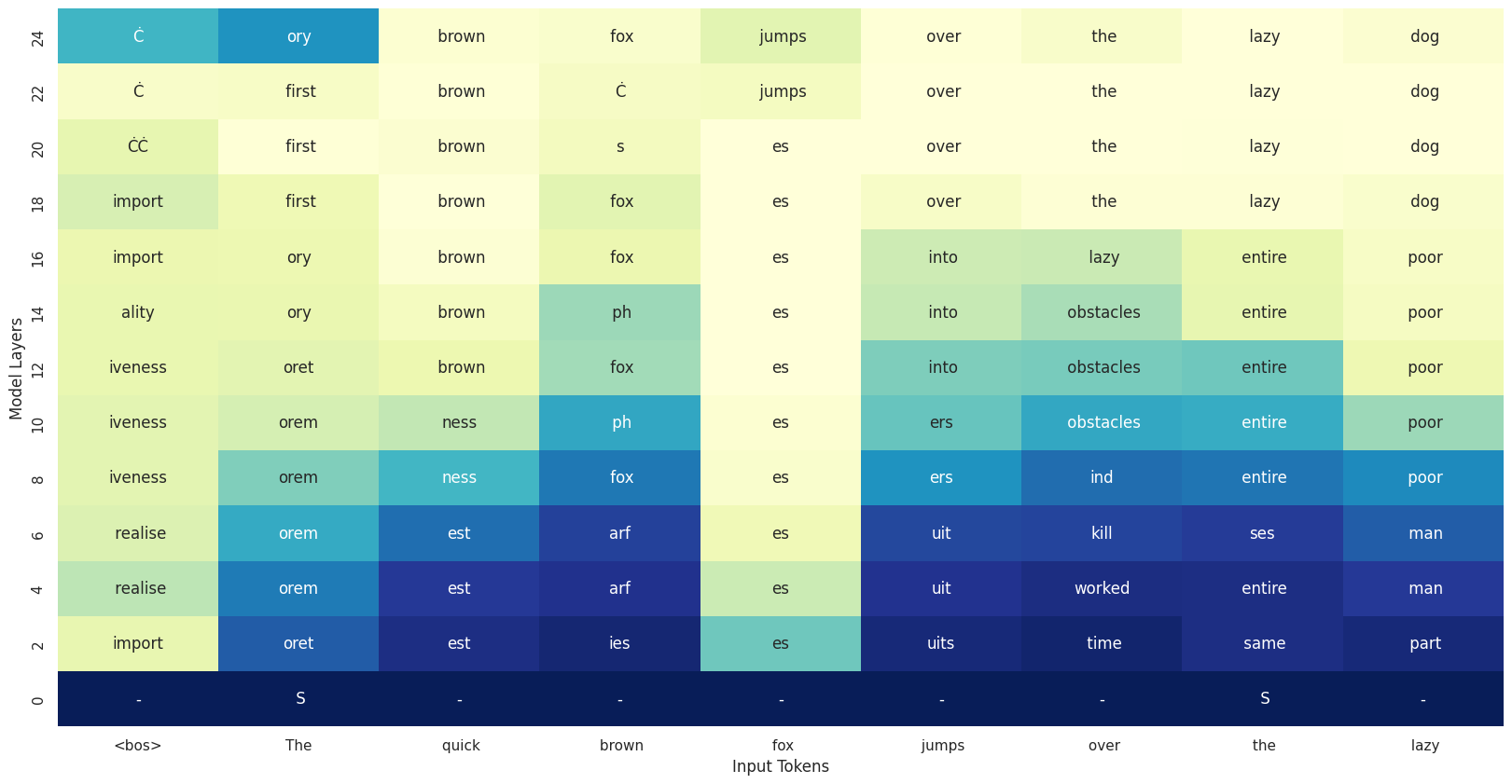
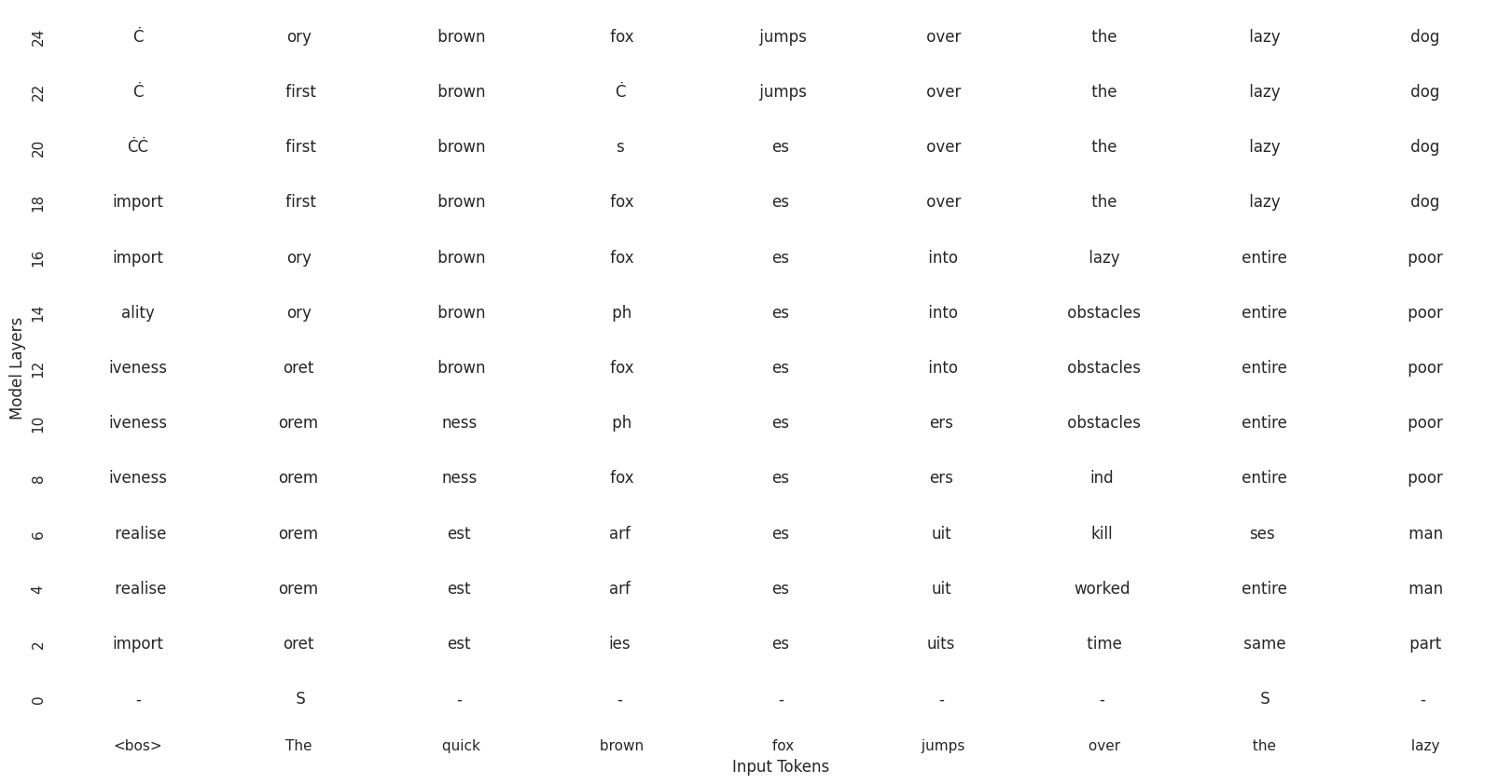
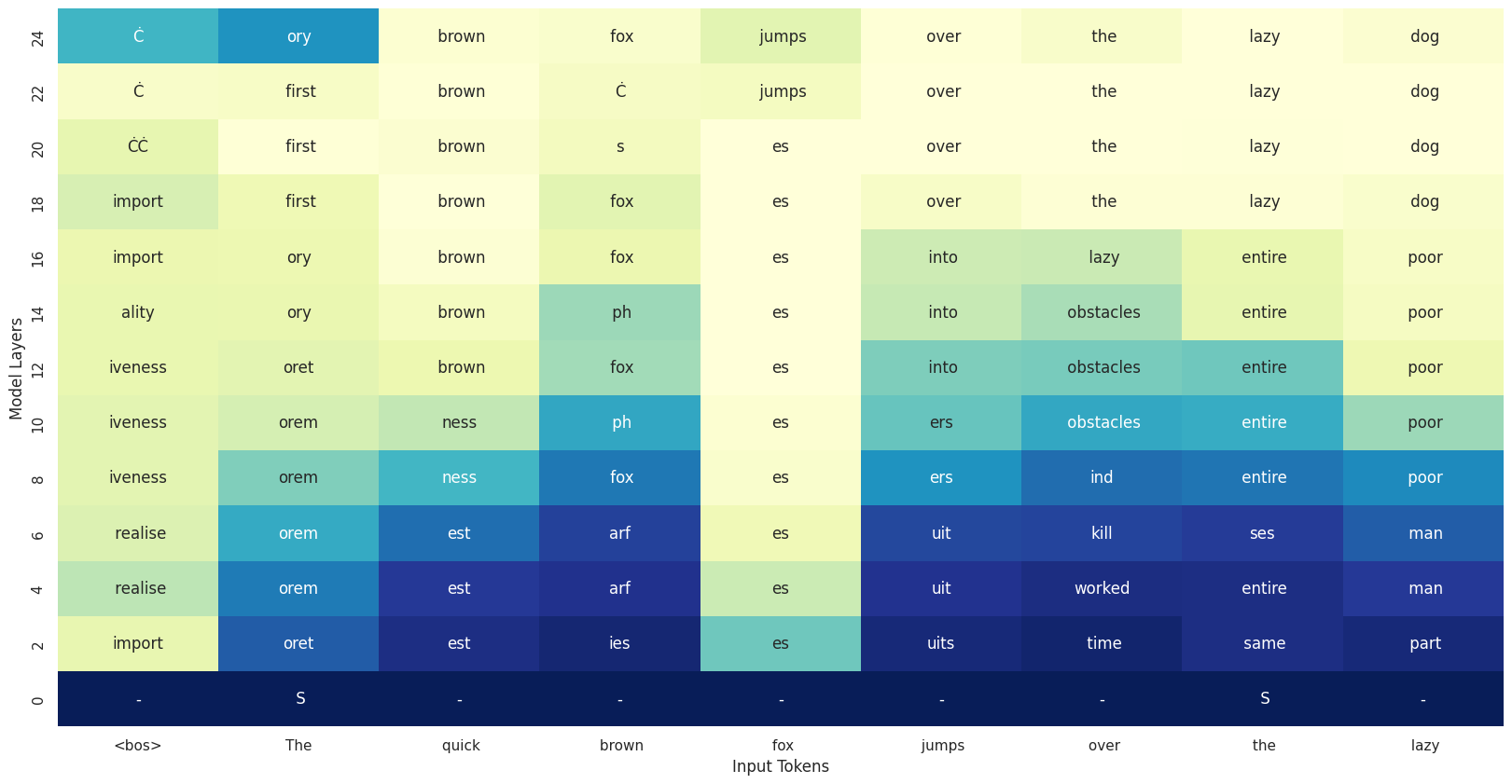
<p>In this post, we’ll explore how DLMs work “under the hood” using one of the most elegant interpretability tools out there: <strong>LogitLens</strong>. The final result will be a plot like this one, that we obtained applying LogitLens to Llama in a previous blog post.</p>

<p><img src="https://alessiodevoto.github.io/assets/images/logitlens/logitlens_small.png" alt="Llama Logitlens" style="max-width: 100%; width: 90%; display: block; margin: 0 auto;" /></p>

<p>As usual, here is the code to reproduce all the plots, just <a href="https://colab.research.google.com/drive/1XfDN_3w4W6Us8mvDQRkehZVdfLJW82VQ" target="_parent"><img src="https://colab.research.google.com/assets/colab-badge.svg" alt="Open In Colab" /></a></p>

<h2 id="a-quick-refresher-what-is-logitlens">A Quick Refresher: What Is LogitLens?</h2>

<p><a href="https://www.lesswrong.com/posts/AcKRB8wDpdaN6v6ru/interpreting-gpt-the-logit-lens">LogitLens</a> is a clever interpretability method originally designed for autoregressive (AR) LLMs. Instead of applying the final language modeling head only to the last hidden layer (as is standard), LogitLens applies it at every intermediate layer. This lets us “see” how predictions evolve across layers—like watching a thought form in real time.</p>

<p>In a previous blog, I showed how to implement LogitLens for LLMs from scratch. This time, we’ll use it to analyze DLMs—specifically LLaDA and Dream—to observe how they construct predictions layer by layer. I should mention here that this is not the most advanced interpretability method (e.g. see this <a href="https://www.soniajoseph.ai/the-logit-lens-can-be-deceptive-if-not-used-properly/">nice blog</a>) but it still gives us cool insights into the model’s inner workings!</p>

<hr />

<h2 id="setup-probing-llada-with-a-simple-prompt">Setup: Probing LLaDA with a Simple Prompt</h2>

<p>Let’s start by loading the LLaDA-8B model and giving it a classic prompt:</p>

<div class="language-python highlighter-rouge"><div class="highlight"><pre class="highlight"><code><span class="kn">import</span> <span class="nn">torch</span>
<span class="kn">from</span> <span class="nn">transformers</span> <span class="kn">import</span> <span class="n">AutoTokenizer</span><span class="p">,</span> <span class="n">AutoModel</span>

<span class="n">device</span> <span class="o">=</span> <span class="s">'cuda'</span>
<span class="n">model_name</span> <span class="o">=</span> <span class="s">'GSAI-ML/LLaDA-8B-Base'</span>
<span class="n">model</span> <span class="o">=</span> <span class="n">AutoModel</span><span class="p">.</span><span class="n">from_pretrained</span><span class="p">(</span><span class="n">model_name</span><span class="p">,</span> <span class="n">trust_remote_code</span><span class="o">=</span><span class="bp">True</span><span class="p">,</span> <span class="n">torch_dtype</span><span class="o">=</span><span class="n">torch</span><span class="p">.</span><span class="n">bfloat16</span><span class="p">).</span><span class="n">to</span><span class="p">(</span><span class="n">device</span><span class="p">).</span><span class="nb">eval</span><span class="p">()</span>
<span class="n">tokenizer</span> <span class="o">=</span> <span class="n">AutoTokenizer</span><span class="p">.</span><span class="n">from_pretrained</span><span class="p">(</span><span class="n">model_name</span><span class="p">,</span> <span class="n">trust_remote_code</span><span class="o">=</span><span class="bp">True</span><span class="p">)</span>
</code></pre></div></div>

<p>Now we create a simple prompt:</p>

<div class="language-python highlighter-rouge"><div class="highlight"><pre class="highlight"><code><span class="n">example</span> <span class="o">=</span> <span class="s">"The quick brown fox jumps"</span>
<span class="n">prompt</span> <span class="o">=</span> <span class="n">tokenizer</span><span class="p">(</span><span class="n">example</span><span class="p">,</span> <span class="n">return_tensors</span><span class="o">=</span><span class="s">"pt"</span><span class="p">).</span><span class="n">to</span><span class="p">(</span><span class="n">device</span><span class="p">).</span><span class="n">input_ids</span>
</code></pre></div></div>

<p>Unlike GPT-style models that generate <em>one token at a time</em>, diffusion models generate N tokens simultaneously, where N is the number of masked tokens in the input sequence. This means they need to know the amount of masked tokens, that is, their target length, before they begin. We can think of it like filling out a crossword puzzle—you need to know exactly how many squares you’re working with before you can start placing letters. This might sound like a design problem for open ended generation (it kind of is) but we can circumvent with <a href="https://arxiv.org/abs/2503.09573">various strategies</a>.</p>

<p>To prepare our input, we create a sequence with the original prompt + 8 mask tokens <code class="language-plaintext highlighter-rouge">&lt;mask&gt;</code>. The <code class="language-plaintext highlighter-rouge">&lt;mask&gt;</code> tokens are the squares of the puzzle the model has to fill in.</p>

<div class="language-python highlighter-rouge"><div class="highlight"><pre class="highlight"><code><span class="n">mask_id</span><span class="o">=</span><span class="mi">126336</span> <span class="c1"># specific to llada model
</span><span class="n">gen_length</span><span class="o">=</span><span class="mi">8</span>
<span class="n">x</span> <span class="o">=</span> <span class="n">torch</span><span class="p">.</span><span class="n">full</span><span class="p">((</span><span class="mi">1</span><span class="p">,</span> <span class="n">prompt</span><span class="p">.</span><span class="n">shape</span><span class="p">[</span><span class="mi">1</span><span class="p">]</span> <span class="o">+</span> <span class="n">gen_length</span><span class="p">),</span> <span class="n">mask_id</span><span class="p">,</span> <span class="n">dtype</span><span class="o">=</span><span class="n">torch</span><span class="p">.</span><span class="nb">long</span><span class="p">).</span><span class="n">to</span><span class="p">(</span><span class="n">model</span><span class="p">.</span><span class="n">device</span><span class="p">)</span>
<span class="n">x</span><span class="p">[:,</span> <span class="p">:</span><span class="n">prompt</span><span class="p">.</span><span class="n">shape</span><span class="p">[</span><span class="mi">1</span><span class="p">]]</span> <span class="o">=</span> <span class="n">prompt</span><span class="p">.</span><span class="n">clone</span><span class="p">()</span>
</code></pre></div></div>
<p>Just to make sure we see what we are doing, let’s visualize what is happening and print the input before feeding it to the model:</p>

<div class="language-python highlighter-rouge"><div class="highlight"><pre class="highlight"><code><span class="n">tokenizer</span><span class="p">.</span><span class="n">convert_ids_to_tokens</span><span class="p">(</span><span class="n">x</span><span class="p">[</span><span class="mi">0</span><span class="p">],</span> <span class="n">skip_special_tokens</span><span class="o">=</span><span class="bp">False</span><span class="p">)</span>
</code></pre></div></div>
<div class="language-plaintext highlighter-rouge"><div class="highlight"><pre class="highlight"><code>['The', 'quick', 'brown', 'fox', 'jumps', '&lt;|mdmmask|&gt;', '&lt;|mdmmask|&gt;', '&lt;|mdmmask|&gt;', '&lt;|mdmmask|&gt;', '&lt;|mdmmask|&gt;', '&lt;|mdmmask|&gt;', '&lt;|mdmmask|&gt;', '&lt;|mdmmask|&gt;']
</code></pre></div></div>

<p>It makes sense, we have our prompt + the mask tokens the model will try to fill in.</p>

<h2 id="running-the-model">Running the Model</h2>
<p>Let’s forward the input through the model and grab the predicted tokens:</p>

<div class="language-python highlighter-rouge"><div class="highlight"><pre class="highlight"><code><span class="c1"># we need all the intermediate hidden states
</span><span class="k">with</span> <span class="n">torch</span><span class="p">.</span><span class="n">no_grad</span><span class="p">():</span>
    <span class="n">outputs</span> <span class="o">=</span> <span class="n">model</span><span class="p">(</span><span class="n">x</span><span class="p">,</span> <span class="n">output_hidden_states</span><span class="o">=</span><span class="bp">True</span><span class="p">)</span>

<span class="c1"># get the predicted tokens and decode them
</span><span class="n">predicted_token_ids</span> <span class="o">=</span> <span class="n">outputs</span><span class="p">[</span><span class="s">"logits"</span><span class="p">].</span><span class="n">argmax</span><span class="p">(</span><span class="o">-</span><span class="mi">1</span><span class="p">)</span>
<span class="n">tokenizer</span><span class="p">.</span><span class="n">convert_ids_to_tokens</span><span class="p">(</span><span class="n">predicted_token_ids</span><span class="p">[</span><span class="mi">0</span><span class="p">],</span> <span class="n">skip_special_tokens</span><span class="o">=</span><span class="bp">False</span><span class="p">)</span>
</code></pre></div></div>

<div class="language-plaintext highlighter-rouge"><div class="highlight"><pre class="highlight"><code>['_', 'quick', 'brown', 'fox', 'jumps', 'over', 'the', 'lazy', 'dog', '.', '_', '_', 'jumps']
</code></pre></div></div>

<p>Well, after just one decoding step we were not expecting any special results. Usually, we perform at least N/2 denoising steps, where N is the generated sequence length. However, we see the model has already guessed (correclty) almost all the missing words. On the other hand, the first token <code class="language-plaintext highlighter-rouge">The</code> has been replaced by a <code class="language-plaintext highlighter-rouge">_</code>, which we don’t mind as being part of the prompt we would just ignore that during decoding. If you want to get a better prediction, you should perform additional diffusion steps, by remasking some of the input tokens. This is out of the scope for this blog, as we just want to explore the inner representations of the model.</p>

<h2 id="logit-lens">Logit Lens</h2>
<p>We just got the predictions fot the <em>final</em> output of the model, that is, what comes out of the last layer. What if we apply the model head (our “Lens”) to intermediate representations though? Intermediate representations are stored in the <code class="language-plaintext highlighter-rouge">outputs.hidden_states</code>. We’ll have one for each layer of the model and each token of the sequence.</p>

<div class="language-python highlighter-rouge"><div class="highlight"><pre class="highlight"><code><span class="n">logitlens</span> <span class="o">=</span> <span class="p">[]</span>

<span class="k">for</span> <span class="n">hidden_state</span> <span class="ow">in</span> <span class="n">hidden_states</span><span class="p">:</span>
    <span class="n">hidden_state</span> <span class="o">=</span> <span class="n">model</span><span class="p">.</span><span class="n">model</span><span class="p">.</span><span class="n">transformer</span><span class="p">.</span><span class="n">ln_f</span><span class="p">(</span><span class="n">hidden_state</span><span class="p">)</span>
    <span class="n">logits</span> <span class="o">=</span> <span class="n">model</span><span class="p">.</span><span class="n">model</span><span class="p">.</span><span class="n">transformer</span><span class="p">.</span><span class="n">ff_out</span><span class="p">(</span><span class="n">hidden_state</span><span class="p">)</span>
    <span class="c1"># get predictions for this layer
</span>    <span class="n">predicted_token_ids</span> <span class="o">=</span> <span class="n">logits</span><span class="p">.</span><span class="n">argmax</span><span class="p">(</span><span class="o">-</span><span class="mi">1</span><span class="p">)</span>
    <span class="n">predicted_tokens</span> <span class="o">=</span> <span class="n">tokenizer</span><span class="p">.</span><span class="n">convert_ids_to_tokens</span><span class="p">(</span><span class="n">predicted_token_ids</span><span class="p">[</span><span class="mi">0</span><span class="p">],</span> <span class="n">skip_special_tokens</span><span class="o">=</span><span class="bp">False</span><span class="p">)</span>
    <span class="c1"># store in our logitlens list
</span>    <span class="n">logitlens</span><span class="p">.</span><span class="n">append</span><span class="p">(</span><span class="n">predicted_tokens</span><span class="p">)</span>
</code></pre></div></div>

<p>Now the list contains decoded sequences for each layer. For instance, if we want to check what the model was “thinking” at layer 5, we can just do:</p>

<div class="language-python highlighter-rouge"><div class="highlight"><pre class="highlight"><code><span class="k">print</span><span class="p">(</span><span class="n">logitlens</span><span class="p">[</span><span class="mi">5</span><span class="p">])</span>
</code></pre></div></div>
<div class="language-plaintext highlighter-rouge"><div class="highlight"><pre class="highlight"><code>['paralleled', 'awaited', 'funnels', 'gfx', 'tesy', 'awaited', 'awaited', 'blockList', 'blockList', 'blockList', 'blockList', 'blockList', 'blockList']
</code></pre></div></div>

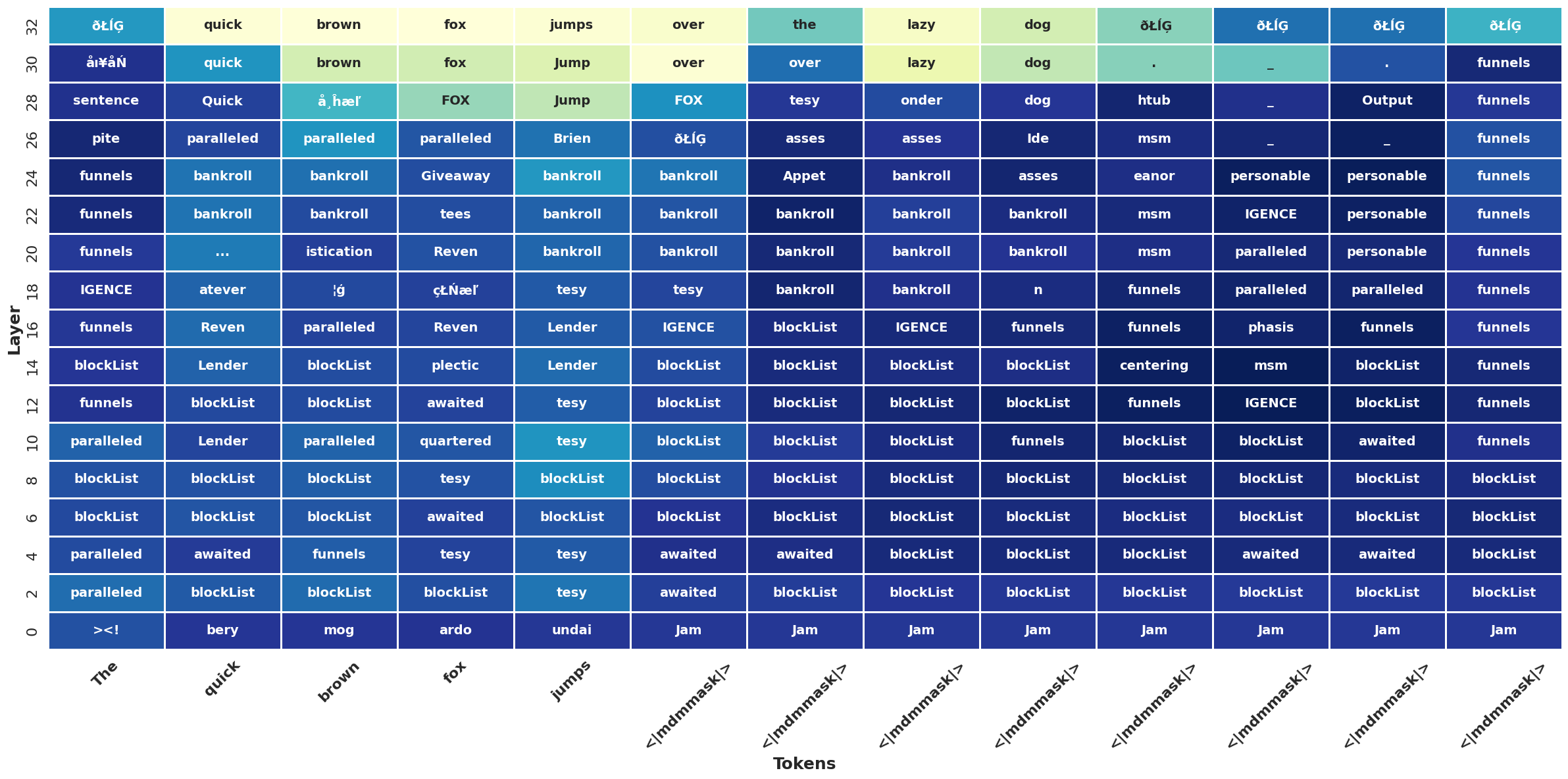
<p>The raw output appears chaotic and difficult to interpret. To better understand the model’s internal reasoning process, let’s visualize the complete sequence predictions across all transformer layers using a heatmap (full implementation available in the accompanying notebook).</p>

<p><img src="https://alessiodevoto.github.io/assets/images/logitlensdiff/output_llada.png" alt="Llada Logitlens" style="max-width: 100%; width: 90%; display: block; margin: 0 auto;" /></p>

<p>The bottom row shows the original input tokens, while each ascending row represents successive transformer layers from early to final. The color intensity indicates entropy ( ~ prediction confidence) at each layer, with darker cells representing higher entropy (model uncertainty) and brighter cells showing lower entropy (confident predictions).
 –  that is why brighter cells are only in the final layers.</p>

<h2 id="a-few-thoughts">A few thoughts</h2>

<p>The most evident pattern <em>is that coherent, confident predictions only emerge in the final layers</em>, typically around layer 25 and beyond. Throughout the majority of the network depth, the model remains highly uncertain about its predictions, as evidenced by the prevalence of darker cells (and wrong tokens) in earlier layers. Additionally, correct tokens only emerge at the very final layer. This behavior fundamentally differs from autoregressive models like LLaMA or Gemma, where confident predictions typically crystallize much earlier in the network.</p>

<p>This behavior might be caused by a lot of factors. <a href="https://www.soniajoseph.ai/the-logit-lens-can-be-deceptive-if-not-used-properly/">Keeping in mind that logit lens can be deceiving as it depends intermediate layer’s basis vector alignment with the output space</a>, we can conjecture that the model is performing  a lot of computation that is not interpretable in intermediate layers, and creating semantic representation only in the final ones. This might be a consequence of the bidirectional attention (implies more “mixing” of the tokens hence more overlapped signals?).</p>

<p>Alos, we should not forget taht we’re observing only the first denoising step of what is inherently a multi-step iterative process. The model is designed to gradually refine predictions across multiple iterations, so initial uncertainty and errors are not only expected but necessary for the denoising mechanism to function properly. More precisely, the more <code class="language-plaintext highlighter-rouge">mask</code> tokens, the harder the task hence the uncertainty for the model.</p>

<h2 id="testing-on-dream">Testing on Dream</h2>

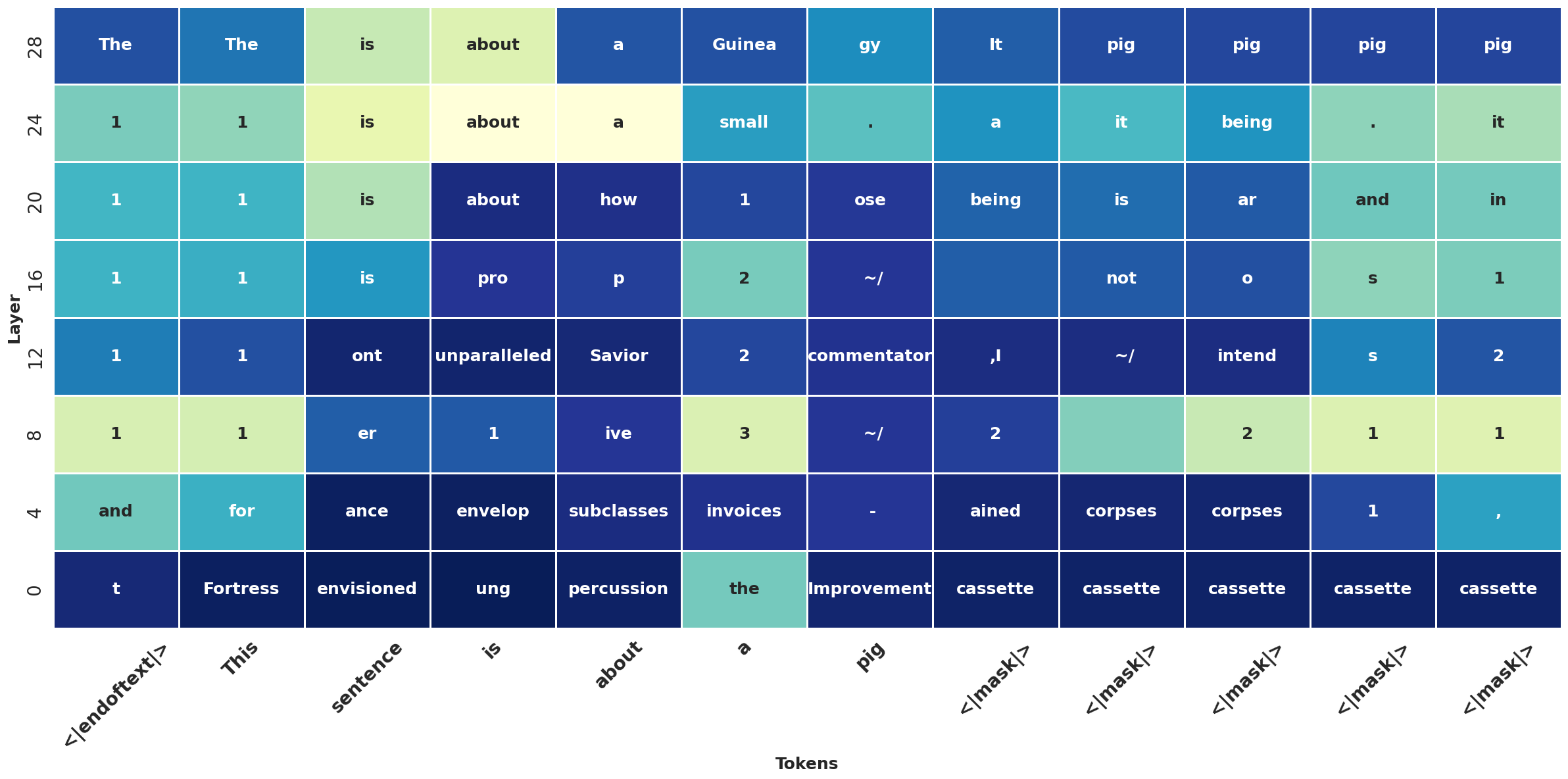
<p>Finally, let’s repeat the process with <a href="https://hkunlp.github.io/blog/2025/dream/">Dream</a> (check the Colab for the full code). Here, I will plot fewer layers to make them more clear:</p>

<p><img src="https://alessiodevoto.github.io/assets/images/logitlensdiff/output_dream.png" alt="Dream Logitlens" style="max-width: 100%; width: 90%; display: block; margin: 0 auto;" /></p>

<p>It looks like Dream gets more confident at early layers, but still, correct predictions only emerge very late. In this plot, it’s also worth to point out an interesting behavior that we didn’t observe in the previous example: DLMs ability to “peek into the future”. If we look carefully, <em>Dream predicts tokens related to words that come later in the sequence</em>, which would be impossible in autoregressive models, where each token only attends to previous ones. An example is the token “Guinea” emerging before “pig” (I’m assuming the sentence “this sentence is about a Guinea pig” is not present in the training corpus here). With bi-directional attention, all tokens attend to each other from the start, enabling DLMs to make globally-informed guesses during decoding!</p>

<p>That’s it! If you have feedback, want to chat about this topic, or find bugs in the code, feel free to reach out on <a href="https://x.com/devoto_alessio">Twitter</a> or any <a href="https://alessiodevoto.github.io/">social platform</a>. Thanks for reading!</p>

<p>P.S. I am maintaining a GitHub repo: <a href="https://github.com/alessiodevoto/awesome-diffusion-language-models/tree/main">Awesome Diffusion Language Models</a>. You might find it interesting if you liked this post!</p>]]></content><author><name>{&quot;name&quot;=&gt;nil, &quot;avatar&quot;=&gt;&quot;/assets/images/alessio_pp_standard.jpg&quot;, &quot;bio&quot;=&gt;&quot;Building AI agents @ NVIDIA &lt;br&gt; PhD in Data Science &lt;br&gt; &lt;br&gt; &lt;a href=&apos;https://classicalanthology.theclassicslibrary.com/2012/05/30/odyssey-1-1-6/&apos;&gt; 📖 &lt;u&gt; Ἄνδρα μοι ἔννεπε, Μοῦσα, πολύτροπον &lt;/u&gt; &lt;a&gt;&quot;, &quot;location&quot;=&gt;&quot;Zurich, Switzerland&quot;, &quot;email&quot;=&gt;nil, &quot;links&quot;=&gt;[{&quot;label&quot;=&gt;&quot;X&quot;, &quot;icon&quot;=&gt;&quot;fab fa-fw fa-square-x-twitter&quot;, &quot;url&quot;=&gt;&quot;https://x.com/devoto_alessio&quot;}, {&quot;label&quot;=&gt;&quot;Email&quot;, &quot;icon&quot;=&gt;&quot;fas fa-fw fa-envelope-square&quot;, &quot;url&quot;=&gt;&quot;mailto:devoto.alessio@gmail.com&quot;}, {&quot;label&quot;=&gt;&quot;GitHub&quot;, &quot;icon&quot;=&gt;&quot;fab fa-fw fa-github&quot;, &quot;url&quot;=&gt;&quot;https://github.com/alessiodevoto&quot;}, {&quot;label&quot;=&gt;&quot;LinkedIn&quot;, &quot;icon&quot;=&gt;&quot;fab fa-fw fa-linkedin&quot;, &quot;url&quot;=&gt;&quot;https://www.linkedin.com/in/alessio-devoto/&quot;}, {&quot;label&quot;=&gt;&quot;Semantic Scholar&quot;, &quot;icon&quot;=&gt;&quot;fa-solid fa-magnifying-glass&quot;, &quot;url&quot;=&gt;&quot;https://www.semanticscholar.org/author/Alessio-Devoto/2172309361&quot;}, {&quot;label&quot;=&gt;&quot;Google Scholar&quot;, &quot;icon&quot;=&gt;&quot;fa-brands fa-google-scholar&quot;, &quot;url&quot;=&gt;&quot;https://scholar.google.com/citations?user=er31rp0AAAAJ&amp;hl&quot;}, {&quot;label&quot;=&gt;&quot;Bluesky&quot;, &quot;icon&quot;=&gt;&quot;fa-brands fa-bluesky&quot;, &quot;url&quot;=&gt;&quot;https://bsky.app/profile/alessiodevoto.bsky.social&quot;}]}</name></author><summary type="html"><![CDATA[Lately, diffusion-based language models like LLaDA and MMaDA have been gaining traction. These aren’t your standard left-to-right text generators - they’re bidirectional models trained to fill in missing tokens, more akin to BERT but on steroids. During training, Diffusion Language Models (DLMs) learn to predict &lt;mask&gt; tokens given context, effectively learning a denoising task.]]></summary></entry><entry><title type="html">Visualizing the Vocabulary of an LLM</title><link href="https://alessiodevoto.github.io/LLM-Embedding-Space/" rel="alternate" type="text/html" title="Visualizing the Vocabulary of an LLM" /><published>2025-04-25T00:00:00+02:00</published><updated>2025-04-25T00:00:00+02:00</updated><id>https://alessiodevoto.github.io/LLM%20Embedding%20Space</id><content type="html" xml:base="https://alessiodevoto.github.io/LLM-Embedding-Space/"><![CDATA[<blockquote>
  <p><strong>Disclaimer</strong>: <em>unlike other posts in this blog that actually served some purpose, this is just a random idea I had and am implementing for fun. So if your question is “why should I want to visualize the vocabulary of an LLM?”, I don’t have an answer</em> 😄</p>
</blockquote>

<hr />

<p>I recently realized I have never visualized the embedding space of an LLM. And while it’s perfectly reasonable to go through life without ever seeing the inside of an LLM’s vocabulary, I personally find it satisfying to make abstract things more concrete — especially when they’re hiding in 4096-dimensional space.</p>

<p>LLMs are trained on vast corpora of text. To process text, they first tokenize it — splitting it into units ( =tokens) — and then represent each token as a dense vector in a high-dimensional space. These vectors are parameters of the model, learned during training.</p>

<p>The size of the vocabulary (i.e., how many distinct tokens the model knows) is a hyperparameter. For example, LLaMA 2: ~32,000 tokens, LLaMA 3: ~128,000 tokens, LLaMA 4: up to 200,000 tokens and so on. The token embedding dimension, that is the number of elements of each vector representing a token, (e.g., 4096) is another hyperparameter.</p>

<p>So if we take a LLaMA 3 model with an embedding size of 4096 and a vocabulary of 128k tokens, we’re dealing with 128k points in a  4096-dimensional space — not exactly human-interpretable. But what if we reduce the dimensionality? We’ll lose information, sure, but it might still give us interesting insights.</p>

<p>As usual, you can also <a href="https://colab.research.google.com/drive/1mxFgj9R8s9nJoJUEisQxVPH9LRT4Lm6R" target="_parent"><img src="https://colab.research.google.com/assets/colab-badge.svg" alt="Open In Colab" /></a></p>

<hr />

<h3 id="-what-well-do">🔧 What We’ll Do</h3>

<ul>
  <li>Use a small corpus (a slice of Wikipedia) to filter only the tokens that appear in it — otherwise, we’d be visualizing 128k points.</li>
  <li>Use PCA to project the 4096-dimensional token vectors into 3D space (so we can plot them).</li>
  <li>Plot token embeddings interactively with Plotly, and visualize how an LLM represents the tokens in its latent space!</li>
</ul>

<p>We’ll use the Hugging Face Transformers library to load a LLaMA 2 model, but you can replace it with any other model !</p>

<div class="language-python highlighter-rouge"><div class="highlight"><pre class="highlight"><code><span class="kn">from</span> <span class="nn">transformers</span> <span class="kn">import</span> <span class="n">AutoTokenizer</span><span class="p">,</span> <span class="n">AutoModel</span>
<span class="kn">import</span> <span class="nn">torch</span>

<span class="n">model_name</span> <span class="o">=</span> <span class="s">"meta-llama/Llama-2-7b-hf"</span>
<span class="n">tokenizer</span> <span class="o">=</span> <span class="n">AutoTokenizer</span><span class="p">.</span><span class="n">from_pretrained</span><span class="p">(</span><span class="n">model_name</span><span class="p">)</span>
<span class="n">model</span> <span class="o">=</span> <span class="n">AutoModel</span><span class="p">.</span><span class="n">from_pretrained</span><span class="p">(</span><span class="n">model_name</span><span class="p">,</span> <span class="n">device_map</span><span class="o">=</span><span class="s">"auto"</span><span class="p">,</span> <span class="n">torch_dtype</span><span class="o">=</span><span class="n">torch</span><span class="p">.</span><span class="n">bfloat16</span><span class="p">).</span><span class="nb">eval</span><span class="p">()</span>
</code></pre></div></div>

<hr />

<p>To avoid plotting all 128k tokens, we’ll just extract those that actually appear in some real text. (If you want to visualize the <strong>entire</strong> vocabulary, I’ll leave the code at the end of the post, but consider that might generate a rather large and unexplorable plot.)</p>

<div class="language-python highlighter-rouge"><div class="highlight"><pre class="highlight"><code><span class="kn">from</span> <span class="nn">datasets</span> <span class="kn">import</span> <span class="n">load_dataset</span>

<span class="c1"># Load part of the Wikitext-2 dataset (raw text)
</span><span class="n">dataset</span> <span class="o">=</span> <span class="n">load_dataset</span><span class="p">(</span><span class="s">"wikitext"</span><span class="p">,</span> <span class="s">"wikitext-2-raw-v1"</span><span class="p">,</span> <span class="n">split</span><span class="o">=</span><span class="s">"train[:20%]"</span><span class="p">)</span>
<span class="n">corpus</span> <span class="o">=</span> <span class="s">" "</span><span class="p">.</span><span class="n">join</span><span class="p">(</span><span class="n">dataset</span><span class="p">[</span><span class="s">"text"</span><span class="p">])</span>
</code></pre></div></div>

<hr />

<p>We tokenize the corpus and count how often each token appears. This helps us later if we want to color or size points by frequency.</p>

<div class="language-python highlighter-rouge"><div class="highlight"><pre class="highlight"><code><span class="kn">from</span> <span class="nn">collections</span> <span class="kn">import</span> <span class="n">Counter</span>

<span class="c1"># Tokenize the corpus
</span><span class="n">input_ids</span> <span class="o">=</span> <span class="n">tokenizer</span><span class="p">(</span><span class="n">corpus</span><span class="p">,</span> <span class="n">return_tensors</span><span class="o">=</span><span class="s">"pt"</span><span class="p">)[</span><span class="s">"input_ids"</span><span class="p">].</span><span class="n">flatten</span><span class="p">()</span>
<span class="n">unique_ids</span> <span class="o">=</span> <span class="nb">sorted</span><span class="p">(</span><span class="nb">set</span><span class="p">(</span><span class="n">input_ids</span><span class="p">.</span><span class="n">tolist</span><span class="p">()))</span>
<span class="n">freqs</span> <span class="o">=</span> <span class="n">Counter</span><span class="p">(</span><span class="n">input_ids</span><span class="p">.</span><span class="n">tolist</span><span class="p">())</span>
</code></pre></div></div>

<hr />

<p>Let’s extract the embeddings from the model and use PCA to reduce their dimension. This means that each token embedding will go from 4096 -&gt; 3 dimensions.</p>

<div class="language-python highlighter-rouge"><div class="highlight"><pre class="highlight"><code><span class="kn">from</span> <span class="nn">sklearn.decomposition</span> <span class="kn">import</span> <span class="n">PCA</span>

<span class="c1"># Extract embeddings for tokens in corpus
</span><span class="n">embedding_weights</span> <span class="o">=</span> <span class="n">model</span><span class="p">.</span><span class="n">embed_tokens</span><span class="p">(</span><span class="n">torch</span><span class="p">.</span><span class="n">tensor</span><span class="p">(</span><span class="n">unique_ids</span><span class="p">).</span><span class="n">unsqueeze</span><span class="p">(</span><span class="mi">0</span><span class="p">).</span><span class="n">to</span><span class="p">(</span><span class="n">model</span><span class="p">.</span><span class="n">device</span><span class="p">)).</span><span class="n">squeeze</span><span class="p">(</span><span class="mi">0</span><span class="p">)</span>

<span class="c1"># Reduce to 3D using PCA
</span><span class="n">reduce_dims</span> <span class="o">=</span> <span class="n">PCA</span><span class="p">(</span><span class="n">n_components</span><span class="o">=</span><span class="mi">3</span><span class="p">)</span>
<span class="n">embeddings_3d</span> <span class="o">=</span> <span class="n">reduce_dims</span><span class="p">.</span><span class="n">fit_transform</span><span class="p">(</span><span class="n">embedding_weights</span><span class="p">.</span><span class="n">cpu</span><span class="p">().</span><span class="n">detach</span><span class="p">().</span><span class="nb">float</span><span class="p">())</span>
</code></pre></div></div>

<hr />

<p>We tokenize the corpus and count how often each token appears. This helps us later if we want to color or size points by frequency.</p>

<div class="language-python highlighter-rouge"><div class="highlight"><pre class="highlight"><code><span class="c1"># Decode each token to its string representation
</span><span class="n">tokens</span> <span class="o">=</span> <span class="p">[</span><span class="n">tokenizer</span><span class="p">.</span><span class="n">decode</span><span class="p">([</span><span class="n">i</span><span class="p">])</span> <span class="k">for</span> <span class="n">i</span> <span class="ow">in</span> <span class="n">unique_ids</span><span class="p">]</span>
<span class="n">sizes</span> <span class="o">=</span> <span class="p">[</span><span class="n">freqs</span><span class="p">[</span><span class="n">i</span><span class="p">]</span> <span class="k">for</span> <span class="n">i</span> <span class="ow">in</span> <span class="n">unique_ids</span><span class="p">]</span>
</code></pre></div></div>

<hr />

<p>Now let’s put it all together in an interactive 3D plot. I’m clipping the tokens that appear more than 100 times because they are outliers that would cause all the other points to have the same color.</p>

<div class="language-python highlighter-rouge"><div class="highlight"><pre class="highlight"><code><span class="kn">import</span> <span class="nn">plotly.express</span> <span class="k">as</span> <span class="n">px</span>

<span class="n">fig</span> <span class="o">=</span> <span class="n">px</span><span class="p">.</span><span class="n">scatter_3d</span><span class="p">(</span>
    <span class="n">x</span><span class="o">=</span><span class="n">embeddings_3d</span><span class="p">[:,</span> <span class="mi">0</span><span class="p">],</span>
    <span class="n">y</span><span class="o">=</span><span class="n">embeddings_3d</span><span class="p">[:,</span> <span class="mi">1</span><span class="p">],</span>
    <span class="n">z</span><span class="o">=</span><span class="n">embeddings_3d</span><span class="p">[:,</span> <span class="mi">2</span><span class="p">],</span>
    <span class="n">hover_name</span><span class="o">=</span><span class="n">tokens</span><span class="p">,</span>
    <span class="n">color</span><span class="o">=</span><span class="p">{</span><span class="n">k</span><span class="p">:</span> <span class="n">v</span> <span class="k">if</span> <span class="n">v</span> <span class="o">&lt;</span> <span class="mi">100</span> <span class="k">else</span> <span class="mi">100</span> <span class="k">for</span> <span class="n">k</span><span class="p">,</span> <span class="n">v</span> <span class="ow">in</span> <span class="n">freqs</span><span class="p">.</span><span class="n">items</span><span class="p">()},</span>  <span class="c1"># clip outlier freqs
</span>    <span class="n">title</span><span class="o">=</span><span class="s">"Token Embeddings (Filtered by Corpus)"</span><span class="p">,</span>
<span class="p">)</span>

<span class="n">fig</span><span class="p">.</span><span class="n">update_traces</span><span class="p">(</span><span class="n">marker</span><span class="o">=</span><span class="nb">dict</span><span class="p">(</span><span class="n">size</span><span class="o">=</span><span class="mi">3</span><span class="p">,</span> <span class="n">showscale</span><span class="o">=</span><span class="bp">False</span><span class="p">))</span>

<span class="n">fig</span><span class="p">.</span><span class="n">write_html</span><span class="p">(</span><span class="s">"my_token_embeddings.html"</span><span class="p">)</span> <span class="c1"># save it to visualize locally
</span><span class="n">fig</span><span class="p">.</span><span class="n">show</span><span class="p">()</span> 
</code></pre></div></div>

<p>And this is the results:</p>

<iframe src="https://alessiodevoto.github.io/assets/html/llama7b.html" width="100%" height="600px" frameborder="0"></iframe>

<p>It’s really interesting to surf the plot and explore where learned to position different tokens in the embedding space! For example, on the top right corner there are a lot of words at the top (high <code class="language-plaintext highlighter-rouge">z</code> coordinate) seem to be names of cities or states: <code class="language-plaintext highlighter-rouge">Switzerland</code>, <code class="language-plaintext highlighter-rouge">Connecticut</code>, <code class="language-plaintext highlighter-rouge">irmingham</code> and so on …</p>

<hr />

<h2 id="extra-1-visualizing-all-tokens-in-dantes-divine-comedy">Extra 1: Visualizing all tokens in Dante’s Divine Comedy</h2>

<div class="language-python highlighter-rouge"><div class="highlight"><pre class="highlight"><code><span class="c1"># download the corpus from https://dmf.unicatt.it/~della/pythoncourse18/commedia.txt
</span><span class="kn">import</span> <span class="nn">requests</span>

<span class="n">url</span> <span class="o">=</span> <span class="s">"https://dmf.unicatt.it/~della/pythoncourse18/commedia.txt"</span>
<span class="n">response</span> <span class="o">=</span> <span class="n">requests</span><span class="p">.</span><span class="n">get</span><span class="p">(</span><span class="n">url</span><span class="p">)</span>
<span class="k">with</span> <span class="nb">open</span><span class="p">(</span><span class="s">"commedia.txt"</span><span class="p">,</span> <span class="s">"w"</span><span class="p">)</span> <span class="k">as</span> <span class="n">f</span><span class="p">:</span>
    <span class="n">f</span><span class="p">.</span><span class="n">write</span><span class="p">(</span><span class="n">response</span><span class="p">.</span><span class="n">text</span><span class="p">)</span>

<span class="n">dataset</span> <span class="o">=</span> <span class="n">load_dataset</span><span class="p">(</span><span class="s">"text"</span><span class="p">,</span> <span class="n">data_files</span><span class="o">=</span><span class="p">{</span><span class="s">"train"</span><span class="p">:</span> <span class="s">"commedia.txt"</span><span class="p">})</span>
<span class="n">corpus</span> <span class="o">=</span> <span class="s">" "</span><span class="p">.</span><span class="n">join</span><span class="p">(</span><span class="n">dataset</span><span class="p">[</span><span class="s">"train"</span><span class="p">][</span><span class="s">"text"</span><span class="p">])</span>
</code></pre></div></div>

<h2 id="extra-2-optional-visualize-the-entire-vocabulary">Extra 2: (Optional) Visualize the Entire Vocabulary</h2>

<p>Try plotting the whole vocab, this will generate a large html plot.</p>

<div class="language-python highlighter-rouge"><div class="highlight"><pre class="highlight"><code><span class="n">Uncomment</span> <span class="n">at</span> <span class="n">your</span> <span class="n">own</span> <span class="n">risk</span> <span class="err">—</span> <span class="n">slow</span> <span class="ow">and</span> <span class="n">memory</span> <span class="n">intensive</span><span class="err">!</span>

<span class="n">full_ids</span> <span class="o">=</span> <span class="nb">list</span><span class="p">(</span><span class="nb">range</span><span class="p">(</span><span class="n">tokenizer</span><span class="p">.</span><span class="n">vocab_size</span><span class="p">))</span>
<span class="n">full_embedding_weights</span> <span class="o">=</span> <span class="n">model</span><span class="p">.</span><span class="n">embed_tokens</span><span class="p">(</span><span class="n">torch</span><span class="p">.</span><span class="n">tensor</span><span class="p">(</span><span class="n">full_ids</span><span class="p">).</span><span class="n">unsqueeze</span><span class="p">(</span><span class="mi">0</span><span class="p">).</span><span class="n">to</span><span class="p">(</span><span class="n">model</span><span class="p">.</span><span class="n">device</span><span class="p">)).</span><span class="n">squeeze</span><span class="p">(</span><span class="mi">0</span><span class="p">)</span>
<span class="n">full_embeddings_3d</span> <span class="o">=</span> <span class="n">PCA</span><span class="p">(</span><span class="n">n_components</span><span class="o">=</span><span class="mi">3</span><span class="p">).</span><span class="n">fit_transform</span><span class="p">(</span><span class="n">full_embedding_weights</span><span class="p">.</span><span class="n">cpu</span><span class="p">().</span><span class="n">detach</span><span class="p">().</span><span class="nb">float</span><span class="p">())</span>
<span class="n">full_tokens</span> <span class="o">=</span> <span class="p">[</span><span class="n">tokenizer</span><span class="p">.</span><span class="n">decode</span><span class="p">([</span><span class="n">i</span><span class="p">])</span> <span class="k">for</span> <span class="n">i</span> <span class="ow">in</span> <span class="n">full_ids</span><span class="p">]</span>

<span class="n">fig_full</span> <span class="o">=</span> <span class="n">px</span><span class="p">.</span><span class="n">scatter_3d</span><span class="p">(</span>
    <span class="n">x</span><span class="o">=</span><span class="n">full_embeddings_3d</span><span class="p">[:,</span> <span class="mi">0</span><span class="p">],</span>
    <span class="n">y</span><span class="o">=</span><span class="n">full_embeddings_3d</span><span class="p">[:,</span> <span class="mi">1</span><span class="p">],</span>
    <span class="n">z</span><span class="o">=</span><span class="n">full_embeddings_3d</span><span class="p">[:,</span> <span class="mi">2</span><span class="p">],</span>
    <span class="n">hover_name</span><span class="o">=</span><span class="n">full_tokens</span><span class="p">,</span>
    <span class="n">title</span><span class="o">=</span><span class="s">"Token Embeddings (Full Vocabulary)"</span>
<span class="p">)</span>

<span class="n">fig_full</span><span class="p">.</span><span class="n">show</span><span class="p">()</span>
</code></pre></div></div>

<hr />

<h2 id="-final-thoughts">🧠 Final Thoughts</h2>

<p>This was just a fun exercise to make LLM internals a bit more tangible. Sure, PCA compresses a lot of high-dimensional nuance into 3D, but it’s still fascinating to see structure emerge. Try zooming into different clusters, or color by other features (length, part-of-speech, etc.).</p>]]></content><author><name>{&quot;name&quot;=&gt;nil, &quot;avatar&quot;=&gt;&quot;/assets/images/alessio_pp_standard.jpg&quot;, &quot;bio&quot;=&gt;&quot;Building AI agents @ NVIDIA &lt;br&gt; PhD in Data Science &lt;br&gt; &lt;br&gt; &lt;a href=&apos;https://classicalanthology.theclassicslibrary.com/2012/05/30/odyssey-1-1-6/&apos;&gt; 📖 &lt;u&gt; Ἄνδρα μοι ἔννεπε, Μοῦσα, πολύτροπον &lt;/u&gt; &lt;a&gt;&quot;, &quot;location&quot;=&gt;&quot;Zurich, Switzerland&quot;, &quot;email&quot;=&gt;nil, &quot;links&quot;=&gt;[{&quot;label&quot;=&gt;&quot;X&quot;, &quot;icon&quot;=&gt;&quot;fab fa-fw fa-square-x-twitter&quot;, &quot;url&quot;=&gt;&quot;https://x.com/devoto_alessio&quot;}, {&quot;label&quot;=&gt;&quot;Email&quot;, &quot;icon&quot;=&gt;&quot;fas fa-fw fa-envelope-square&quot;, &quot;url&quot;=&gt;&quot;mailto:devoto.alessio@gmail.com&quot;}, {&quot;label&quot;=&gt;&quot;GitHub&quot;, &quot;icon&quot;=&gt;&quot;fab fa-fw fa-github&quot;, &quot;url&quot;=&gt;&quot;https://github.com/alessiodevoto&quot;}, {&quot;label&quot;=&gt;&quot;LinkedIn&quot;, &quot;icon&quot;=&gt;&quot;fab fa-fw fa-linkedin&quot;, &quot;url&quot;=&gt;&quot;https://www.linkedin.com/in/alessio-devoto/&quot;}, {&quot;label&quot;=&gt;&quot;Semantic Scholar&quot;, &quot;icon&quot;=&gt;&quot;fa-solid fa-magnifying-glass&quot;, &quot;url&quot;=&gt;&quot;https://www.semanticscholar.org/author/Alessio-Devoto/2172309361&quot;}, {&quot;label&quot;=&gt;&quot;Google Scholar&quot;, &quot;icon&quot;=&gt;&quot;fa-brands fa-google-scholar&quot;, &quot;url&quot;=&gt;&quot;https://scholar.google.com/citations?user=er31rp0AAAAJ&amp;hl&quot;}, {&quot;label&quot;=&gt;&quot;Bluesky&quot;, &quot;icon&quot;=&gt;&quot;fa-brands fa-bluesky&quot;, &quot;url&quot;=&gt;&quot;https://bsky.app/profile/alessiodevoto.bsky.social&quot;}]}</name></author><summary type="html"><![CDATA[Disclaimer: unlike other posts in this blog that actually served some purpose, this is just a random idea I had and am implementing for fun. So if your question is “why should I want to visualize the vocabulary of an LLM?”, I don’t have an answer 😄]]></summary></entry><entry><title type="html">LogitLens From Scratch With Hugging Face Transformers</title><link href="https://alessiodevoto.github.io/LogitLens/" rel="alternate" type="text/html" title="LogitLens From Scratch With Hugging Face Transformers" /><published>2024-10-28T00:00:00+01:00</published><updated>2024-10-28T00:00:00+01:00</updated><id>https://alessiodevoto.github.io/LogitLens</id><content type="html" xml:base="https://alessiodevoto.github.io/LogitLens/"><![CDATA[<p>In this short tutorial, we’ll implement LogitLens to inspect the inner representations of a pre-trained <code class="language-plaintext highlighter-rouge">Phi-1.5</code>. <a href="https://www.alignmentforum.org/posts/AcKRB8wDpdaN6v6ru/interpreting-gpt-the-logit-lens">LogitLens</a> is a straightforward yet effective interpretability method.</p>

<p>The core idea behind it is to apply the language model’s output layer (also known as the “unembedding matrix” or “language modeling head”) to the hidden states at each layer of the transformer. This allows us to see how the model’s internal representations change as the input progresses through the network. Surprisingly, the model often acquires a significant amount of semantic understanding in the earlier layers of the transformer. By inspecting the predicted tokens at each layer, we can observe how the model’s understanding of the input evolves.</p>

<blockquote>
  <p><strong>Disclaimer</strong>: ✋ If you’re looking for advanced interpretability tools, there are plenty of powerful libraries out there. But here, we’re going back to basics and do this from scratch because it’s always cool to understand how things work under the hood.</p>
</blockquote>

<p>You can also <a href="https://colab.research.google.com/drive/1nTGbjz4AK7QZqq5BgzQozqHcjpIAndCG" target="_parent"><img src="https://colab.research.google.com/assets/colab-badge.svg" alt="Open In Colab" /></a></p>

<p>We’ll use <code class="language-plaintext highlighter-rouge">Microsoft Phi-1.5 </code>here since it’s a small, open model. Feel free to swap in another Hugging Face model.</p>

<div class="language-python highlighter-rouge"><div class="highlight"><pre class="highlight"><code><span class="kn">from</span> <span class="nn">transformers</span> <span class="kn">import</span> <span class="n">AutoModelForCausalLM</span><span class="p">,</span> <span class="n">AutoTokenizer</span>
<span class="kn">import</span> <span class="nn">torch</span>

<span class="n">model_id</span><span class="o">=</span> <span class="s">"microsoft/phi-1.5"</span>

<span class="c1"># load the model
</span><span class="n">model</span> <span class="o">=</span> <span class="n">AutoModelForCausalLM</span><span class="p">.</span><span class="n">from_pretrained</span><span class="p">(</span><span class="n">model_id</span><span class="p">,</span> <span class="n">torch_dtype</span><span class="o">=</span><span class="n">torch</span><span class="p">.</span><span class="n">bfloat16</span><span class="p">).</span><span class="nb">eval</span><span class="p">().</span><span class="n">to</span><span class="p">(</span><span class="n">device</span><span class="p">)</span>
<span class="n">tokenizer</span> <span class="o">=</span> <span class="n">AutoTokenizer</span><span class="p">.</span><span class="n">from_pretrained</span><span class="p">(</span><span class="n">model_id</span><span class="p">,</span> <span class="n">add_bos_token</span><span class="o">=</span><span class="bp">True</span><span class="p">,</span> <span class="n">bos_token</span><span class="o">=</span><span class="s">'&lt;bos&gt;'</span><span class="p">,</span> <span class="n">use_fast</span><span class="o">=</span><span class="bp">False</span><span class="p">)</span>
</code></pre></div></div>
<p>Downloading the model might take a while, so you better pick a small model :).
Let’s now consider an example input sentence and tokenize it.</p>

<div class="language-python highlighter-rouge"><div class="highlight"><pre class="highlight"><code><span class="n">example</span> <span class="o">=</span> <span class="s">"The quick brown fox jumps over the lazy"</span>
<span class="n">inputs</span> <span class="o">=</span> <span class="n">tokenizer</span><span class="p">(</span><span class="n">example</span><span class="p">,</span> <span class="n">return_tensors</span><span class="o">=</span><span class="s">"pt"</span><span class="p">).</span><span class="n">to</span><span class="p">(</span><span class="n">device</span><span class="p">)</span>

<span class="k">print</span><span class="p">(</span><span class="s">"Input shape: "</span><span class="p">,</span> <span class="n">inputs</span><span class="p">[</span><span class="s">"input_ids"</span><span class="p">].</span><span class="n">shape</span><span class="p">)</span>
</code></pre></div></div>
<div class="language-plaintext highlighter-rouge"><div class="highlight"><pre class="highlight"><code>Input shape:  torch.Size([1, 9])
</code></pre></div></div>

<p>The sentence was encoded into 9 tokens. In case you want to know what the tokens looks like, you can just decode them back:</p>

<div class="language-python highlighter-rouge"><div class="highlight"><pre class="highlight"><code><span class="n">original_input_tokens</span> <span class="o">=</span> <span class="n">tokenizer</span><span class="p">.</span><span class="n">convert_ids_to_tokens</span><span class="p">(</span><span class="n">inputs</span><span class="p">[</span><span class="s">"input_ids"</span><span class="p">][</span><span class="mi">0</span><span class="p">],</span> <span class="n">skip_special_tokens</span><span class="o">=</span><span class="bp">False</span><span class="p">)</span>
<span class="k">print</span><span class="p">(</span><span class="s">"Input tokens: "</span><span class="p">,</span> <span class="n">original_input_tokens</span><span class="p">)</span>
</code></pre></div></div>

<div class="language-plaintext highlighter-rouge"><div class="highlight"><pre class="highlight"><code>Input tokens:  ['&lt;bos&gt;', 'The', 'Ġquick', 'Ġbrown', 'Ġfox', 'Ġjumps', 'Ġover', 'Ġthe', 'Ġlazy']
</code></pre></div></div>

<p>As we can see, the tokenizer added the beggining of sentence <code class="language-plaintext highlighter-rouge">&lt;bos&gt;</code> token. The ugly <code class="language-plaintext highlighter-rouge">Ġ</code> represent spaces.</p>

<p>In the notebook you can find a function clean these up a bit (I find the <code class="language-plaintext highlighter-rouge">Ġ</code>s are really annoying):</p>
<div class="language-python highlighter-rouge"><div class="highlight"><pre class="highlight"><code><span class="n">original_input_tokens</span> <span class="o">=</span> <span class="n">cleanup_tokens</span><span class="p">(</span><span class="n">original_input_tokens</span><span class="p">)</span>
<span class="n">original_input_tokens</span>
</code></pre></div></div>
<div class="language-plaintext highlighter-rouge"><div class="highlight"><pre class="highlight"><code>['&lt;bos&gt;', 'The', ' quick', ' brown', ' fox', ' jumps', ' over', ' the', ' lazy']
</code></pre></div></div>

<p>Now, let’s feed the input into the model to get the next token prediction along with all the hidden states. Fortunately, the model’s forward method provides an option to return its hidden states.</p>

<div class="language-python highlighter-rouge"><div class="highlight"><pre class="highlight"><code><span class="c1"># we need all the intermediate hidden states
</span><span class="k">with</span> <span class="n">torch</span><span class="p">.</span><span class="n">no_grad</span><span class="p">():</span>
    <span class="n">outputs</span> <span class="o">=</span> <span class="n">model</span><span class="p">(</span><span class="o">**</span><span class="n">inputs</span><span class="p">,</span> <span class="n">output_hidden_states</span><span class="o">=</span><span class="bp">True</span><span class="p">)</span>

<span class="c1"># # print(outputs.keys())
</span><span class="k">print</span><span class="p">(</span><span class="s">"Logits shape: "</span><span class="p">,</span> <span class="n">outputs</span><span class="p">[</span><span class="s">"logits"</span><span class="p">].</span><span class="n">shape</span><span class="p">)</span>
</code></pre></div></div>
<div class="language-plaintext highlighter-rouge"><div class="highlight"><pre class="highlight"><code>Logits shape:  torch.Size([1, 9, 51200]) # (batch, sequence len, vocab size)
</code></pre></div></div>

<p>The logits have been already projected into the vocabulary space. Hidden states on the other hand are still “raw” token representations. We’ll have one hiddent state vector for each model layer.</p>

<div class="language-python highlighter-rouge"><div class="highlight"><pre class="highlight"><code><span class="n">hidden_states</span> <span class="o">=</span> <span class="n">outputs</span><span class="p">.</span><span class="n">hidden_states</span>
<span class="k">print</span><span class="p">(</span><span class="s">"Number of model layers"</span><span class="p">,</span> <span class="nb">len</span><span class="p">(</span><span class="n">hidden_states</span><span class="p">))</span>
<span class="k">print</span><span class="p">(</span><span class="s">"Hidden states for first layer"</span><span class="p">,</span> <span class="n">hidden_states</span><span class="p">[</span><span class="mi">0</span><span class="p">].</span><span class="n">shape</span><span class="p">)</span>
</code></pre></div></div>
<div class="language-plaintext highlighter-rouge"><div class="highlight"><pre class="highlight"><code>Number of model layers:  25
Hidden states for first layer:  torch.Size([1, 9, 2048])
</code></pre></div></div>

<p>As we see, each layer in the model produces a hidden state. Here the last dimension represents the embedding size (not the vocbulary size).</p>

<p>By applying the language modeling head (or unembedding matrix) to the hidden state at any layer, we can generate ‘early’ logits—predictions from intermediate representations. While the model isn’t explicitly trained to produce meaningful logits at these layers, we’ll see that it naturally starts embedding token-level information along the way.</p>

<p>We can apply the language modeling head like this:</p>

<div class="language-python highlighter-rouge"><div class="highlight"><pre class="highlight"><code><span class="n">logits_at_second_layer</span> <span class="o">=</span> <span class="n">model</span><span class="p">.</span><span class="n">lm_head</span><span class="p">(</span><span class="n">hidden_states</span><span class="p">[</span><span class="mi">2</span><span class="p">])</span>
<span class="k">print</span><span class="p">(</span><span class="s">"Logits at second layer shape: "</span><span class="p">,</span> <span class="n">logits_at_second_layer</span><span class="p">.</span><span class="n">shape</span><span class="p">)</span>
</code></pre></div></div>
<div class="language-plaintext highlighter-rouge"><div class="highlight"><pre class="highlight"><code>Logits at second layer shape:  torch.Size([1, 9, 51200])
</code></pre></div></div>

<p>We now want to access the hidden state at each layer, apply the language modeling head to get the logits, and finally decode the logits into tokens.</p>

<div class="language-python highlighter-rouge"><div class="highlight"><pre class="highlight"><code><span class="k">for</span> <span class="n">i</span><span class="p">,</span> <span class="n">hidden_state</span> <span class="ow">in</span> <span class="nb">enumerate</span><span class="p">(</span><span class="n">hidden_states</span><span class="p">):</span>
    <span class="c1"># apply the language model head to the hidden states
</span>    <span class="n">logits</span> <span class="o">=</span> <span class="n">model</span><span class="p">.</span><span class="n">lm_head</span><span class="p">(</span><span class="n">hidden_state</span><span class="p">)</span>

    <span class="c1"># decode the logits to get the predicted token ids
</span>    <span class="n">predicted_token_ids</span> <span class="o">=</span> <span class="n">logits</span><span class="p">.</span><span class="n">argmax</span><span class="p">(</span><span class="o">-</span><span class="mi">1</span><span class="p">)</span>

    <span class="c1"># convert the token ids to tokens
</span>    <span class="n">predicted_tokens</span> <span class="o">=</span> <span class="n">tokenizer</span><span class="p">.</span><span class="n">convert_ids_to_tokens</span><span class="p">(</span><span class="n">predicted_token_ids</span><span class="p">[</span><span class="mi">0</span><span class="p">],</span> <span class="n">skip_special_tokens</span><span class="o">=</span><span class="bp">False</span><span class="p">)</span>
    <span class="n">predicted_tokens</span> <span class="o">=</span> <span class="n">cleanup_tokens</span><span class="p">(</span><span class="n">predicted_tokens</span><span class="p">)</span>

    <span class="c1"># append the predicted tokens to the list for later
</span>    <span class="n">logitlens</span><span class="p">.</span><span class="n">append</span><span class="p">(</span><span class="n">predicted_tokens</span><span class="p">)</span>

    <span class="k">print</span><span class="p">(</span><span class="sa">f</span><span class="s">"Layer </span><span class="si">{</span><span class="n">i</span><span class="si">}</span><span class="s">: </span><span class="si">{</span><span class="n">predicted_tokens</span><span class="si">}</span><span class="s">"</span><span class="p">)</span>
</code></pre></div></div>

<div class="language-plaintext highlighter-rouge"><div class="highlight"><pre class="highlight"><code>Layer 0: ['-', ' S', '-', '-', '-', '-', '-', ' S', '-']
Layer 1: ['ed', 'oret', 'est', 'ies', 'es', 'uit', ' the', ' same', ' double']
Layer 2: ['import', 'oret', 'est', 'ies', 'es', 'uits', ' time', ' same', ' part']
Layer 3: ['import', 'orem', 'est', 'arf', 'es', 'es', ' all', ' entire', ' man']
Layer 4: [' realise', 'orem', 'est', 'arf', 'es', 'uit', 'worked', ' entire', ' man']
Layer 5: [' realise', 'orem', 'est', 'arf', 'es', 'uit', 'worked', ' entire', ' man']
Layer 6: [' realise', 'orem', 'est', 'arf', 'es', 'uit', 'kill', 'ses', ' man']
Layer 7: ['iveness', 'orem', 'est', ' fox', 'es', 'ers', ' all', ' entire', ' brown']
Layer 8: ['iveness', 'orem', 'ness', ' fox', 'es', 'ers', 'ind', ' entire', ' poor']
Layer 9: ['iveness', 'orem', 'ness', ' fox', 'es', 'ers', ' obstacles', ' entire', ' poor']
Layer 10: ['iveness', 'orem', 'ness', ' ph', 'es', 'ers', ' obstacles', ' entire', ' poor']
Layer 11: ['iveness', 'orem', ' brown', ' fox', 'es', 'ers', ' obstacles', ' entire', ' poor']
Layer 12: ['iveness', 'oret', ' brown', ' fox', 'es', ' into', ' obstacles', ' entire', ' poor']
Layer 13: ['ality', 'oret', ' brown', ' fox', 'es', ' into', ' obstacles', ' entire', ' poor']
Layer 14: ['ality', 'ory', ' brown', ' ph', 'es', ' into', ' obstacles', ' entire', ' poor']
Layer 15: ['iveness', 'ory', ' brown', ' fox', 'es', ' into', ' obstacles', ' entire', ' poor']
Layer 16: ['import', 'ory', ' brown', ' fox', 'es', ' into', ' lazy', ' entire', ' poor']
Layer 17: ['import', 'mes', ' brown', ' fox', 'es', ' over', ' the', ' lazy', ' poor']
Layer 18: ['import', ' first', ' brown', ' fox', 'es', ' over', ' the', ' lazy', ' dog']
Layer 19: [' example', ' first', ' brown', 'Ċ', 'es', ' over', ' the', ' lazy', ' dog']
Layer 20: ['ĊĊ', ' first', ' brown', 's', 'es', ' over', ' the', ' lazy', ' dog']
Layer 21: ['ing', ' first', ' brown', ' fox', 'es', ' over', ' the', ' lazy', ' dog']
Layer 22: ['Ċ', ' first', ' brown', 'Ċ', ' jumps', ' over', ' the', ' lazy', ' dog']
Layer 23: ['Ċ', 'Ċ', ' brown', ' fox', ' J', ' over', ' the', ' lazy', ' dog']
Layer 24: ['Ċ', 'ory', ' brown', ' fox', ' jumps', ' over', ' the', ' lazy', ' dog']
</code></pre></div></div>

<p>As you observe, the predictions refine layer-by-layer, reflecting the model’s gradual understanding of the input.
We can visualize the predictions with a heatmap:</p>

<div class="language-python highlighter-rouge"><div class="highlight"><pre class="highlight"><code><span class="c1"># create a heatmap that has a row for each list in the logitlens list
</span><span class="kn">import</span> <span class="nn">matplotlib.pyplot</span> <span class="k">as</span> <span class="n">plt</span>
<span class="kn">import</span> <span class="nn">seaborn</span> <span class="k">as</span> <span class="n">sns</span>
<span class="kn">import</span> <span class="nn">numpy</span> <span class="k">as</span> <span class="n">np</span>

<span class="n">sns</span><span class="p">.</span><span class="n">set_theme</span><span class="p">(</span><span class="n">style</span><span class="o">=</span><span class="s">"white"</span><span class="p">)</span>

<span class="c1"># just for the bkg color
</span><span class="n">intensities</span> <span class="o">=</span> <span class="n">np</span><span class="p">.</span><span class="n">ones</span><span class="p">((</span><span class="nb">len</span><span class="p">(</span><span class="n">hidden_states</span><span class="p">),</span> <span class="nb">len</span><span class="p">(</span><span class="n">original_input_tokens</span><span class="p">)))</span>

<span class="c1"># Create heatmap
</span><span class="n">plt</span><span class="p">.</span><span class="n">figure</span><span class="p">(</span><span class="n">figsize</span><span class="o">=</span><span class="p">(</span><span class="mi">20</span><span class="p">,</span> <span class="mi">10</span><span class="p">))</span>
<span class="n">ax</span> <span class="o">=</span> <span class="n">sns</span><span class="p">.</span><span class="n">heatmap</span><span class="p">(</span><span class="n">intensities</span><span class="p">[::</span><span class="mi">2</span><span class="p">],</span>
                <span class="n">annot</span><span class="o">=</span><span class="n">cleanup_tokens</span><span class="p">(</span><span class="n">logitlens</span><span class="p">)[::</span><span class="mi">2</span><span class="p">],</span>
                <span class="n">fmt</span><span class="o">=</span><span class="s">''</span><span class="p">,</span>
                <span class="n">cmap</span><span class="o">=</span><span class="s">'Greys'</span><span class="p">,</span>
                <span class="n">xticklabels</span><span class="o">=</span><span class="n">original_input_tokens</span><span class="p">,</span>
                <span class="n">yticklabels</span><span class="o">=</span><span class="nb">list</span><span class="p">(</span><span class="nb">range</span><span class="p">(</span><span class="nb">len</span><span class="p">(</span><span class="n">logitlens</span><span class="p">)))[::</span><span class="mi">2</span><span class="p">],</span>
                <span class="n">cbar</span><span class="o">=</span><span class="bp">False</span>
                <span class="p">).</span><span class="n">invert_yaxis</span><span class="p">()</span>

</code></pre></div></div>

<p><img src="https://raw.githubusercontent.com/alessiodevoto/alessiodevoto.github.io/refs/heads/main/assets/images/logitlens/logit_small.png" alt="png" /></p>

<p>Right now, our heatmap just displays the model’s top predictions (using <code class="language-plaintext highlighter-rouge">argmax</code>), which is fine but a bit flat. Let’s make it more interesting by incorporating model certainty into the visualization.</p>

<p>A good way to quantify the model’s certainity about its output is looking at the <a href="https://en.wikipedia.org/wiki/Entropy_(information_theory)">entropy</a> of the output distribution. Let’s replace the background color of each cell with the entropy of the model when generating that token.</p>

<p>We’ll calculate the entropy of the output distribution, using it to color the background:</p>

<div class="language-python highlighter-rouge"><div class="highlight"><pre class="highlight"><code><span class="c1"># aux function to compute the entropy from logits
</span><span class="k">def</span> <span class="nf">entropy_from_logits</span><span class="p">(</span><span class="n">logits</span><span class="p">):</span>
    <span class="n">probs</span> <span class="o">=</span> <span class="n">torch</span><span class="p">.</span><span class="n">nn</span><span class="p">.</span><span class="n">functional</span><span class="p">.</span><span class="n">softmax</span><span class="p">(</span><span class="n">logits</span><span class="p">,</span> <span class="n">dim</span><span class="o">=-</span><span class="mi">1</span><span class="p">).</span><span class="n">clamp</span><span class="p">(</span><span class="mf">1e-8</span><span class="p">,</span> <span class="mi">1</span><span class="p">)</span> <span class="c1">#avoid nans
</span>    <span class="k">return</span> <span class="o">-</span><span class="n">torch</span><span class="p">.</span><span class="nb">sum</span><span class="p">(</span><span class="n">probs</span> <span class="o">*</span> <span class="n">torch</span><span class="p">.</span><span class="n">log</span><span class="p">(</span><span class="n">probs</span><span class="p">),</span> <span class="n">dim</span><span class="o">=-</span><span class="mi">1</span><span class="p">).</span><span class="n">squeeze</span><span class="p">()</span>
</code></pre></div></div>

<p>Now we can run the same code as before, this time we’ll also compute and store the entropies.</p>

<div class="language-python highlighter-rouge"><div class="highlight"><pre class="highlight"><code><span class="n">logitlens</span> <span class="o">=</span> <span class="p">[]</span>
<span class="n">entropies</span> <span class="o">=</span> <span class="p">[]</span>

<span class="k">for</span> <span class="n">i</span><span class="p">,</span> <span class="n">hidden_state</span> <span class="ow">in</span> <span class="nb">enumerate</span><span class="p">(</span><span class="n">hidden_states</span><span class="p">):</span>
    <span class="c1"># apply the language model head to the hidden states
</span>    <span class="n">logits</span> <span class="o">=</span> <span class="n">model</span><span class="p">.</span><span class="n">lm_head</span><span class="p">(</span><span class="n">hidden_state</span><span class="p">)</span>

    <span class="c1"># get the entropy of the logits
</span>    <span class="n">entropy</span> <span class="o">=</span> <span class="n">entropy_from_logits</span><span class="p">(</span><span class="n">logits</span><span class="p">).</span><span class="nb">float</span><span class="p">().</span><span class="n">cpu</span><span class="p">().</span><span class="n">detach</span><span class="p">().</span><span class="n">numpy</span><span class="p">()</span>

    <span class="c1"># decode the logits to get the predicted token ids
</span>    <span class="n">predicted_token_ids</span> <span class="o">=</span> <span class="n">logits</span><span class="p">.</span><span class="n">argmax</span><span class="p">(</span><span class="o">-</span><span class="mi">1</span><span class="p">)</span>

    <span class="c1"># convert the token ids to tokens
</span>    <span class="n">predicted_tokens</span> <span class="o">=</span> <span class="n">tokenizer</span><span class="p">.</span><span class="n">convert_ids_to_tokens</span><span class="p">(</span><span class="n">predicted_token_ids</span><span class="p">[</span><span class="mi">0</span><span class="p">],</span> <span class="n">skip_special_tokens</span><span class="o">=</span><span class="bp">False</span><span class="p">)</span>
    <span class="n">predicted_tokens</span> <span class="o">=</span> <span class="n">cleanup_tokens</span><span class="p">(</span><span class="n">predicted_tokens</span><span class="p">)</span>

    <span class="c1"># append the predicted tokens to the list
</span>    <span class="n">logitlens</span><span class="p">.</span><span class="n">append</span><span class="p">(</span><span class="n">predicted_tokens</span><span class="p">)</span>
    <span class="n">entropies</span><span class="p">.</span><span class="n">append</span><span class="p">(</span><span class="n">entropy</span><span class="p">)</span>

    <span class="k">print</span><span class="p">(</span><span class="sa">f</span><span class="s">"Layer </span><span class="si">{</span><span class="n">i</span><span class="si">}</span><span class="s">: </span><span class="si">{</span><span class="n">predicted_tokens</span><span class="si">}</span><span class="s">"</span><span class="p">)</span>
</code></pre></div></div>

<p>Let’s now create a plot where each cell is colored based on the entropy.</p>

<div class="language-python highlighter-rouge"><div class="highlight"><pre class="highlight"><code><span class="c1"># Create figure and axis
</span><span class="n">plt</span><span class="p">.</span><span class="n">figure</span><span class="p">(</span><span class="n">figsize</span><span class="o">=</span><span class="p">(</span><span class="mi">20</span><span class="p">,</span> <span class="mi">10</span><span class="p">))</span>

<span class="c1"># Create heatmap
</span><span class="n">ax</span> <span class="o">=</span> <span class="n">sns</span><span class="p">.</span><span class="n">heatmap</span><span class="p">(</span><span class="n">np</span><span class="p">.</span><span class="n">stack</span><span class="p">(</span><span class="n">entropies</span><span class="p">)[::</span><span class="mi">2</span><span class="p">],</span>
                <span class="n">annot</span><span class="o">=</span><span class="n">logitlens</span><span class="p">[::</span><span class="mi">2</span><span class="p">],</span>
                <span class="n">fmt</span><span class="o">=</span><span class="s">''</span><span class="p">,</span>
                <span class="n">cmap</span><span class="o">=</span><span class="s">'YlGnBu'</span><span class="p">,</span>
                <span class="n">xticklabels</span><span class="o">=</span><span class="n">original_input_tokens</span><span class="p">,</span>
                <span class="n">yticklabels</span><span class="o">=</span><span class="nb">list</span><span class="p">(</span><span class="nb">range</span><span class="p">(</span><span class="nb">len</span><span class="p">(</span><span class="n">logitlens</span><span class="p">)))[::</span><span class="mi">2</span><span class="p">],</span>
                <span class="p">).</span><span class="n">invert_yaxis</span><span class="p">()</span>
</code></pre></div></div>

<p><img src="https://raw.githubusercontent.com/alessiodevoto/alessiodevoto.github.io/refs/heads/main/assets/images/logitlens/logitlens_small.png" alt="png" /></p>

<h4 id="final-consideration">Final consideration</h4>
<p>I recently came across a <a href="https://www.soniajoseph.ai/the-logit-lens-can-be-deceptive-if-not-used-properly/">nice blog</a> by Sonia Joseph, pointing out that <em>the logit lens is a convenient way to investigate internal representations. But it can be misleading, as it depends on the layer’s basis vector alignment with the output space. Linear probes often show that decent representations can be present in much earlier layers than what the logit lens portrays.</em></p>

<p>Hope you liked this! If you have any suggestions/questios, feel free to drop me a message/email or visit <a href="https://alessiodevoto.github.io/">my page</a> or my twitter <a href="https://x.com/devoto_alessio">@devoto_alessio</a>.</p>

<p>Thanks <a href="https://luigisigillo.github.io/">Luigi</a> for reviewing this!</p>]]></content><author><name>{&quot;name&quot;=&gt;nil, &quot;avatar&quot;=&gt;&quot;/assets/images/alessio_pp_standard.jpg&quot;, &quot;bio&quot;=&gt;&quot;Building AI agents @ NVIDIA &lt;br&gt; PhD in Data Science &lt;br&gt; &lt;br&gt; &lt;a href=&apos;https://classicalanthology.theclassicslibrary.com/2012/05/30/odyssey-1-1-6/&apos;&gt; 📖 &lt;u&gt; Ἄνδρα μοι ἔννεπε, Μοῦσα, πολύτροπον &lt;/u&gt; &lt;a&gt;&quot;, &quot;location&quot;=&gt;&quot;Zurich, Switzerland&quot;, &quot;email&quot;=&gt;nil, &quot;links&quot;=&gt;[{&quot;label&quot;=&gt;&quot;X&quot;, &quot;icon&quot;=&gt;&quot;fab fa-fw fa-square-x-twitter&quot;, &quot;url&quot;=&gt;&quot;https://x.com/devoto_alessio&quot;}, {&quot;label&quot;=&gt;&quot;Email&quot;, &quot;icon&quot;=&gt;&quot;fas fa-fw fa-envelope-square&quot;, &quot;url&quot;=&gt;&quot;mailto:devoto.alessio@gmail.com&quot;}, {&quot;label&quot;=&gt;&quot;GitHub&quot;, &quot;icon&quot;=&gt;&quot;fab fa-fw fa-github&quot;, &quot;url&quot;=&gt;&quot;https://github.com/alessiodevoto&quot;}, {&quot;label&quot;=&gt;&quot;LinkedIn&quot;, &quot;icon&quot;=&gt;&quot;fab fa-fw fa-linkedin&quot;, &quot;url&quot;=&gt;&quot;https://www.linkedin.com/in/alessio-devoto/&quot;}, {&quot;label&quot;=&gt;&quot;Semantic Scholar&quot;, &quot;icon&quot;=&gt;&quot;fa-solid fa-magnifying-glass&quot;, &quot;url&quot;=&gt;&quot;https://www.semanticscholar.org/author/Alessio-Devoto/2172309361&quot;}, {&quot;label&quot;=&gt;&quot;Google Scholar&quot;, &quot;icon&quot;=&gt;&quot;fa-brands fa-google-scholar&quot;, &quot;url&quot;=&gt;&quot;https://scholar.google.com/citations?user=er31rp0AAAAJ&amp;hl&quot;}, {&quot;label&quot;=&gt;&quot;Bluesky&quot;, &quot;icon&quot;=&gt;&quot;fa-brands fa-bluesky&quot;, &quot;url&quot;=&gt;&quot;https://bsky.app/profile/alessiodevoto.bsky.social&quot;}]}</name></author><summary type="html"><![CDATA[In this short tutorial, we’ll implement LogitLens to inspect the inner representations of a pre-trained Phi-1.5. LogitLens is a straightforward yet effective interpretability method.]]></summary></entry><entry><title type="html">Vision Transformer in *pure* JAX.</title><link href="https://alessiodevoto.github.io/ViT-in-pure-JAX/" rel="alternate" type="text/html" title="Vision Transformer in *pure* JAX." /><published>2024-10-18T00:00:00+02:00</published><updated>2024-10-18T00:00:00+02:00</updated><id>https://alessiodevoto.github.io/ViT%20in%20pure%20JAX</id><content type="html" xml:base="https://alessiodevoto.github.io/ViT-in-pure-JAX/"><![CDATA[<p>I decided to do this for two reasons. The first reason is that, for years, I had to bear my Ph.D. advisor coming into the lab while I was happily coding my Pytorch model, slowly sneaking at my back, stare at my screen and say - with a disappointed look - “you should definitely do this in JAX”. The second reason is this nice <a href="https://neel04.github.io/my-website/blog/pytorch_rant/">blog post</a> from Neel Gupta.</p>

<script type="text/javascript" async="" src="https://cdn.mathjax.org/mathjax/latest/MathJax.js?config=TeX-MML-AM_CHTML">
</script>

<p>However, every time I tried to use JAX, I ended up using Flax instead, which offers a kind of object oriented interface (similar to torch). While Flax is great, it introduces additional layers of abstraction that make it similar to Pytorch and therefore I ended up wondering: “why am I doing this?”. There are other great frameworks as well, with different functionalities, like equinox (maybe closer to JAX’s original nature), but they always add “another layer”.</p>

<p>This time, I wanted to take a taste of <strong>bare JAX</strong> and avoid external libraries or abstractions. In this implementation, I’ve built a basic Vision Transformer entirely from scratch. Although it may not be the most efficient code, my focus is to explore JAX directly and train a small model while leveraging JAX’s core features, like <code class="language-plaintext highlighter-rouge">vmap</code> and <code class="language-plaintext highlighter-rouge">jit</code>, without any external frameworks.</p>

<p>I will cover the following topics:</p>

<ol>
  <li>Initialization of the weights (in pure JAX it can take a while)</li>
  <li>Coding the ViT logic and parallelization (with <code class="language-plaintext highlighter-rouge">jax.vmap</code>)</li>
  <li>Training with just in time (with <code class="language-plaintext highlighter-rouge">jax.jit</code>)</li>
</ol>

<p>✋ If you are not interested in model initialization, you can just skip to the core part where we implement the <a href="https://alessiodevoto.github.io/ViT-in-pure-JAX/#the-model-is-just-a-function">model and train it</a>.</p>

<p>You can also <a href="https://colab.research.google.com/drive/1wBA1UUde72yMDvZ7ITS8cFAx90HDwD5D#scrollTo=SUBw2ZtVN7Lr" target="_parent"><img src="https://colab.research.google.com/assets/colab-badge.svg" alt="Open In Colab" /></a></p>

<h3 id="vision-transfomer">Vision Transfomer</h3>
<p>In the following, I assume you are already familiar with the Vision Transformer architecture. If you are not, you can take a look <a href="https://arxiv.org/abs/2010.11929">here</a>. In short, ViTs split images into patches, and treat patches as tokens (like words in NLP models), processing them using transformer layers with bidirectional (non masked) attention. In this post, we’ll build a small ViT that can train on the Imagenette dataset, and you can even run it on your local machine.</p>

<p>Speaking of GPUs, JAX offers seamless handling of hardware acceleration. It automatically detects and utilizes available GPUs/TPUs without requiring explicit code changes.</p>

<div class="language-python highlighter-rouge"><div class="highlight"><pre class="highlight"><code><span class="kn">import</span> <span class="nn">jax</span>

<span class="k">print</span><span class="p">(</span><span class="s">"Available devices:"</span><span class="p">,</span> <span class="n">jax</span><span class="p">.</span><span class="n">devices</span><span class="p">())</span> <span class="c1"># JAX will take care of the device placement for you
</span></code></pre></div></div>

<div class="language-plaintext highlighter-rouge"><div class="highlight"><pre class="highlight"><code>Available devices: [TpuDevice(id=0, process_index=0, coords=(0,0,0), core_on_chip=0), TpuDevice(id=1, process_index=0, coords=(0,0,0), core_on_chip=1), TpuDevice(id=2, process_index=0, coords=(1,0,0), core_on_chip=0), TpuDevice(id=3, process_index=0, coords=(1,0,0), core_on_chip=1), TpuDevice(id=4, process_index=0, coords=(0,1,0), core_on_chip=0), TpuDevice(id=5, process_index=0, coords=(0,1,0), core_on_chip=1), TpuDevice(id=6, process_index=0, coords=(1,1,0), core_on_chip=0), TpuDevice(id=7, process_index=0, coords=(1,1,0), core_on_chip=1)]
</code></pre></div></div>

<p>In this notebook, we are going to use a small ViT, with the following hyperparameters:</p>

<div class="language-python highlighter-rouge"><div class="highlight"><pre class="highlight"><code><span class="n">image_size</span> <span class="o">=</span> <span class="mi">64</span>
<span class="n">patch_size</span> <span class="o">=</span> <span class="mi">4</span>
<span class="n">num_patches</span> <span class="o">=</span> <span class="p">(</span><span class="n">image_size</span> <span class="o">//</span> <span class="n">patch_size</span><span class="p">)</span> <span class="o">**</span> <span class="mi">2</span>

<span class="n">num_layers</span> <span class="o">=</span> <span class="mi">4</span>      <span class="c1"># number of transfomer layers
</span><span class="n">hidden_dim</span> <span class="o">=</span> <span class="mi">192</span>    <span class="c1"># hidden dimension of each token
</span><span class="n">mlp_dim</span> <span class="o">=</span> <span class="mi">192</span><span class="o">*</span><span class="mi">4</span>     <span class="c1"># hidden dimension in the MLP 
</span>
<span class="n">num_classes</span> <span class="o">=</span> <span class="mi">10</span>    <span class="c1"># Imagenette number of classes
</span><span class="n">num_heads</span> <span class="o">=</span> <span class="mi">4</span>       <span class="c1"># attention heads
</span><span class="n">head_dim</span> <span class="o">=</span> <span class="n">hidden_dim</span><span class="o">//</span><span class="n">num_heads</span>
</code></pre></div></div>

<h3 id="initializing-the-model">Initializing the model</h3>

<p>JAX is a fully functional framework, which means that model parameters are treated as a distinct set of numbers, existing “outside” the model itself. This gives you a nice, low-level feel for how the model works. Instead of encapsulating parameters within an object (like in torch), you’re directly manipulating a concrete set of weights along with a function that processes them.</p>

<p>To initialize these weights at random, we need some random primitives (just like in torch). In JAX, every call to a random primitive requires a random key, which ensures that the randomness is both explicit and controllable.  This means that instead of going</p>

<div class="language-python highlighter-rouge"><div class="highlight"><pre class="highlight"><code><span class="n">a_tensor</span> <span class="o">=</span> <span class="n">torch</span><span class="p">.</span><span class="n">randn</span><span class="p">(</span><span class="n">tensor_shape</span><span class="p">)</span>
</code></pre></div></div>

<p>you have to explicitly allocate a key first and then use it to generate a random number, like this:</p>

<div class="language-python highlighter-rouge"><div class="highlight"><pre class="highlight"><code><span class="n">key</span> <span class="o">=</span> <span class="n">random</span><span class="p">.</span><span class="n">PRNGKey</span><span class="p">(</span><span class="mi">42</span><span class="p">)</span>
<span class="n">a_tensor</span> <span class="o">=</span> <span class="n">random</span><span class="p">.</span><span class="n">normal</span><span class="p">(</span><span class="n">key</span><span class="p">,</span> <span class="n">tensor_shape</span><span class="p">)</span>
</code></pre></div></div>

<p>This is great for ML practitioners, and you know what I’m talking about if you ever had to use <a href="https://neel04.github.io/my-website/blog/pytorch_rant/#seeding">torch random seeding and ended up with reproducibility issues</a>. The main reason for JAX explicitly tracking the random keys without using a global random state is that this would compromise the execution of parallel code, that is one of the main perks of JAX. You can read more about randomness in JAX <a href="https://jax.readthedocs.io/en/latest/jax.random.html">here</a>.</p>

<p>Let’s see what parameters we need for our ViT. Here is the list:</p>

<ul>
  <li>a <code class="language-plaintext highlighter-rouge">CLS</code> (classification) token</li>
  <li>a projection to transform the patches into tokens</li>
  <li>a positional encoding</li>
  <li>N transformer blocks made of multihead attention and Feed Forward MLP</li>
  <li>a final head for classification</li>
</ul>

<p>As mentioned before, these parameters are just numbers that we can store in a dictionary like this:</p>

<div class="language-python highlighter-rouge"><div class="highlight"><pre class="highlight"><code><span class="c1"># initialize vit parameters
</span><span class="n">vit_parameters</span> <span class="o">=</span> <span class="p">{</span>
    <span class="s">'patch_embed'</span><span class="p">:</span> <span class="bp">None</span><span class="p">,</span>
    <span class="s">'positional_encoding'</span><span class="p">:</span> <span class="bp">None</span><span class="p">,</span>
    <span class="s">'layers'</span><span class="p">:</span> <span class="p">[],</span>
    <span class="s">'final_layer_norm'</span><span class="p">:</span> <span class="bp">None</span><span class="p">,</span>
    <span class="s">'head'</span><span class="p">:</span> <span class="p">[],</span>
    <span class="s">'cls_token'</span><span class="p">:</span> <span class="bp">None</span>
<span class="p">}</span>
</code></pre></div></div>

<p>We now need to initialize each set of weights separately. Again, we could use a library for this, like optax, but we want to go through the process manually to better understand what’s happening under the hood.</p>

<p>We initialize the class token with all zeros:</p>
<div class="language-python highlighter-rouge"><div class="highlight"><pre class="highlight"><code><span class="kn">import</span> <span class="nn">jax.numpy</span> <span class="k">as</span> <span class="n">jnp</span> <span class="c1"># this is what we use to manipulate tensors in JAX. It is supers similar to numpy
</span>
<span class="c1"># for the class token, we just need a single vector of the same size as a token
</span><span class="n">cls_token</span> <span class="o">=</span> <span class="n">jnp</span><span class="p">.</span><span class="n">zeros</span><span class="p">((</span><span class="mi">1</span><span class="p">,</span><span class="n">hidden_dim</span><span class="p">))</span>
<span class="n">vit_parameters</span><span class="p">[</span><span class="s">'cls_token'</span><span class="p">]</span> <span class="o">=</span> <span class="n">cls_token</span>
</code></pre></div></div>

<p>For patch embedding, positional encoding, final head, and all transformer blocks we use random values (check the colab for complete code).
Each transformer block is made up of <code class="language-plaintext highlighter-rouge">attention</code>, <code class="language-plaintext highlighter-rouge">mlp</code> and <code class="language-plaintext highlighter-rouge">layer normalization</code>. We define a function to initialize each of these components. I’ll show just the mlp initialization here for brevity. I’ll do it using <a href="https://paperswithcode.com/method/xavier-initialization">Xavier intialization</a>, but this is not crucial and you can just use a random normal.</p>

<p>For the MLP, we need weights and biases for 2 layers.</p>
<div class="language-python highlighter-rouge"><div class="highlight"><pre class="highlight"><code><span class="k">def</span> <span class="nf">initialize_mlp</span><span class="p">(</span><span class="n">hidden_dim</span><span class="p">,</span> <span class="n">mlp_dim</span><span class="p">,</span> <span class="n">key</span><span class="p">):</span>
    <span class="n">w1_key</span><span class="p">,</span> <span class="n">w2_key</span> <span class="o">=</span> <span class="n">random</span><span class="p">.</span><span class="n">split</span><span class="p">(</span><span class="n">key</span><span class="p">)</span> <span class="c1"># get new random keys from the one provided
</span>
    <span class="c1"># Xavier uniform limit for w1 and w2
</span>    <span class="n">limit</span> <span class="o">=</span> <span class="n">jnp</span><span class="p">.</span><span class="n">sqrt</span><span class="p">(</span><span class="mf">6.0</span> <span class="o">/</span> <span class="p">(</span><span class="n">hidden_dim</span> <span class="o">+</span> <span class="n">mlp_dim</span><span class="p">))</span>

    <span class="c1"># Xavier uniform initialization for weights
</span>    <span class="n">w1</span> <span class="o">=</span> <span class="n">random</span><span class="p">.</span><span class="n">uniform</span><span class="p">(</span><span class="n">w1_key</span><span class="p">,</span> <span class="p">(</span><span class="n">hidden_dim</span><span class="p">,</span> <span class="n">mlp_dim</span><span class="p">),</span> <span class="n">minval</span><span class="o">=-</span><span class="n">limit</span><span class="p">,</span> <span class="n">maxval</span><span class="o">=</span><span class="n">limit</span><span class="p">)</span>
    <span class="n">b1</span> <span class="o">=</span> <span class="n">jnp</span><span class="p">.</span><span class="n">zeros</span><span class="p">(</span><span class="n">mlp_dim</span><span class="p">)</span>

    <span class="n">w2</span> <span class="o">=</span> <span class="n">random</span><span class="p">.</span><span class="n">uniform</span><span class="p">(</span><span class="n">w2_key</span><span class="p">,</span> <span class="p">(</span><span class="n">mlp_dim</span><span class="p">,</span> <span class="n">hidden_dim</span><span class="p">),</span> <span class="n">minval</span><span class="o">=-</span><span class="n">limit</span><span class="p">,</span> <span class="n">maxval</span><span class="o">=</span><span class="n">limit</span><span class="p">)</span>
    <span class="n">b2</span> <span class="o">=</span> <span class="n">jnp</span><span class="p">.</span><span class="n">zeros</span><span class="p">(</span><span class="n">hidden_dim</span><span class="p">)</span>

    <span class="k">return</span> <span class="n">w1</span><span class="p">,</span> <span class="n">b1</span><span class="p">,</span> <span class="n">w2</span><span class="p">,</span> <span class="n">b2</span>
</code></pre></div></div>

<p>We are now ready to initialize all the weights in each transformer layer! Let’s create a set of parameters for each layer and store them in our dictionary.</p>
<div class="language-python highlighter-rouge"><div class="highlight"><pre class="highlight"><code><span class="n">key</span> <span class="o">=</span> <span class="n">random</span><span class="p">.</span><span class="n">PRNGKey</span><span class="p">(</span><span class="mi">42</span><span class="p">)</span>
<span class="n">key</span><span class="p">,</span> <span class="o">*</span><span class="n">layer_keys</span> <span class="o">=</span> <span class="n">random</span><span class="p">.</span><span class="n">split</span><span class="p">(</span><span class="n">key</span><span class="p">,</span> <span class="n">num_layers</span><span class="o">+</span><span class="mi">1</span><span class="p">)</span>

<span class="k">for</span> <span class="n">i</span> <span class="ow">in</span> <span class="nb">range</span><span class="p">(</span><span class="n">num_layers</span><span class="p">):</span>
    <span class="n">mlp_params</span> <span class="o">=</span> <span class="n">initialize_mlp</span><span class="p">(</span><span class="n">hidden_dim</span><span class="p">,</span> <span class="n">mlp_dim</span><span class="p">,</span> <span class="n">layer_keys</span><span class="p">[</span><span class="n">i</span><span class="p">])</span>
    <span class="n">attn_params</span> <span class="o">=</span> <span class="n">initialize_attention</span><span class="p">(</span><span class="n">hidden_dim</span><span class="p">,</span> <span class="n">num_heads</span><span class="p">,</span> <span class="n">layer_keys</span><span class="p">[</span><span class="n">i</span><span class="p">])</span>
    <span class="n">ln1_params</span> <span class="o">=</span> <span class="n">initialize_layer_norm</span><span class="p">(</span><span class="n">hidden_dim</span><span class="p">)</span>
    <span class="n">ln2_params</span> <span class="o">=</span> <span class="n">initialize_layer_norm</span><span class="p">(</span><span class="n">hidden_dim</span><span class="p">)</span>
    <span class="n">vit_parameters</span><span class="p">[</span><span class="s">'layers'</span><span class="p">].</span><span class="n">append</span><span class="p">((</span><span class="n">mlp_params</span><span class="p">,</span> <span class="n">attn_params</span><span class="p">,</span> <span class="n">ln1_params</span><span class="p">,</span> <span class="n">ln2_params</span><span class="p">))</span>

<span class="c1"># we also have a final layer norm outside the loop
</span><span class="n">final_layer_norm_params</span> <span class="o">=</span> <span class="n">initialize_layer_norm</span><span class="p">(</span><span class="n">hidden_dim</span><span class="p">)</span>
<span class="n">vit_parameters</span><span class="p">[</span><span class="s">'final_layer_norm'</span><span class="p">]</span> <span class="o">=</span> <span class="n">final_layer_norm_params</span>
</code></pre></div></div>

<p>Finally, we can now write the code for the transformer encoder!</p>

<h3 id="the-model-is-just-a-function">The Model is Just a Function</h3>

<p>One thing we quickly notice about JAX is that everything is a function — including models. This is very different from torch, where we usually look at the model as a composition of objects (<code class="language-plaintext highlighter-rouge">nn.Module</code>s). So we’ll write the forward pass as  <em>just</em> a function. The ViT function will take the ViT parameters and an image as input, that is:</p>

<div class="language-python highlighter-rouge"><div class="highlight"><pre class="highlight"><code><span class="n">prediction</span> <span class="o">=</span> <span class="n">vit_function</span><span class="p">(</span><span class="n">image</span><span class="p">,</span> <span class="n">vit_parameters</span><span class="p">)</span>
</code></pre></div></div>

<p>As we can see, the parameters are “outside” of the model. Before writing the actual code for the ViT, we come to another special feature o JAX: <em>parallelization</em>. Thanks to JAX native <code class="language-plaintext highlighter-rouge">vmap</code> function, we’ll just pretend there is no batch dimension and then use <code class="language-plaintext highlighter-rouge">vmap</code> to automagically handle batches. This is a great improvement as we don’t have to reason in one additional dimension and there will be no need for stuff like <code class="language-plaintext highlighter-rouge">batch,sequence,dim = input.shape</code> (unlike torch.) So from now on, we’ll just ignore the batch dimension.</p>

<p>Don’t forget that each transformer block is nothing but a <em>function</em> over the <strong>model parameters</strong> and an <strong>input</strong>.
For the MLP, we just perform an up and down projection with a Relu activation function in the middle. Notice that we will get the input parameters from the dictionary we created earlier.</p>
<div class="language-python highlighter-rouge"><div class="highlight"><pre class="highlight"><code><span class="k">def</span> <span class="nf">mlp</span><span class="p">(</span><span class="n">x</span><span class="p">,</span> <span class="n">mlp_params</span><span class="p">):</span>

    <span class="c1"># unpack the parameters
</span>    <span class="n">w1</span><span class="p">,</span> <span class="n">b1</span><span class="p">,</span> <span class="n">w2</span><span class="p">,</span> <span class="n">b2</span> <span class="o">=</span> <span class="n">mlp_params</span>

    <span class="c1"># out = (Relu(x*w1 + b1))*w2 + b2
</span>    <span class="n">up_proj</span> <span class="o">=</span> <span class="n">relu</span><span class="p">(</span><span class="n">jnp</span><span class="p">.</span><span class="n">matmul</span><span class="p">(</span><span class="n">x</span><span class="p">,</span> <span class="n">w1</span><span class="p">)</span> <span class="o">+</span> <span class="n">b1</span><span class="p">)</span>
    <span class="n">down_proj</span> <span class="o">=</span> <span class="n">jnp</span><span class="p">.</span><span class="n">matmul</span><span class="p">(</span><span class="n">up_proj</span><span class="p">,</span> <span class="n">w2</span><span class="p">)</span> <span class="o">+</span> <span class="n">b2</span>

    <span class="k">return</span> <span class="n">down_proj</span>
</code></pre></div></div>

<p>Now self attention, the only catch here is to project into multiple heads and then concatenate back</p>
<div class="language-python highlighter-rouge"><div class="highlight"><pre class="highlight"><code><span class="k">def</span> <span class="nf">self_attention</span><span class="p">(</span><span class="n">x</span><span class="p">,</span> <span class="n">attn_params</span><span class="p">):</span>
    <span class="c1"># unpack the parameters
</span>    <span class="n">q_w</span><span class="p">,</span> <span class="n">k_w</span><span class="p">,</span> <span class="n">v_w</span><span class="p">,</span> <span class="n">q_b</span><span class="p">,</span> <span class="n">k_b</span><span class="p">,</span> <span class="n">v_b</span> <span class="o">=</span> <span class="n">attn_params</span>
    <span class="n">n</span><span class="p">,</span> <span class="n">d_k</span> <span class="o">=</span> <span class="n">x</span><span class="p">.</span><span class="n">shape</span>   <span class="c1"># n and d_k are the sequence length of the input and the hidden dimension
</span>
    <span class="c1"># project the input into the query, key and value spaces
</span>    <span class="n">q</span> <span class="o">=</span> <span class="n">jnp</span><span class="p">.</span><span class="n">matmul</span><span class="p">(</span><span class="n">x</span><span class="p">,</span> <span class="n">q_w</span><span class="p">)</span> <span class="o">+</span> <span class="n">q_b</span>
    <span class="n">k</span> <span class="o">=</span> <span class="n">jnp</span><span class="p">.</span><span class="n">matmul</span><span class="p">(</span><span class="n">x</span><span class="p">,</span> <span class="n">k_w</span><span class="p">)</span> <span class="o">+</span> <span class="n">k_b</span>
    <span class="n">v</span> <span class="o">=</span> <span class="n">jnp</span><span class="p">.</span><span class="n">matmul</span><span class="p">(</span><span class="n">x</span><span class="p">,</span> <span class="n">v_w</span><span class="p">)</span> <span class="o">+</span> <span class="n">v_b</span>

    <span class="c1"># reshape to have heads
</span>    <span class="c1"># n, (num_heads head_dim) -&gt;  (n, num_heads, headim) -&gt; (num_heads, n, head_dim)
</span>    <span class="n">q</span> <span class="o">=</span> <span class="n">q</span><span class="p">.</span><span class="n">reshape</span><span class="p">(</span><span class="n">n</span><span class="p">,</span> <span class="n">num_heads</span><span class="p">,</span> <span class="n">head_dim</span><span class="p">).</span><span class="n">swapaxes</span><span class="p">(</span><span class="mi">0</span><span class="p">,</span> <span class="mi">1</span><span class="p">)</span>
    <span class="n">k</span> <span class="o">=</span> <span class="n">k</span><span class="p">.</span><span class="n">reshape</span><span class="p">(</span><span class="n">n</span><span class="p">,</span> <span class="n">num_heads</span><span class="p">,</span> <span class="n">head_dim</span><span class="p">).</span><span class="n">swapaxes</span><span class="p">(</span><span class="mi">0</span><span class="p">,</span> <span class="mi">1</span><span class="p">)</span>
    <span class="n">v</span> <span class="o">=</span> <span class="n">v</span><span class="p">.</span><span class="n">reshape</span><span class="p">(</span><span class="n">n</span><span class="p">,</span> <span class="n">num_heads</span><span class="p">,</span> <span class="n">head_dim</span><span class="p">).</span><span class="n">swapaxes</span><span class="p">(</span><span class="mi">0</span><span class="p">,</span> <span class="mi">1</span><span class="p">)</span>


    <span class="c1"># perform multi-head attention
</span>    <span class="n">attention_weights_heads</span> <span class="o">=</span> <span class="n">jnp</span><span class="p">.</span><span class="n">matmul</span><span class="p">(</span><span class="n">q</span><span class="p">,</span> <span class="n">jnp</span><span class="p">.</span><span class="n">swapaxes</span><span class="p">(</span><span class="n">k</span><span class="p">,</span> <span class="o">-</span><span class="mi">1</span><span class="p">,</span> <span class="o">-</span><span class="mi">2</span><span class="p">))</span> <span class="o">/</span> <span class="n">jnp</span><span class="p">.</span><span class="n">sqrt</span><span class="p">(</span><span class="n">head_dim</span><span class="p">)</span>
    <span class="n">attention_weights_heads</span> <span class="o">=</span> <span class="n">jax</span><span class="p">.</span><span class="n">nn</span><span class="p">.</span><span class="n">softmax</span><span class="p">(</span><span class="n">attention_weights_heads</span><span class="p">,</span> <span class="n">axis</span><span class="o">=-</span><span class="mi">1</span><span class="p">)</span>

    <span class="c1"># output projection
</span>    <span class="n">output</span> <span class="o">=</span> <span class="n">jnp</span><span class="p">.</span><span class="n">matmul</span><span class="p">(</span><span class="n">attention_weights_heads</span><span class="p">,</span> <span class="n">v</span><span class="p">)</span>
    <span class="n">output</span> <span class="o">=</span> <span class="n">output</span><span class="p">.</span><span class="n">swapaxes</span><span class="p">(</span><span class="mi">0</span><span class="p">,</span><span class="mi">1</span><span class="p">).</span><span class="n">reshape</span><span class="p">(</span><span class="n">n</span><span class="p">,</span> <span class="n">d_k</span><span class="p">)</span>
    <span class="k">return</span> <span class="n">output</span>
</code></pre></div></div>

<p>Finally, we can assemble attention and mlps into a transformer block.</p>
<div class="language-python highlighter-rouge"><div class="highlight"><pre class="highlight"><code><span class="k">def</span> <span class="nf">transformer_block</span><span class="p">(</span><span class="n">inp</span><span class="p">,</span> <span class="n">block_params</span><span class="p">):</span>

    <span class="c1"># unpack the parameters
</span>    <span class="n">mlp_params</span><span class="p">,</span> <span class="n">attn_params</span><span class="p">,</span> <span class="n">ln1_params</span><span class="p">,</span> <span class="n">ln2_params</span> <span class="o">=</span> <span class="n">block_params</span>

    <span class="c1"># attention
</span>    <span class="n">x</span> <span class="o">=</span> <span class="n">layer_norm</span><span class="p">(</span><span class="n">inp</span><span class="p">,</span> <span class="n">ln1_params</span><span class="p">)</span>
    <span class="n">x</span> <span class="o">=</span> <span class="n">self_attention</span><span class="p">(</span><span class="n">x</span><span class="p">,</span> <span class="n">attn_params</span><span class="p">)</span>
    <span class="n">res</span> <span class="o">=</span> <span class="n">x</span> <span class="o">+</span> <span class="n">inp</span> <span class="c1"># skip connection
</span>
    <span class="c1"># mlp
</span>    <span class="n">x</span> <span class="o">=</span> <span class="n">layer_norm</span><span class="p">(</span><span class="n">res</span><span class="p">,</span> <span class="n">ln2_params</span><span class="p">)</span>
    <span class="n">x</span> <span class="o">=</span> <span class="n">mlp</span><span class="p">(</span><span class="n">x</span><span class="p">,</span> <span class="n">mlp_params</span><span class="p">)</span>
    <span class="n">x</span> <span class="o">=</span> <span class="n">x</span> <span class="o">+</span> <span class="n">res</span>
    <span class="k">return</span> <span class="n">x</span>
</code></pre></div></div>

<p>Before feeding the first image to the model, we need one more additional step to transform an input image into a sequence of patches. To do that, we use <a href="https://einops.rocks/">einops</a>, which offers a highly expressive interface to reshape tensors. Another way would be applying convolutions but here we are just using bare JAX code so we get a sequence of tokens from an image like this:</p>

<div class="language-python highlighter-rouge"><div class="highlight"><pre class="highlight"><code><span class="kn">from</span> <span class="nn">einops</span> <span class="kn">import</span> <span class="n">rearrange</span>
<span class="n">patches</span> <span class="o">=</span> <span class="n">rearrange</span> <span class="p">(</span><span class="n">image</span><span class="p">,</span> <span class="s">'c (h p1) (w p2) -&gt; (h w) (p1 p2 c)'</span><span class="p">,</span> <span class="n">p1</span><span class="o">=</span><span class="n">patch_size</span><span class="p">,</span> <span class="n">p2</span><span class="o">=</span><span class="n">patch_size</span><span class="p">)</span>
</code></pre></div></div>
<p>With this, we are ready to go! The final transformer then works by:</p>
<ol>
  <li>reshaping the image into patches</li>
  <li>projecting patches into tokens</li>
  <li>adding a class token and positional embeddings</li>
  <li>looping through a stack of transformer blocks</li>
  <li>applying the final classification head</li>
</ol>

<p>Let’s implement these steps:</p>

<div class="language-python highlighter-rouge"><div class="highlight"><pre class="highlight"><code><span class="k">def</span> <span class="nf">transformer</span><span class="p">(</span><span class="n">image</span><span class="p">,</span> <span class="n">vit_parameters</span><span class="p">):</span>
    <span class="c1"># reshape image from c,h,w -&gt; num_patches, patch_size*patch_size
</span>    <span class="n">patches</span> <span class="o">=</span> <span class="n">rearrange</span> <span class="p">(</span><span class="n">image</span><span class="p">,</span> <span class="s">'c (h p1) (w p2) -&gt; (h w) (p1 p2 c)'</span><span class="p">,</span> <span class="n">p1</span><span class="o">=</span><span class="n">patch_size</span><span class="p">,</span> <span class="n">p2</span><span class="o">=</span><span class="n">patch_size</span><span class="p">)</span>

    <span class="c1"># embed the patches into tokens
</span>    <span class="n">patches</span> <span class="o">=</span> <span class="n">jnp</span><span class="p">.</span><span class="n">matmul</span><span class="p">(</span><span class="n">patches</span><span class="p">,</span> <span class="n">vit_parameters</span><span class="p">[</span><span class="s">'patch_embed'</span><span class="p">])</span>

    <span class="c1"># add positional encoding
</span>    <span class="n">patches</span> <span class="o">=</span> <span class="n">patches</span> <span class="o">+</span> <span class="n">vit_parameters</span><span class="p">[</span><span class="s">'positional_encoding'</span><span class="p">]</span>

    <span class="c1"># append class token to sequence
</span>    <span class="n">cls_token</span> <span class="o">=</span> <span class="n">vit_parameters</span><span class="p">[</span><span class="s">'cls_token'</span><span class="p">]</span>
    <span class="n">patches</span> <span class="o">=</span> <span class="n">jnp</span><span class="p">.</span><span class="n">concatenate</span><span class="p">([</span><span class="n">cls_token</span><span class="p">,</span> <span class="n">patches</span><span class="p">],</span> <span class="n">axis</span><span class="o">=</span><span class="mi">0</span><span class="p">)</span>

    <span class="c1"># forward through all transformer blocks
</span>    <span class="k">for</span> <span class="n">layer</span><span class="p">,</span> <span class="n">block_params</span> <span class="ow">in</span> <span class="nb">enumerate</span><span class="p">(</span><span class="n">vit_parameters</span><span class="p">[</span><span class="s">'layers'</span><span class="p">]):</span>
        <span class="n">patches</span> <span class="o">=</span> <span class="n">transformer_block</span><span class="p">(</span><span class="n">patches</span><span class="p">,</span> <span class="n">block_params</span><span class="p">)</span>

    <span class="c1"># final layer norm
</span>    <span class="n">patches</span> <span class="o">=</span> <span class="n">layer_norm</span><span class="p">(</span><span class="n">patches</span><span class="p">,</span> <span class="n">vit_parameters</span><span class="p">[</span><span class="s">'final_layer_norm'</span><span class="p">])</span>

    <span class="c1"># get the class token and apply the final head
</span>    <span class="n">patches</span> <span class="o">=</span> <span class="n">patches</span><span class="p">[</span><span class="mi">0</span><span class="p">,</span> <span class="p">:]</span>
    <span class="n">logits</span> <span class="o">=</span> <span class="n">jnp</span><span class="p">.</span><span class="n">matmul</span><span class="p">(</span><span class="n">patches</span><span class="p">,</span> <span class="n">vit_parameters</span><span class="p">[</span><span class="s">'head'</span><span class="p">][</span><span class="mi">0</span><span class="p">])</span> <span class="o">+</span> <span class="n">vit_parameters</span><span class="p">[</span><span class="s">'head'</span><span class="p">][</span><span class="mi">1</span><span class="p">]</span>
    <span class="k">return</span> <span class="n">logits</span>
</code></pre></div></div>

<p>Let’s test it on a random input:</p>

<div class="language-python highlighter-rouge"><div class="highlight"><pre class="highlight"><code><span class="n">sample_image</span> <span class="o">=</span> <span class="n">random</span><span class="p">.</span><span class="n">normal</span><span class="p">(</span><span class="n">key</span><span class="p">,</span> <span class="p">(</span><span class="mi">3</span> <span class="p">,</span><span class="n">image_size</span><span class="p">,</span> <span class="n">image_size</span><span class="p">))</span>
<span class="n">prediction</span> <span class="o">=</span> <span class="n">transformer</span><span class="p">(</span><span class="n">sample_image</span><span class="p">,</span> <span class="n">vit_parameters</span><span class="p">)</span>
<span class="k">print</span><span class="p">(</span><span class="s">"Output shape:"</span><span class="p">,</span> <span class="n">prediction</span><span class="p">.</span><span class="n">shape</span><span class="p">)</span> <span class="c1"># should be (num_classes,)
</span></code></pre></div></div>

<div class="language-plaintext highlighter-rouge"><div class="highlight"><pre class="highlight"><code>Output shape: (10,)
</code></pre></div></div>

<p>As you may have noticed, the random input is just an image without a batch dimension. Let’s see how we can add a batch dimension without modifying the code.</p>

<h3 id="vectorized-mapping-with-vmap">Vectorized Mapping with <code class="language-plaintext highlighter-rouge">vmap</code></h3>

<p>As anticipated, before jumping into training, we’ll look at one of the coolest features JAX offers: <code class="language-plaintext highlighter-rouge">vmap</code>. This allows you to vectorize your functions, meaning you can apply them over batches of data without writing explicit loops. In a way, it’s like automatic batching. You write a function that works on a single example, and <code class="language-plaintext highlighter-rouge">vmap</code> will apply it to all examples in a batch in one go.</p>

<p>For example, if you have a function that processes a single image, you can turn it into a function that processes an entire batch of images with just one line:</p>

<div class="language-python highlighter-rouge"><div class="highlight"><pre class="highlight"><code><span class="n">batched_fn</span> <span class="o">=</span> <span class="n">jax</span><span class="p">.</span><span class="n">vmap</span><span class="p">(</span><span class="n">single_image_fn</span><span class="p">)</span>
</code></pre></div></div>

<p>This can come in handy when applying the model over a batch of data. This means that we can run one pass of our transformer over a batch of images very easily. Let’s try:</p>

<div class="language-python highlighter-rouge"><div class="highlight"><pre class="highlight"><code><span class="n">bsize</span> <span class="o">=</span> <span class="mi">5</span>
<span class="n">sample_images</span> <span class="o">=</span> <span class="n">random</span><span class="p">.</span><span class="n">normal</span><span class="p">(</span><span class="n">key</span><span class="p">,</span> <span class="p">(</span><span class="n">bsize</span><span class="p">,</span> <span class="mi">3</span> <span class="p">,</span><span class="n">image_size</span><span class="p">,</span> <span class="n">image_size</span><span class="p">))</span>

<span class="c1"># if we apply the transformer to a batch of images, we should get a batch of logits
# but this will raise an error
# prediction = transformer(sample_images, vit_parameters)
</span></code></pre></div></div>

<p>Let’s apply <code class="language-plaintext highlighter-rouge">vmap</code>. We need to map each input in the batch (first dimension is 0) to <em>all</em> the parameters (second dimension in <code class="language-plaintext highlighter-rouge">None</code>).</p>

<div class="language-python highlighter-rouge"><div class="highlight"><pre class="highlight"><code><span class="n">prediction</span> <span class="o">=</span> <span class="n">jax</span><span class="p">.</span><span class="n">vmap</span><span class="p">(</span><span class="n">transformer</span><span class="p">,</span> <span class="n">in_axes</span><span class="o">=</span><span class="p">(</span><span class="mi">0</span><span class="p">,</span> <span class="bp">None</span><span class="p">))(</span><span class="n">sample_images</span><span class="p">,</span> <span class="n">vit_parameters</span><span class="p">)</span>
<span class="k">print</span><span class="p">(</span><span class="s">"Prediction shape:"</span><span class="p">,</span> <span class="n">prediction</span><span class="p">.</span><span class="n">shape</span><span class="p">)</span>
</code></pre></div></div>

<div class="language-plaintext highlighter-rouge"><div class="highlight"><pre class="highlight"><code>Prediction shape: (5, 10)
</code></pre></div></div>

<p>Actually, <code class="language-plaintext highlighter-rouge">vmap</code> can do way more than this. I recommend this <a href="https://jiayiwu.me/blog/2021/04/05/learning-about-jax-axes-in-vmap.html">blog</a> for an overview.</p>

<h3 id="loss-function">Loss Function</h3>

<p>Next up is the loss function. We’ll use the Cross-Entropy Loss, which is a standard choice for classification tasks.</p>

<div class="language-python highlighter-rouge"><div class="highlight"><pre class="highlight"><code><span class="k">def</span> <span class="nf">cross_entropy_loss</span><span class="p">(</span><span class="n">patches</span><span class="p">,</span> <span class="n">vit_parameters</span><span class="p">,</span> <span class="n">ground_truth</span><span class="p">):</span>
    <span class="n">prediction</span> <span class="o">=</span> <span class="n">jax</span><span class="p">.</span><span class="n">vmap</span><span class="p">(</span><span class="n">transformer</span><span class="p">,</span> <span class="n">in_axes</span><span class="o">=</span><span class="p">(</span><span class="mi">0</span><span class="p">,</span> <span class="bp">None</span><span class="p">))(</span><span class="n">patches</span><span class="p">,</span> <span class="n">vit_parameters</span><span class="p">)</span>
    <span class="n">logs</span> <span class="o">=</span> <span class="n">jax</span><span class="p">.</span><span class="n">nn</span><span class="p">.</span><span class="n">log_softmax</span><span class="p">(</span><span class="n">prediction</span><span class="p">)</span>
    <span class="n">l</span> <span class="o">=</span> <span class="o">-</span><span class="n">jnp</span><span class="p">.</span><span class="n">mean</span><span class="p">(</span><span class="n">jnp</span><span class="p">.</span><span class="nb">sum</span><span class="p">(</span><span class="n">ground_truth</span> <span class="o">*</span> <span class="n">logs</span><span class="p">,</span> <span class="n">axis</span><span class="o">=-</span><span class="mi">1</span><span class="p">))</span>
    <span class="k">return</span> <span class="n">l</span>
</code></pre></div></div>

<div class="language-python highlighter-rouge"><div class="highlight"><pre class="highlight"><code><span class="n">l</span> <span class="o">=</span> <span class="n">cross_entropy_loss</span><span class="p">(</span><span class="n">sample_images</span><span class="p">,</span> <span class="n">vit_parameters</span><span class="p">,</span> <span class="n">jnp</span><span class="p">.</span><span class="n">zeros</span><span class="p">((</span><span class="n">bsize</span><span class="p">,</span> <span class="mi">10</span><span class="p">)).</span><span class="n">at</span><span class="p">[</span><span class="mi">0</span><span class="p">,</span> <span class="mi">1</span><span class="p">].</span><span class="nb">set</span><span class="p">(</span><span class="mi">1</span><span class="p">))</span>
<span class="k">print</span><span class="p">(</span><span class="s">"Loss:"</span><span class="p">,</span> <span class="n">l</span><span class="p">)</span>
</code></pre></div></div>

<div class="language-plaintext highlighter-rouge"><div class="highlight"><pre class="highlight"><code>Loss: 0.49248534
</code></pre></div></div>

<h3 id="dataset-loading-stealing-from-pytorch">Dataset Loading (Stealing From PyTorch)</h3>

<p>For dataset loading, I’m going to steal some code from PyTorch. PyTorch’s data utilities work really well, and since this isn’t a post about data loading, we’ll skip the hassle of reinventing the wheel here.</p>

<div class="language-python highlighter-rouge"><div class="highlight"><pre class="highlight"><code><span class="kn">from</span> <span class="nn">torchvision.datasets</span> <span class="kn">import</span> <span class="n">CIFAR10</span><span class="p">,</span> <span class="n">Imagenette</span>
<span class="kn">from</span> <span class="nn">torchvision</span> <span class="kn">import</span> <span class="n">transforms</span>
<span class="kn">from</span> <span class="nn">torch.utils.data</span> <span class="kn">import</span> <span class="n">DataLoader</span>

<span class="n">mean</span><span class="p">,</span> <span class="n">std</span> <span class="o">=</span> <span class="p">[</span><span class="mf">0.485</span><span class="p">,</span> <span class="mf">0.456</span><span class="p">,</span> <span class="mf">0.406</span><span class="p">],</span> <span class="p">[</span><span class="mf">0.229</span><span class="p">,</span> <span class="mf">0.224</span><span class="p">,</span> <span class="mf">0.225</span><span class="p">]</span>

<span class="n">train_dataset</span> <span class="o">=</span> <span class="n">Imagenette</span><span class="p">(</span>
    <span class="n">root</span><span class="o">=</span><span class="s">'/home/aledev/datasets/imagenette3'</span><span class="p">,</span>
    <span class="n">size</span><span class="o">=</span><span class="s">"160px"</span><span class="p">,</span>
    <span class="n">split</span><span class="o">=</span><span class="s">'train'</span><span class="p">,</span>
    <span class="n">download</span><span class="o">=</span><span class="bp">False</span><span class="p">,</span>
    <span class="n">transform</span><span class="o">=</span><span class="n">transforms</span><span class="p">.</span><span class="n">Compose</span><span class="p">([</span><span class="n">transforms</span><span class="p">.</span><span class="n">Resize</span><span class="p">((</span><span class="n">image_size</span><span class="p">,</span><span class="n">image_size</span><span class="p">)),</span>  <span class="n">transforms</span><span class="p">.</span><span class="n">ToTensor</span><span class="p">(),</span> <span class="n">transforms</span><span class="p">.</span><span class="n">Normalize</span><span class="p">(</span><span class="n">mean</span><span class="p">,</span> <span class="n">std</span><span class="p">)])</span>
    <span class="p">)</span>
<span class="n">train_loader</span> <span class="o">=</span> <span class="n">DataLoader</span><span class="p">(</span><span class="n">train_dataset</span><span class="p">,</span> <span class="n">batch_size</span><span class="o">=</span><span class="mi">256</span><span class="p">,</span> <span class="n">shuffle</span><span class="o">=</span><span class="bp">True</span><span class="p">)</span>

<span class="n">test_dataset</span> <span class="o">=</span> <span class="n">Imagenette</span><span class="p">(</span>
    <span class="n">root</span><span class="o">=</span><span class="s">'/home/aledev/datasets/imagenette3'</span><span class="p">,</span>
    <span class="n">size</span><span class="o">=</span><span class="s">"160px"</span><span class="p">,</span>
    <span class="n">split</span><span class="o">=</span><span class="s">'val'</span><span class="p">,</span>
    <span class="n">download</span><span class="o">=</span><span class="bp">False</span><span class="p">,</span>
    <span class="n">transform</span><span class="o">=</span><span class="n">transforms</span><span class="p">.</span><span class="n">Compose</span><span class="p">([</span><span class="n">transforms</span><span class="p">.</span><span class="n">Resize</span><span class="p">((</span><span class="n">image_size</span><span class="p">,</span><span class="n">image_size</span><span class="p">)),</span> <span class="n">transforms</span><span class="p">.</span><span class="n">ToTensor</span><span class="p">(),</span> <span class="n">transforms</span><span class="p">.</span><span class="n">Normalize</span><span class="p">(</span><span class="n">mean</span><span class="p">,</span> <span class="n">std</span><span class="p">)])</span>
    <span class="p">)</span>
<span class="n">test_loader</span> <span class="o">=</span> <span class="n">DataLoader</span><span class="p">(</span><span class="n">test_dataset</span><span class="p">,</span> <span class="n">batch_size</span><span class="o">=</span><span class="mi">256</span><span class="p">,</span> <span class="n">shuffle</span><span class="o">=</span><span class="bp">False</span><span class="p">)</span>
</code></pre></div></div>

<p>Let’s code a simple evaluation function that loops over the test data and computes accuracy</p>

<div class="language-python highlighter-rouge"><div class="highlight"><pre class="highlight"><code><span class="kn">from</span> <span class="nn">tqdm</span> <span class="kn">import</span> <span class="n">tqdm</span>

<span class="k">def</span> <span class="nf">eval</span><span class="p">(</span><span class="n">vit_parameters</span><span class="p">):</span>

  <span class="n">correct</span> <span class="o">=</span> <span class="mi">0</span>

  <span class="k">for</span><span class="p">(</span><span class="n">img</span><span class="p">,</span> <span class="n">target</span><span class="p">)</span> <span class="ow">in</span> <span class="n">tqdm</span><span class="p">(</span><span class="n">test_loader</span><span class="p">,</span> <span class="n">desc</span><span class="o">=</span><span class="s">"Eval"</span><span class="p">,</span> <span class="n">unit</span><span class="o">=</span><span class="s">"item"</span><span class="p">):</span>

    <span class="n">img</span> <span class="o">=</span> <span class="n">jnp</span><span class="p">.</span><span class="n">asarray</span><span class="p">(</span><span class="n">img</span><span class="p">,</span> <span class="n">dtype</span><span class="o">=</span><span class="n">jnp</span><span class="p">.</span><span class="n">float32</span><span class="p">)</span>
    <span class="n">target</span> <span class="o">=</span> <span class="n">jnp</span><span class="p">.</span><span class="n">asarray</span><span class="p">(</span><span class="n">target</span><span class="p">)</span>

    <span class="n">logits</span> <span class="o">=</span> <span class="n">jax</span><span class="p">.</span><span class="n">vmap</span><span class="p">(</span><span class="n">transformer</span><span class="p">,</span> <span class="n">in_axes</span><span class="o">=</span><span class="p">(</span><span class="mi">0</span><span class="p">,</span> <span class="bp">None</span><span class="p">))(</span><span class="n">img</span><span class="p">,</span> <span class="n">vit_parameters</span><span class="p">)</span>
    <span class="n">prediction</span> <span class="o">=</span> <span class="n">jnp</span><span class="p">.</span><span class="n">argmax</span><span class="p">(</span><span class="n">logits</span><span class="p">,</span> <span class="n">axis</span><span class="o">=-</span><span class="mi">1</span><span class="p">)</span>
    <span class="n">correct</span> <span class="o">+=</span> <span class="n">jnp</span><span class="p">.</span><span class="nb">sum</span><span class="p">(</span><span class="n">prediction</span> <span class="o">==</span> <span class="n">target</span><span class="p">).</span><span class="n">item</span><span class="p">()</span>

  <span class="n">acc</span> <span class="o">=</span> <span class="n">correct</span> <span class="o">/</span> <span class="nb">len</span><span class="p">(</span><span class="n">test_dataset</span><span class="p">)</span>

  <span class="k">return</span> <span class="n">acc</span>

<span class="n">accuracy</span> <span class="o">=</span> <span class="nb">eval</span><span class="p">(</span><span class="n">vit_parameters</span><span class="p">)</span>
<span class="k">print</span><span class="p">(</span><span class="s">"Accuracy before training"</span><span class="p">,</span> <span class="n">accuracy</span><span class="p">)</span>
</code></pre></div></div>

<div class="language-plaintext highlighter-rouge"><div class="highlight"><pre class="highlight"><code>Eval: 100%|██████████| 16/16 [00:18&lt;00:00,  1.13s/item]

Accuracy before training 0.06394904458598726
</code></pre></div></div>

<h3 id="training-and-just-in-time-compilation">Training and Just in Time compilation</h3>

<p>Before we dive into training, we meet another cool feature of JAX: <code class="language-plaintext highlighter-rouge">jit</code>, that is, just in time compilation. One of JAX’s biggest selling points is its ability to automatically compile and optimize your code using just-in-time (JIT) compilation. With JAX, you can wrap your functions in <code class="language-plaintext highlighter-rouge">jax.jit()</code> to make them faster by turning them into optimized code. It’s a one-liner and can massively speed up your training loop. In essence, <code class="language-plaintext highlighter-rouge">jit</code> lets you write Python code, and JAX will magically optimize it behind the scenes. It’s not even hard to use, so there’s no reason <em>not</em> to take advantage of it!</p>

<p>Here’s how you can JIT-compile your training step:</p>

<div class="language-python highlighter-rouge"><div class="highlight"><pre class="highlight"><code><span class="o">@</span><span class="n">jax</span><span class="p">.</span><span class="n">jit</span>
<span class="k">def</span> <span class="nf">train_step</span><span class="p">(</span><span class="n">params</span><span class="p">,</span> <span class="n">data</span><span class="p">):</span>
    <span class="c1"># your training step logic here
</span></code></pre></div></div>

<h4 id="parameter-updates">Parameter updates</h4>

<p>This is where JAX differs most from PyTorch. In PyTorch, you call <code class="language-plaintext highlighter-rouge">.backward()</code> on your loss, and it handles everything, i.e. computes loss and gradients, that you’ll find stored in your model parameters. In JAX, you need to manually compute gradients and update parameters yourself, which gives you a more hands-on experience with the inner workings of optimization.</p>

<p>To perform gradient descent, we’ll compute the gradient of the loss with respect to the parameters. In JAX, you can do this using the <code class="language-plaintext highlighter-rouge">jax.values_and_grad</code> function:</p>

<div class="language-python highlighter-rouge"><div class="highlight"><pre class="highlight"><code><span class="n">loss</span><span class="p">,</span> <span class="n">grads</span> <span class="o">=</span> <span class="n">value_and_grad</span><span class="p">(</span><span class="n">cross_entropy_loss</span><span class="p">,</span> <span class="n">argnums</span><span class="o">=</span><span class="mi">1</span><span class="p">)(</span><span class="nb">input</span><span class="p">,</span> <span class="n">parameters</span><span class="p">,</span> <span class="n">targets</span><span class="p">)</span>
</code></pre></div></div>

<p>What will the gradients look like ? The gradients are just going to be a dictionary (pytree) with the same keys as the model parameters, but instead of holding the parameters, they will hold the gradients.</p>

<div class="language-python highlighter-rouge"><div class="highlight"><pre class="highlight"><code><span class="kn">from</span> <span class="nn">jax</span> <span class="kn">import</span> <span class="n">value_and_grad</span>

<span class="c1"># fake labels and images
</span><span class="n">sample_images</span> <span class="o">=</span> <span class="n">random</span><span class="p">.</span><span class="n">normal</span><span class="p">(</span><span class="n">key</span><span class="p">,</span> <span class="p">(</span><span class="n">bsize</span><span class="p">,</span> <span class="mi">3</span> <span class="p">,</span><span class="n">image_size</span><span class="p">,</span> <span class="n">image_size</span><span class="p">))</span>
<span class="n">sample_target</span> <span class="o">=</span> <span class="n">jnp</span><span class="p">.</span><span class="n">zeros</span><span class="p">((</span><span class="n">bsize</span><span class="p">,</span> <span class="mi">10</span><span class="p">)).</span><span class="n">at</span><span class="p">[</span><span class="mi">0</span><span class="p">,</span> <span class="mi">1</span><span class="p">].</span><span class="nb">set</span><span class="p">(</span><span class="mi">1</span><span class="p">)</span>
<span class="n">current_loss</span><span class="p">,</span> <span class="n">grads</span> <span class="o">=</span> <span class="n">value_and_grad</span><span class="p">(</span><span class="n">cross_entropy_loss</span><span class="p">,</span> <span class="n">argnums</span><span class="o">=</span><span class="mi">1</span><span class="p">)(</span><span class="n">sample_images</span><span class="p">,</span> <span class="n">vit_parameters</span><span class="p">,</span> <span class="n">sample_target</span><span class="p">)</span>

<span class="k">print</span><span class="p">(</span><span class="s">"Current loss:"</span><span class="p">,</span> <span class="n">current_loss</span><span class="p">)</span>
<span class="k">print</span><span class="p">(</span><span class="s">"Gradients:"</span><span class="p">,</span> <span class="n">grads</span><span class="p">.</span><span class="n">keys</span><span class="p">())</span>
</code></pre></div></div>

<div class="language-plaintext highlighter-rouge"><div class="highlight"><pre class="highlight"><code>Current loss: 0.49248534
Gradients: dict_keys(['cls_token', 'final_layer_norm', 'head', 'layers', 'patch_embed', 'positional_encoding'])
</code></pre></div></div>

<p>We now have a dictionary of gradients that mirrors the structure of our parameters. To update the parameters, we’ll perform simple gradient descent. The update rule is:</p>

\[\theta_{\text{new}} = \theta_{\text{old}} - \eta \cdot \nabla_\theta L(\theta)\]

<p>Where:</p>
<ul>
  <li>\(\theta\) is the parameter we’re updating, in our case the dictionary.</li>
  <li>\(\eta\)  is the learning rate.</li>
  <li>\(\nabla_\theta L(\theta)\) is the gradient of the loss with respect to the parameter, in our case the gradients dictionary.</li>
</ul>

<p>JAX has some great libraries for optimization, like <code class="language-plaintext highlighter-rouge">optax</code>, but for simplicity, we’ll just manually update the parameters using vanilla SGD. Notice that to do this we’d have to go throught the dictionary and update all values that have the same key. Fortunately, JAX has a function that does that for us: <code class="language-plaintext highlighter-rouge">jax.tree.map</code>.</p>

<p>We just have to tell the gradient descent rule:</p>

<div class="language-plaintext highlighter-rouge"><div class="highlight"><pre class="highlight"><code>updated_params = jax.tree.map(lambda p, g: p - 0.01 * g, vit_parameters, grads)
</code></pre></div></div>

<p>Putting everything together, the training step will look like this:</p>

<div class="language-python highlighter-rouge"><div class="highlight"><pre class="highlight"><code><span class="kn">from</span> <span class="nn">jax</span> <span class="kn">import</span> <span class="n">jit</span><span class="p">,</span> <span class="n">value_and_grad</span>

<span class="o">@</span><span class="n">jit</span>
<span class="k">def</span> <span class="nf">train_step</span><span class="p">(</span><span class="n">patches</span><span class="p">,</span> <span class="n">vit_parameters</span><span class="p">,</span> <span class="n">target_one_hot</span><span class="p">):</span>
    <span class="c1"># compute gradients
</span>    <span class="n">current_loss</span><span class="p">,</span> <span class="n">grads</span> <span class="o">=</span> <span class="n">value_and_grad</span><span class="p">(</span><span class="n">cross_entropy_loss</span><span class="p">,</span> <span class="n">argnums</span><span class="o">=</span><span class="mi">1</span><span class="p">)(</span><span class="n">patches</span><span class="p">,</span> <span class="n">vit_parameters</span><span class="p">,</span> <span class="n">target_one_hot</span><span class="p">)</span>

    <span class="c1"># update parameters
</span>    <span class="n">updated_params</span> <span class="o">=</span> <span class="n">jax</span><span class="p">.</span><span class="n">tree</span><span class="p">.</span><span class="nb">map</span><span class="p">(</span><span class="k">lambda</span> <span class="n">p</span><span class="p">,</span> <span class="n">g</span><span class="p">:</span> <span class="n">p</span> <span class="o">-</span> <span class="mf">0.01</span> <span class="o">*</span> <span class="n">g</span><span class="p">,</span> <span class="n">vit_parameters</span><span class="p">,</span> <span class="n">grads</span><span class="p">)</span>

    <span class="k">return</span> <span class="n">current_loss</span><span class="p">,</span> <span class="n">updated_params</span>
</code></pre></div></div>

<p>Finally, let’s train the model. We don’t expect any special results because we training without any optimization and with a super small model. Also, I’ll only train for 30 epochs here, but you can let it go on for longer.</p>

<div class="language-python highlighter-rouge"><div class="highlight"><pre class="highlight"><code><span class="kn">import</span> <span class="nn">jax</span>
<span class="kn">from</span> <span class="nn">jax</span> <span class="kn">import</span> <span class="n">value_and_grad</span>
<span class="kn">from</span> <span class="nn">jax</span> <span class="kn">import</span> <span class="n">jit</span>
<span class="kn">from</span> <span class="nn">tqdm</span> <span class="kn">import</span> <span class="n">tqdm</span>

<span class="n">num_epochs</span> <span class="o">=</span> <span class="mi">20</span>


<span class="k">for</span> <span class="n">epoch</span> <span class="ow">in</span> <span class="nb">range</span><span class="p">(</span><span class="n">num_epochs</span><span class="p">):</span>

    <span class="n">progress_bar</span> <span class="o">=</span> <span class="n">tqdm</span><span class="p">(</span><span class="nb">enumerate</span><span class="p">(</span><span class="n">train_loader</span><span class="p">),</span> <span class="n">total</span><span class="o">=</span><span class="nb">len</span><span class="p">(</span><span class="n">train_loader</span><span class="p">),</span> <span class="n">desc</span><span class="o">=</span><span class="sa">f</span><span class="s">"Epoch </span><span class="si">{</span><span class="n">epoch</span><span class="o">+</span><span class="mi">1</span><span class="si">}</span><span class="s">/</span><span class="si">{</span><span class="n">num_epochs</span><span class="si">}</span><span class="s">"</span><span class="p">)</span>
    <span class="c1">#for (data, target) in tqdm(train_loader, desc=f'Train epoch {epoch}'):
</span>    <span class="k">for</span> <span class="n">i</span><span class="p">,</span> <span class="p">(</span><span class="n">data</span><span class="p">,</span> <span class="n">target</span><span class="p">)</span> <span class="ow">in</span> <span class="n">progress_bar</span><span class="p">:</span>

        <span class="c1"># convert to numpy
</span>        <span class="n">data</span> <span class="o">=</span> <span class="n">jnp</span><span class="p">.</span><span class="n">asarray</span><span class="p">(</span><span class="n">data</span><span class="p">)</span>
        <span class="n">target</span> <span class="o">=</span> <span class="n">jnp</span><span class="p">.</span><span class="n">asarray</span><span class="p">(</span><span class="n">target</span><span class="p">)</span>

        <span class="c1"># reshape and get one hot fot loss
</span>        <span class="n">target_one_hot</span> <span class="o">=</span> <span class="n">jax</span><span class="p">.</span><span class="n">nn</span><span class="p">.</span><span class="n">one_hot</span><span class="p">(</span><span class="n">target</span><span class="p">,</span> <span class="n">num_classes</span><span class="p">)</span>

        <span class="n">current_loss</span><span class="p">,</span> <span class="n">vit_parameters</span> <span class="o">=</span> <span class="n">train_step</span><span class="p">(</span><span class="n">data</span><span class="p">,</span> <span class="n">vit_parameters</span><span class="p">,</span> <span class="n">target_one_hot</span><span class="p">)</span>

        <span class="n">progress_bar</span><span class="p">.</span><span class="n">set_postfix</span><span class="p">({</span><span class="s">'loss'</span><span class="p">:</span> <span class="n">current_loss</span><span class="p">})</span>

    <span class="n">eval_acc</span> <span class="o">=</span> <span class="nb">eval</span><span class="p">(</span><span class="n">vit_parameters</span><span class="p">)</span>
    <span class="k">print</span><span class="p">(</span><span class="sa">f</span><span class="s">'Epoch: </span><span class="si">{</span><span class="n">epoch</span><span class="si">}</span><span class="s">, Eval acc: </span><span class="si">{</span><span class="n">eval_acc</span><span class="si">}</span><span class="s">'</span><span class="p">)</span>
</code></pre></div></div>

<div class="language-plaintext highlighter-rouge"><div class="highlight"><pre class="highlight"><code>Epoch 1/20: 100%|██████████| 37/37 [00:29&lt;00:00,  1.26it/s, loss=2.1218076]
Eval: 100%|██████████| 16/16 [00:07&lt;00:00,  2.17item/s]


Epoch: 0, Eval acc: 0.2573248407643312


Epoch 2/20: 100%|██████████| 37/37 [00:17&lt;00:00,  2.07it/s, loss=2.162859]
Eval: 100%|██████████| 16/16 [00:07&lt;00:00,  2.10item/s]


Epoch: 1, Eval acc: 0.25095541401273885
...
</code></pre></div></div>

<p>Hope you enjoyed this, please reach me at https://alessiodevoto.github.io/ if you have any questions or find inconsistencies!</p>

<p>Thanks to <a href="https://x.com/rahilpandya">Rahil</a> for spotting a bug in the attention shapes!</p>

<p>Thanks <a href="https://luigisigillo.github.io/">Luigi</a> and <a href="https://jarypomponi.com/">Jary</a> for reviewing this!</p>]]></content><author><name>{&quot;name&quot;=&gt;nil, &quot;avatar&quot;=&gt;&quot;/assets/images/alessio_pp_standard.jpg&quot;, &quot;bio&quot;=&gt;&quot;Building AI agents @ NVIDIA &lt;br&gt; PhD in Data Science &lt;br&gt; &lt;br&gt; &lt;a href=&apos;https://classicalanthology.theclassicslibrary.com/2012/05/30/odyssey-1-1-6/&apos;&gt; 📖 &lt;u&gt; Ἄνδρα μοι ἔννεπε, Μοῦσα, πολύτροπον &lt;/u&gt; &lt;a&gt;&quot;, &quot;location&quot;=&gt;&quot;Zurich, Switzerland&quot;, &quot;email&quot;=&gt;nil, &quot;links&quot;=&gt;[{&quot;label&quot;=&gt;&quot;X&quot;, &quot;icon&quot;=&gt;&quot;fab fa-fw fa-square-x-twitter&quot;, &quot;url&quot;=&gt;&quot;https://x.com/devoto_alessio&quot;}, {&quot;label&quot;=&gt;&quot;Email&quot;, &quot;icon&quot;=&gt;&quot;fas fa-fw fa-envelope-square&quot;, &quot;url&quot;=&gt;&quot;mailto:devoto.alessio@gmail.com&quot;}, {&quot;label&quot;=&gt;&quot;GitHub&quot;, &quot;icon&quot;=&gt;&quot;fab fa-fw fa-github&quot;, &quot;url&quot;=&gt;&quot;https://github.com/alessiodevoto&quot;}, {&quot;label&quot;=&gt;&quot;LinkedIn&quot;, &quot;icon&quot;=&gt;&quot;fab fa-fw fa-linkedin&quot;, &quot;url&quot;=&gt;&quot;https://www.linkedin.com/in/alessio-devoto/&quot;}, {&quot;label&quot;=&gt;&quot;Semantic Scholar&quot;, &quot;icon&quot;=&gt;&quot;fa-solid fa-magnifying-glass&quot;, &quot;url&quot;=&gt;&quot;https://www.semanticscholar.org/author/Alessio-Devoto/2172309361&quot;}, {&quot;label&quot;=&gt;&quot;Google Scholar&quot;, &quot;icon&quot;=&gt;&quot;fa-brands fa-google-scholar&quot;, &quot;url&quot;=&gt;&quot;https://scholar.google.com/citations?user=er31rp0AAAAJ&amp;hl&quot;}, {&quot;label&quot;=&gt;&quot;Bluesky&quot;, &quot;icon&quot;=&gt;&quot;fa-brands fa-bluesky&quot;, &quot;url&quot;=&gt;&quot;https://bsky.app/profile/alessiodevoto.bsky.social&quot;}]}</name></author><summary type="html"><![CDATA[I decided to do this for two reasons. The first reason is that, for years, I had to bear my Ph.D. advisor coming into the lab while I was happily coding my Pytorch model, slowly sneaking at my back, stare at my screen and say - with a disappointed look - “you should definitely do this in JAX”. The second reason is this nice blog post from Neel Gupta.]]></summary></entry><entry><title type="html">Visualizing Attention Maps in Pre-trained Vision Transformers (Pytorch)</title><link href="https://alessiodevoto.github.io/vit-attention/" rel="alternate" type="text/html" title="Visualizing Attention Maps in Pre-trained Vision Transformers (Pytorch)" /><published>2024-10-01T00:00:00+02:00</published><updated>2024-10-01T00:00:00+02:00</updated><id>https://alessiodevoto.github.io/vit-attention</id><content type="html" xml:base="https://alessiodevoto.github.io/vit-attention/"><![CDATA[<p><strong>Goal</strong>: Visualizing the attention maps for the <code class="language-plaintext highlighter-rouge">CLS</code> token in a pretrained Vision Transformer from the <a href="https://pprp.github.io/timm/">timm library</a>.</p>

<p>For a better experience, open in Colab:  <a href="https://colab.research.google.com/drive/1yDuwH_5HIAHLMwb2borfl_ewuGArJFco?usp=sharing" target="_parent"><img src="https://colab.research.google.com/assets/colab-badge.svg" alt="Open In Colab" /></a></p>

<p>In this short notebook, we’ll try to get some insights into pre-trained vision transformers by looking at attention patterns. More specifically, we’ll plot the attention scores between the <code class="language-plaintext highlighter-rouge">CLS</code> token and other tokens and check whether they have a semantic interpretation or not. This is often the case, so we expect to images like this:</p>

<div style="text-align: center;">
<img src="https://raw.githubusercontent.com/alessiodevoto/alessiodevoto.github.io/refs/heads/main/assets/images/panda.jpg" alt="Description of image" style="width: 40%;" />
</div>

<div class="language-python highlighter-rouge"><div class="highlight"><pre class="highlight"><code><span class="c1"># install timm
</span><span class="err">!</span><span class="n">pip</span> <span class="n">install</span> <span class="n">timm</span>
</code></pre></div></div>

<p>We load a pre-trained DeiT (data efficient Vision Transformer) see he
<a href="https://github.com/facebookresearch/deit/blob/main/README_deit.md">here</a>.</p>

<p>Anyway, <code class="language-plaintext highlighter-rouge">Timm</code> has
<a href="https://huggingface.co/models?library=timm&amp;sort=trending">plenty</a> of
pre-trained models to choose from.</p>

<div class="language-python highlighter-rouge"><div class="highlight"><pre class="highlight"><code><span class="kn">import</span> <span class="nn">torch</span>
<span class="n">model</span> <span class="o">=</span> <span class="n">torch</span><span class="p">.</span><span class="n">hub</span><span class="p">.</span><span class="n">load</span><span class="p">(</span><span class="s">'facebookresearch/deit:main'</span><span class="p">,</span> <span class="s">'deit_tiny_patch16_224'</span><span class="p">,</span> <span class="n">pretrained</span><span class="o">=</span><span class="bp">True</span><span class="p">)</span>
</code></pre></div></div>

<div class="language-python highlighter-rouge"><div class="highlight"><pre class="highlight"><code><span class="k">print</span><span class="p">(</span><span class="n">model</span><span class="p">)</span>
</code></pre></div></div>

<div class="language-python highlighter-rouge"><div class="highlight"><pre class="highlight"><code>    <span class="n">VisionTransformer</span><span class="p">(</span>
      <span class="p">(</span><span class="n">patch_embed</span><span class="p">):</span> <span class="n">PatchEmbed</span><span class="p">(</span>
        <span class="p">(</span><span class="n">proj</span><span class="p">):</span> <span class="n">Conv2d</span><span class="p">(</span><span class="mi">3</span><span class="p">,</span> <span class="mi">192</span><span class="p">,</span> <span class="n">kernel_size</span><span class="o">=</span><span class="p">(</span><span class="mi">16</span><span class="p">,</span> <span class="mi">16</span><span class="p">),</span> <span class="n">stride</span><span class="o">=</span><span class="p">(</span><span class="mi">16</span><span class="p">,</span> <span class="mi">16</span><span class="p">))</span>
        <span class="p">(</span><span class="n">norm</span><span class="p">):</span> <span class="n">Identity</span><span class="p">()</span>
      <span class="p">)</span>
      <span class="p">(</span><span class="n">pos_drop</span><span class="p">):</span> <span class="n">Dropout</span><span class="p">(</span><span class="n">p</span><span class="o">=</span><span class="mf">0.0</span><span class="p">,</span> <span class="n">inplace</span><span class="o">=</span><span class="bp">False</span><span class="p">)</span>
      <span class="p">(</span><span class="n">patch_drop</span><span class="p">):</span> <span class="n">Identity</span><span class="p">()</span>
      <span class="p">(</span><span class="n">norm_pre</span><span class="p">):</span> <span class="n">Identity</span><span class="p">()</span>
      <span class="p">(</span><span class="n">blocks</span><span class="p">):</span> <span class="n">Sequential</span><span class="p">(</span>
        <span class="p">(</span><span class="mi">12</span><span class="n">x</span><span class="p">):</span> <span class="n">Block</span><span class="p">(</span>
          <span class="p">(</span><span class="n">norm1</span><span class="p">):</span> <span class="n">LayerNorm</span><span class="p">((</span><span class="mi">192</span><span class="p">,),</span> <span class="n">eps</span><span class="o">=</span><span class="mf">1e-06</span><span class="p">,</span> <span class="n">elementwise_affine</span><span class="o">=</span><span class="bp">True</span><span class="p">)</span>
          <span class="p">(</span><span class="n">attn</span><span class="p">):</span> <span class="n">Attention</span><span class="p">(</span>
            <span class="p">(</span><span class="n">qkv</span><span class="p">):</span> <span class="n">Linear</span><span class="p">(</span><span class="n">in_features</span><span class="o">=</span><span class="mi">192</span><span class="p">,</span> <span class="n">out_features</span><span class="o">=</span><span class="mi">576</span><span class="p">,</span> <span class="n">bias</span><span class="o">=</span><span class="bp">True</span><span class="p">)</span>
            <span class="p">(</span><span class="n">q_norm</span><span class="p">):</span> <span class="n">Identity</span><span class="p">()</span>
            <span class="p">(</span><span class="n">k_norm</span><span class="p">):</span> <span class="n">Identity</span><span class="p">()</span>
            <span class="p">(</span><span class="n">attn_drop</span><span class="p">):</span> <span class="n">Dropout</span><span class="p">(</span><span class="n">p</span><span class="o">=</span><span class="mf">0.0</span><span class="p">,</span> <span class="n">inplace</span><span class="o">=</span><span class="bp">False</span><span class="p">)</span>
            <span class="p">(</span><span class="n">proj</span><span class="p">):</span> <span class="n">Linear</span><span class="p">(</span><span class="n">in_features</span><span class="o">=</span><span class="mi">192</span><span class="p">,</span> <span class="n">out_features</span><span class="o">=</span><span class="mi">192</span><span class="p">,</span> <span class="n">bias</span><span class="o">=</span><span class="bp">True</span><span class="p">)</span>
            <span class="p">(</span><span class="n">proj_drop</span><span class="p">):</span> <span class="n">Dropout</span><span class="p">(</span><span class="n">p</span><span class="o">=</span><span class="mf">0.0</span><span class="p">,</span> <span class="n">inplace</span><span class="o">=</span><span class="bp">False</span><span class="p">)</span>
          <span class="p">)</span>
          <span class="p">(</span><span class="n">ls1</span><span class="p">):</span> <span class="n">Identity</span><span class="p">()</span>
          <span class="p">(</span><span class="n">drop_path1</span><span class="p">):</span> <span class="n">Identity</span><span class="p">()</span>
          <span class="p">(</span><span class="n">norm2</span><span class="p">):</span> <span class="n">LayerNorm</span><span class="p">((</span><span class="mi">192</span><span class="p">,),</span> <span class="n">eps</span><span class="o">=</span><span class="mf">1e-06</span><span class="p">,</span> <span class="n">elementwise_affine</span><span class="o">=</span><span class="bp">True</span><span class="p">)</span>
          <span class="p">(</span><span class="n">mlp</span><span class="p">):</span> <span class="n">Mlp</span><span class="p">(</span>
            <span class="p">(</span><span class="n">fc1</span><span class="p">):</span> <span class="n">Linear</span><span class="p">(</span><span class="n">in_features</span><span class="o">=</span><span class="mi">192</span><span class="p">,</span> <span class="n">out_features</span><span class="o">=</span><span class="mi">768</span><span class="p">,</span> <span class="n">bias</span><span class="o">=</span><span class="bp">True</span><span class="p">)</span>
            <span class="p">(</span><span class="n">act</span><span class="p">):</span> <span class="n">GELU</span><span class="p">(</span><span class="n">approximate</span><span class="o">=</span><span class="s">'none'</span><span class="p">)</span>
            <span class="p">(</span><span class="n">drop1</span><span class="p">):</span> <span class="n">Dropout</span><span class="p">(</span><span class="n">p</span><span class="o">=</span><span class="mf">0.0</span><span class="p">,</span> <span class="n">inplace</span><span class="o">=</span><span class="bp">False</span><span class="p">)</span>
            <span class="p">(</span><span class="n">norm</span><span class="p">):</span> <span class="n">Identity</span><span class="p">()</span>
            <span class="p">(</span><span class="n">fc2</span><span class="p">):</span> <span class="n">Linear</span><span class="p">(</span><span class="n">in_features</span><span class="o">=</span><span class="mi">768</span><span class="p">,</span> <span class="n">out_features</span><span class="o">=</span><span class="mi">192</span><span class="p">,</span> <span class="n">bias</span><span class="o">=</span><span class="bp">True</span><span class="p">)</span>
            <span class="p">(</span><span class="n">drop2</span><span class="p">):</span> <span class="n">Dropout</span><span class="p">(</span><span class="n">p</span><span class="o">=</span><span class="mf">0.0</span><span class="p">,</span> <span class="n">inplace</span><span class="o">=</span><span class="bp">False</span><span class="p">)</span>
          <span class="p">)</span>
          <span class="p">(</span><span class="n">ls2</span><span class="p">):</span> <span class="n">Identity</span><span class="p">()</span>
          <span class="p">(</span><span class="n">drop_path2</span><span class="p">):</span> <span class="n">Identity</span><span class="p">()</span>
        <span class="p">))</span>
        <span class="p">...</span>
</code></pre></div></div>

<p>The original code can be found
<a href="https://github.com/huggingface/pytorch-image-models/blob/2703d155c88d27bba9a1f465f5489a7947ffc313/timm/models/vision_transformer.py#L58">here</a>.
We can see the attention scores are not returned (unlike the Pytorch
implementation) so we have to <em>"feature extract"</em> them.</p>

<p>More specifically, we see that in the attention class the attention
score are computed as</p>

<div class="language-plaintext highlighter-rouge"><div class="highlight"><pre class="highlight"><code>attn = self.attn_drop(attn)
</code></pre></div></div>

<p>and only when <code class="language-plaintext highlighter-rouge">sdpa attention</code> is not enabled. Before going on, let's
disable the <code class="language-plaintext highlighter-rouge">sdpa attention</code> in each block.</p>

<div class="language-python highlighter-rouge"><div class="highlight"><pre class="highlight"><code><span class="k">for</span> <span class="n">block</span> <span class="ow">in</span> <span class="n">model</span><span class="p">.</span><span class="n">blocks</span><span class="p">:</span>
  <span class="n">block</span><span class="p">.</span><span class="n">attn</span><span class="p">.</span><span class="n">fused_attn</span> <span class="o">=</span> <span class="bp">False</span>
</code></pre></div></div>

<p>Now we are ready to extract the features. We'll do it with a very cool
torch feature extraction tool called <code class="language-plaintext highlighter-rouge">torch.fx</code>. This allows you to
extract all intermediate activations from a model without the cumbersome
process of adding hooks or subclassing the forward, you can find more
info
<a href="https://pytorch.org/blog/FX-feature-extraction-torchvision/">here</a>.</p>

<p>Let's see which features we can extract, using <code class="language-plaintext highlighter-rouge">get_graph_node_names</code>.</p>

<div class="language-python highlighter-rouge"><div class="highlight"><pre class="highlight"><code><span class="kn">from</span> <span class="nn">torchvision.models.feature_extraction</span> <span class="kn">import</span> <span class="n">get_graph_node_names</span>

<span class="n">nodes</span><span class="p">,</span> <span class="n">_</span> <span class="o">=</span> <span class="n">get_graph_node_names</span><span class="p">(</span><span class="n">model</span><span class="p">)</span>

<span class="k">print</span><span class="p">(</span><span class="n">nodes</span><span class="p">)</span>
</code></pre></div></div>

<div class="language-plaintext highlighter-rouge"><div class="highlight"><pre class="highlight"><code>    ['x', 'patch_embed.getattr', 'patch_embed.getitem', 'patch_embed.getitem_1', 'patch_embed.getitem_2', 'patch_embed.getitem_3', 'patch_embed.eq', 'patch_embed._assert', 'patch_embed.eq_1', 'patch_embed._assert_1', 'patch_embed.proj', 'patch_embed.flatten', 'patch_embed.transpose', 'patch_embed.norm', 'pos_embed', 'cls_token', 'getattr', 'getitem', 'expand', 'cat', 'add', 'pos_drop', 'patch_drop', 'norm_pre', 'blocks.0.norm1', 'blocks.0.attn.getattr', 'blocks.0.attn.getitem', 'blocks.0.attn.getitem_1', 'blocks.0.attn.getitem_2', 'blocks.0.attn.qkv', 'blocks.0.attn.reshape', 'blocks.0.attn.permute', 'blocks.0.attn.unbind', 'blocks.0.attn.getitem_3', 'blocks.0.attn.getitem_4', 'blocks.0.attn.getitem_5', 'blocks.0.attn.q_norm', 'blocks.0.attn.k_norm', 'blocks.0.attn.mul', 'blocks.0.attn.transpose', 'blocks.0.attn.matmul', 'blocks.0.attn.softmax', 'blocks.0.attn.attn_drop', 'blocks.0.attn.matmul_1', 'blocks.0.attn.transpose_1', 'blocks.0.attn.reshape_1', 'blocks.0.attn.proj', 'blocks.0.attn.proj_drop', 'blocks.0.ls1', 'blocks.0.drop_path1', 'blocks.0.add', 'blocks.0.norm2', 'blocks.0.mlp.fc1', 'blocks.0.mlp.act', 'blocks.0.mlp.drop1', 'blocks.0.mlp.norm', 'blocks.0.mlp.fc2', 'blocks.0.mlp.drop2', 'blocks.0.ls2', 'blocks.0.drop_path2', 'blocks.0.add_1', 'blocks.1.norm1', 'blocks.1.attn.getattr', 'blocks.1.attn.getitem', 'blocks.1.attn.getitem_1', 'blocks.1.attn.getitem_2', 'blocks.1.attn.qkv', 'blocks.1.attn.reshape', 'blocks.1.attn.permute', 'blocks.1.attn.unbind', 'blocks.1.attn.getitem_3', 'blocks.1.attn.getitem_4', 'blocks.1.attn.getitem_5', 'blocks.1.attn.q_norm', 'blocks.1.attn.k_norm', 'blocks.1.attn.mul', 'blocks.1.attn.transpose', 'blocks.1.attn.matmul', 'blocks.1.attn.softmax', 'blocks.1.attn.attn_drop', 'blocks.1.attn.matmul_1', 'blocks.1.attn.transpose_1', 'blocks.1.attn.reshape_1', 'blocks.1.attn.proj', 'blocks.1.attn.proj_drop', 'blocks.1.ls1', 'blocks.1.drop_path1', 'blocks.1.add', 'blocks.1.norm2', 'blocks.1.mlp.fc1', 'blocks.1.mlp.act', 'blocks.1.mlp.drop1', 'blocks.1.mlp.norm', 'blocks.1.mlp.fc2', 'blocks.1.mlp.drop2', 'blocks.1.ls2', 'blocks.1.drop_path2', 'blocks.1.add_1', 'blocks.2.norm1', ...]
</code></pre></div></div>

<div class="language-python highlighter-rouge"><div class="highlight"><pre class="highlight"><code><span class="c1"># A lot of useless stuff
# we only care for nodes that contain attn_drop
</span>
<span class="n">interesting_nodes</span> <span class="o">=</span> <span class="p">[</span><span class="n">x</span> <span class="k">for</span> <span class="n">x</span> <span class="ow">in</span> <span class="n">nodes</span> <span class="k">if</span> <span class="s">'attn_drop'</span> <span class="ow">in</span> <span class="n">x</span><span class="p">]</span>
<span class="k">print</span><span class="p">(</span><span class="n">interesting_nodes</span><span class="p">)</span>
</code></pre></div></div>

<div class="language-plaintext highlighter-rouge"><div class="highlight"><pre class="highlight"><code>    ['blocks.0.attn.attn_drop', 'blocks.1.attn.attn_drop', 'blocks.2.attn.attn_drop', 'blocks.3.attn.attn_drop', 'blocks.4.attn.attn_drop', 'blocks.5.attn.attn_drop', 'blocks.6.attn.attn_drop', 'blocks.7.attn.attn_drop', 'blocks.8.attn.attn_drop', 'blocks.9.attn.attn_drop', 'blocks.10.attn.attn_drop', 'blocks.11.attn.attn_drop']
</code></pre></div></div>

<p>Makes sense, we have one attention for each layer.</p>

<p>Before going on, some standard stuff to normalize and denormalize the
image for plotting.</p>

<div class="language-python highlighter-rouge"><div class="highlight"><pre class="highlight"><code><span class="err">!</span><span class="n">wget</span> <span class="n">https</span><span class="p">:</span><span class="o">//</span><span class="n">raw</span><span class="p">.</span><span class="n">githubusercontent</span><span class="p">.</span><span class="n">com</span><span class="o">/</span><span class="n">alessiodevoto</span><span class="o">/</span><span class="n">notebooks</span><span class="o">/</span><span class="n">refs</span><span class="o">/</span><span class="n">heads</span><span class="o">/</span><span class="n">main</span><span class="o">/</span><span class="n">data</span><span class="o">/</span><span class="n">bird</span><span class="p">.</span><span class="n">jpg</span>
</code></pre></div></div>

<p>Some image processing basic stuff.</p>

<div class="language-python highlighter-rouge"><div class="highlight"><pre class="highlight"><code><span class="c1"># Load and preprocess image
</span>
<span class="kn">from</span> <span class="nn">PIL</span> <span class="kn">import</span> <span class="n">Image</span>
<span class="kn">from</span> <span class="nn">torchvision</span> <span class="kn">import</span> <span class="n">transforms</span>

<span class="n">mean</span><span class="p">,</span> <span class="n">std</span> <span class="o">=</span> <span class="p">[</span><span class="mf">0.485</span><span class="p">,</span> <span class="mf">0.456</span><span class="p">,</span> <span class="mf">0.406</span><span class="p">],</span> <span class="p">[</span><span class="mf">0.229</span><span class="p">,</span> <span class="mf">0.224</span><span class="p">,</span> <span class="mf">0.225</span><span class="p">]</span>

<span class="n">img</span> <span class="o">=</span> <span class="n">Image</span><span class="p">.</span><span class="nb">open</span><span class="p">(</span><span class="s">'bird.jpg'</span><span class="p">)</span>

<span class="n">preprocess</span> <span class="o">=</span> <span class="n">transforms</span><span class="p">.</span><span class="n">Compose</span><span class="p">([</span>
    <span class="n">transforms</span><span class="p">.</span><span class="n">Resize</span><span class="p">((</span><span class="mi">224</span><span class="p">,</span> <span class="mi">224</span><span class="p">)),</span>
    <span class="n">transforms</span><span class="p">.</span><span class="n">ToTensor</span><span class="p">(),</span>
    <span class="n">transforms</span><span class="p">.</span><span class="n">Normalize</span><span class="p">(</span><span class="n">mean</span><span class="o">=</span><span class="n">mean</span><span class="p">,</span> <span class="n">std</span><span class="o">=</span><span class="n">std</span><span class="p">),</span>
<span class="p">])</span>


<span class="k">def</span> <span class="nf">denormalize</span><span class="p">(</span><span class="n">image</span><span class="p">):</span>
    <span class="n">denormalized_image</span> <span class="o">=</span> <span class="n">image</span> <span class="o">*</span> <span class="n">torch</span><span class="p">.</span><span class="n">tensor</span><span class="p">(</span><span class="n">std</span><span class="p">).</span><span class="n">view</span><span class="p">(</span><span class="mi">3</span><span class="p">,</span> <span class="mi">1</span><span class="p">,</span> <span class="mi">1</span><span class="p">)</span> <span class="o">+</span> <span class="n">torch</span><span class="p">.</span><span class="n">tensor</span><span class="p">(</span><span class="n">mean</span><span class="p">).</span><span class="n">view</span><span class="p">(</span><span class="mi">3</span><span class="p">,</span> <span class="mi">1</span><span class="p">,</span> <span class="mi">1</span><span class="p">)</span>
    <span class="k">return</span> <span class="n">denormalized_image</span>

<span class="n">img_tensor</span> <span class="o">=</span> <span class="n">preprocess</span><span class="p">(</span><span class="n">img</span><span class="p">).</span><span class="n">unsqueeze</span><span class="p">(</span><span class="mi">0</span><span class="p">)</span>
</code></pre></div></div>

<p>We finally extract the attention scores. We see we are interested in all
those nodes that contain <code class="language-plaintext highlighter-rouge">attn_drop</code>.</p>

<div class="language-python highlighter-rouge"><div class="highlight"><pre class="highlight"><code><span class="kn">from</span> <span class="nn">torchvision.models.feature_extraction</span> <span class="kn">import</span> <span class="n">create_feature_extractor</span>

<span class="n">feature_extractor</span> <span class="o">=</span> <span class="n">create_feature_extractor</span><span class="p">(</span>
	<span class="n">model</span><span class="p">,</span> <span class="n">return_nodes</span><span class="o">=</span><span class="n">interesting_nodes</span><span class="p">)</span>
<span class="c1"># `out` will be a dict of Tensors, each representing a feature map
</span><span class="n">out</span> <span class="o">=</span> <span class="n">feature_extractor</span><span class="p">(</span><span class="n">img_tensor</span><span class="p">)</span>
</code></pre></div></div>

<div class="language-python highlighter-rouge"><div class="highlight"><pre class="highlight"><code><span class="k">for</span> <span class="n">k</span><span class="p">,</span> <span class="n">v</span> <span class="ow">in</span> <span class="n">out</span><span class="p">.</span><span class="n">items</span><span class="p">():</span>
  <span class="k">print</span><span class="p">(</span><span class="n">k</span><span class="p">,</span> <span class="n">v</span><span class="p">.</span><span class="n">shape</span><span class="p">)</span>
</code></pre></div></div>

<p>We see the attention scores have shape
<code class="language-plaintext highlighter-rouge">(batch, num_heads, num_patches+1, num_patches+1)</code>, where the <code class="language-plaintext highlighter-rouge">+1</code> is
because we added the <code class="language-plaintext highlighter-rouge">CLS</code> token.</p>

<p>Let's iterate over the attention scores and plot them for each head.</p>

<div class="language-python highlighter-rouge"><div class="highlight"><pre class="highlight"><code><span class="kn">import</span> <span class="nn">matplotlib.pyplot</span> <span class="k">as</span> <span class="n">plt</span>
<span class="kn">import</span> <span class="nn">numpy</span> <span class="k">as</span> <span class="n">np</span>

<span class="n">num_layers</span> <span class="o">=</span> <span class="mi">12</span>
<span class="n">num_heads</span> <span class="o">=</span> <span class="mi">3</span>

<span class="c1"># create subplots of 12 x 4
</span><span class="n">fig</span><span class="p">,</span> <span class="n">axs</span> <span class="o">=</span> <span class="n">plt</span><span class="p">.</span><span class="n">subplots</span><span class="p">(</span><span class="n">num_layers</span><span class="p">,</span> <span class="n">num_heads</span><span class="o">+</span><span class="mi">1</span><span class="p">,</span> <span class="n">figsize</span><span class="o">=</span><span class="p">(</span><span class="mi">12</span><span class="p">,</span> <span class="mi">24</span><span class="p">))</span>

<span class="k">for</span> <span class="n">i</span><span class="p">,</span> <span class="p">(</span><span class="n">k</span><span class="p">,</span> <span class="n">v</span><span class="p">)</span> <span class="ow">in</span> <span class="nb">enumerate</span><span class="p">(</span><span class="n">out</span><span class="p">.</span><span class="n">items</span><span class="p">()):</span>
  <span class="c1"># class token attention scores
</span>  <span class="n">attn_scores</span> <span class="o">=</span> <span class="n">v</span><span class="p">.</span><span class="n">squeeze</span><span class="p">()</span> <span class="c1">#remove the batch dimension
</span>  <span class="c1"># print(attn_scores.shape)
</span>
  <span class="k">for</span> <span class="n">head</span> <span class="ow">in</span> <span class="nb">range</span><span class="p">(</span><span class="n">num_heads</span><span class="p">):</span>
    <span class="n">attn_scores_head</span> <span class="o">=</span> <span class="n">attn_scores</span><span class="p">[</span><span class="n">head</span><span class="p">]</span>
    <span class="c1"># print(attn_scores_head.shape)
</span>    <span class="n">cls_token_attn_scores</span> <span class="o">=</span> <span class="n">attn_scores_head</span><span class="p">[</span><span class="mi">0</span><span class="p">,</span><span class="mi">1</span><span class="p">:]</span>
    <span class="c1"># print(cls_token_attn_scores.shape)
</span>    <span class="n">axs</span><span class="p">[</span><span class="n">i</span><span class="p">,</span><span class="n">head</span><span class="o">+</span><span class="mi">1</span><span class="p">].</span><span class="n">imshow</span><span class="p">(</span><span class="n">cls_token_attn_scores</span><span class="p">.</span><span class="n">reshape</span><span class="p">(</span><span class="mi">14</span><span class="p">,</span><span class="mi">14</span><span class="p">).</span><span class="n">detach</span><span class="p">(),</span> <span class="n">cmap</span><span class="o">=</span><span class="s">'viridis'</span><span class="p">)</span>


  <span class="n">axs</span><span class="p">[</span><span class="n">i</span><span class="p">,</span><span class="mi">0</span><span class="p">].</span><span class="n">imshow</span><span class="p">(</span><span class="n">denormalize</span><span class="p">(</span><span class="n">img_tensor</span><span class="p">).</span><span class="n">detach</span><span class="p">().</span><span class="n">numpy</span><span class="p">().</span><span class="n">squeeze</span><span class="p">().</span><span class="n">transpose</span><span class="p">(</span><span class="mi">1</span><span class="p">,</span><span class="mi">2</span><span class="p">,</span><span class="mi">0</span><span class="p">))</span>


<span class="c1"># hide ticks
</span><span class="k">for</span> <span class="n">ax</span> <span class="ow">in</span> <span class="n">axs</span><span class="p">.</span><span class="n">flat</span><span class="p">:</span>
    <span class="n">ax</span><span class="p">.</span><span class="nb">set</span><span class="p">(</span><span class="n">xticks</span><span class="o">=</span><span class="p">[],</span> <span class="n">yticks</span><span class="o">=</span><span class="p">[])</span>

<span class="n">plt</span><span class="p">.</span><span class="n">tight_layout</span><span class="p">()</span>

</code></pre></div></div>

<p><img src="https://raw.githubusercontent.com/alessiodevoto/alessiodevoto.github.io/refs/heads/main/assets/images/bird_maps.png" alt="" /></p>

<p>Hope you liked this! If you have any suggestions/questios, feel free to drop me a message/email or visit <a href="https://alessiodevoto.github.io/">my page</a> or my twitter <a href="https://x.com/devoto_alessio">@devoto_alessio</a>.</p>]]></content><author><name>{&quot;name&quot;=&gt;nil, &quot;avatar&quot;=&gt;&quot;/assets/images/alessio_pp_standard.jpg&quot;, &quot;bio&quot;=&gt;&quot;Building AI agents @ NVIDIA &lt;br&gt; PhD in Data Science &lt;br&gt; &lt;br&gt; &lt;a href=&apos;https://classicalanthology.theclassicslibrary.com/2012/05/30/odyssey-1-1-6/&apos;&gt; 📖 &lt;u&gt; Ἄνδρα μοι ἔννεπε, Μοῦσα, πολύτροπον &lt;/u&gt; &lt;a&gt;&quot;, &quot;location&quot;=&gt;&quot;Zurich, Switzerland&quot;, &quot;email&quot;=&gt;nil, &quot;links&quot;=&gt;[{&quot;label&quot;=&gt;&quot;X&quot;, &quot;icon&quot;=&gt;&quot;fab fa-fw fa-square-x-twitter&quot;, &quot;url&quot;=&gt;&quot;https://x.com/devoto_alessio&quot;}, {&quot;label&quot;=&gt;&quot;Email&quot;, &quot;icon&quot;=&gt;&quot;fas fa-fw fa-envelope-square&quot;, &quot;url&quot;=&gt;&quot;mailto:devoto.alessio@gmail.com&quot;}, {&quot;label&quot;=&gt;&quot;GitHub&quot;, &quot;icon&quot;=&gt;&quot;fab fa-fw fa-github&quot;, &quot;url&quot;=&gt;&quot;https://github.com/alessiodevoto&quot;}, {&quot;label&quot;=&gt;&quot;LinkedIn&quot;, &quot;icon&quot;=&gt;&quot;fab fa-fw fa-linkedin&quot;, &quot;url&quot;=&gt;&quot;https://www.linkedin.com/in/alessio-devoto/&quot;}, {&quot;label&quot;=&gt;&quot;Semantic Scholar&quot;, &quot;icon&quot;=&gt;&quot;fa-solid fa-magnifying-glass&quot;, &quot;url&quot;=&gt;&quot;https://www.semanticscholar.org/author/Alessio-Devoto/2172309361&quot;}, {&quot;label&quot;=&gt;&quot;Google Scholar&quot;, &quot;icon&quot;=&gt;&quot;fa-brands fa-google-scholar&quot;, &quot;url&quot;=&gt;&quot;https://scholar.google.com/citations?user=er31rp0AAAAJ&amp;hl&quot;}, {&quot;label&quot;=&gt;&quot;Bluesky&quot;, &quot;icon&quot;=&gt;&quot;fa-brands fa-bluesky&quot;, &quot;url&quot;=&gt;&quot;https://bsky.app/profile/alessiodevoto.bsky.social&quot;}]}</name></author><summary type="html"><![CDATA[Goal: Visualizing the attention maps for the CLS token in a pretrained Vision Transformer from the timm library.]]></summary></entry><entry><title type="html">Short Notes on Types of Parallelism for Training Neural Networks</title><link href="https://alessiodevoto.github.io/parallelism/" rel="alternate" type="text/html" title="Short Notes on Types of Parallelism for Training Neural Networks" /><published>2024-08-17T00:00:00+02:00</published><updated>2024-08-17T00:00:00+02:00</updated><id>https://alessiodevoto.github.io/parallelism</id><content type="html" xml:base="https://alessiodevoto.github.io/parallelism/"><![CDATA[<p>As neural networks grow larger (see LLMs, though now it looks like we also have a trend towards smaller models with <a href="https://huggingface.co/google/gemma-2-2b">Gemma2-2b</a> ) and datasets become more massive, parallelism techniques are crucial for efficient training. 
This is a short, far-from-exahustive list of different types of parallelism that can be found out there in the wild.</p>

<p>Obviously, all these methods assume you have multiple GPUs at your disposal (surprise!).</p>

<h3 id="1-data-parallelism">1. Data Parallelism</h3>

<blockquote>
  <p>TLDR: Split your dataset across multiple GPUs, each with a full model copy. Synchronize gradients after each pass.</p>
</blockquote>

<p>Data parallelism is simple to implement, and scales well with number of devices for smaller model. It is especially effective for large datasets. On the other hand, it introduces a lot of communication overhead for gradient synchronization. Additionally, because a full copy of the model is stored on each device, it also causes memory redundancy.</p>

<p>Pseudocode:</p>
<div class="language-python highlighter-rouge"><div class="highlight"><pre class="highlight"><code><span class="c1"># On each device
</span><span class="k">for</span> <span class="n">batch</span> <span class="ow">in</span> <span class="n">dataloader</span><span class="p">:</span>
    <span class="n">outputs</span> <span class="o">=</span> <span class="n">model</span><span class="p">(</span><span class="n">batch</span><span class="p">)</span>
    <span class="n">loss</span> <span class="o">=</span> <span class="n">criterion</span><span class="p">(</span><span class="n">outputs</span><span class="p">,</span> <span class="n">targets</span><span class="p">)</span>
    <span class="n">loss</span><span class="p">.</span><span class="n">backward</span><span class="p">()</span>
    
    <span class="c1"># Synchronize gradients across devices
</span>    <span class="n">all_reduce</span><span class="p">(</span><span class="n">model</span><span class="p">.</span><span class="n">parameters</span><span class="p">.</span><span class="n">grad</span><span class="p">)</span>
    
    <span class="n">optimizer</span><span class="p">.</span><span class="n">step</span><span class="p">()</span>
</code></pre></div></div>

<h3 id="2-model-parallelism">2. Model Parallelism</h3>

<blockquote>
  <p>TLDR: Divide your model across devices, each processes the same input at different stages.</p>
</blockquote>

<p>Model parallelism is perfect for handling models too large for a single device. In doing so, it also reduces the memory required for a single device. Unfortunately, it might be complex to implement efficiently, because of potential load imbalance: it usually needs pipelining to avoid GPUs from remaining idle.</p>

<p>Pseudocode:</p>
<div class="language-python highlighter-rouge"><div class="highlight"><pre class="highlight"><code><span class="c1"># Define model portions
</span><span class="n">model_part1</span> <span class="o">=</span> <span class="n">nn</span><span class="p">.</span><span class="n">Sequential</span><span class="p">(</span><span class="n">layer1</span><span class="p">,</span> <span class="n">layer2</span><span class="p">).</span><span class="n">to</span><span class="p">(</span><span class="s">'cuda:0'</span><span class="p">)</span>
<span class="n">model_part2</span> <span class="o">=</span> <span class="n">nn</span><span class="p">.</span><span class="n">Sequential</span><span class="p">(</span><span class="n">layer3</span><span class="p">,</span> <span class="n">layer4</span><span class="p">).</span><span class="n">to</span><span class="p">(</span><span class="s">'cuda:1'</span><span class="p">)</span>

<span class="c1"># Forward pass
</span><span class="k">def</span> <span class="nf">forward</span><span class="p">(</span><span class="n">x</span><span class="p">):</span>
    <span class="n">x</span> <span class="o">=</span> <span class="n">model_part1</span><span class="p">(</span><span class="n">x</span><span class="p">)</span>
    <span class="n">x</span> <span class="o">=</span> <span class="n">x</span><span class="p">.</span><span class="n">to</span><span class="p">(</span><span class="s">'cuda:1'</span><span class="p">)</span>
    <span class="k">return</span> <span class="n">model_part2</span><span class="p">(</span><span class="n">x</span><span class="p">)</span>
</code></pre></div></div>

<h3 id="3-pipeline-parallelism">3. Pipeline Parallelism</h3>

<blockquote>
  <p>TLDR: Split your model into stages on different devices. Data flows through the pipeline, with multiple batches processed simultaneously.</p>
</blockquote>

<p>This is the solution to the imbalancing problem for plain model parallel. A nice explanation of model parallel + pipeline parallel can be found <a href="https://pytorch.org/tutorials/intermediate/model_parallel_tutorial.html">here</a>. Pipeline parallel balances computation and communication and makes model parallelism more efficient. As a drawback, it requires a potentially complex scheduling: you have to deal with splitting the input across GPUs and schedule the pipeline. If you do this the wrong way, you might cause “bubble” periods of idle time.</p>

<p>Pseudocode:</p>
<div class="language-python highlighter-rouge"><div class="highlight"><pre class="highlight"><code><span class="c1"># Define stages
</span><span class="n">stage1</span> <span class="o">=</span> <span class="n">nn</span><span class="p">.</span><span class="n">Sequential</span><span class="p">(</span><span class="n">layer1</span><span class="p">,</span> <span class="n">layer2</span><span class="p">).</span><span class="n">to</span><span class="p">(</span><span class="s">'cuda:0'</span><span class="p">)</span>
<span class="n">stage2</span> <span class="o">=</span> <span class="n">nn</span><span class="p">.</span><span class="n">Sequential</span><span class="p">(</span><span class="n">layer3</span><span class="p">,</span> <span class="n">layer4</span><span class="p">).</span><span class="n">to</span><span class="p">(</span><span class="s">'cuda:1'</span><span class="p">)</span>

<span class="c1"># Pipeline forward
</span><span class="k">def</span> <span class="nf">pipeline_forward</span><span class="p">(</span><span class="n">batches</span><span class="p">):</span>
    <span class="k">for</span> <span class="n">i</span><span class="p">,</span> <span class="n">batch</span> <span class="ow">in</span> <span class="nb">enumerate</span><span class="p">(</span><span class="n">batches</span><span class="p">):</span>
        <span class="n">x</span> <span class="o">=</span> <span class="n">stage1</span><span class="p">(</span><span class="n">batch</span><span class="p">)</span>
        <span class="n">x</span> <span class="o">=</span> <span class="n">x</span><span class="p">.</span><span class="n">to</span><span class="p">(</span><span class="s">'cuda:1'</span><span class="p">)</span>
        <span class="k">if</span> <span class="n">i</span> <span class="o">&gt;</span> <span class="mi">0</span><span class="p">:</span>
            <span class="k">yield</span> <span class="n">stage2</span><span class="p">(</span><span class="n">prev_x</span><span class="p">)</span>
        <span class="n">prev_x</span> <span class="o">=</span> <span class="n">x</span>
    <span class="k">yield</span> <span class="n">stage2</span><span class="p">(</span><span class="n">prev_x</span><span class="p">)</span>
</code></pre></div></div>

<h3 id="4-tensor-parallelism">4. Tensor Parallelism</h3>

<blockquote>
  <p>TLDR: Partition individual tensors (weights, activations) across devices. Each computes a portion of tensor operations.</p>
</blockquote>

<p>This is somewhat on another level of abstraction wrt to Data and Model parallel, as tensor can represent anything in a deep learning pipeline. In other words, tensor parallel includes model and data parallel.</p>

<p>Pseudocode:</p>
<div class="language-python highlighter-rouge"><div class="highlight"><pre class="highlight"><code><span class="c1"># Simplified tensor parallel linear layer
</span><span class="k">class</span> <span class="nc">TPLinear</span><span class="p">(</span><span class="n">nn</span><span class="p">.</span><span class="n">Module</span><span class="p">):</span>
    <span class="k">def</span> <span class="nf">__init__</span><span class="p">(</span><span class="bp">self</span><span class="p">,</span> <span class="n">in_features</span><span class="p">,</span> <span class="n">out_features</span><span class="p">,</span> <span class="n">n_devices</span><span class="p">):</span>
        <span class="nb">super</span><span class="p">().</span><span class="n">__init__</span><span class="p">()</span>
        <span class="bp">self</span><span class="p">.</span><span class="n">weight</span> <span class="o">=</span> <span class="n">nn</span><span class="p">.</span><span class="n">Parameter</span><span class="p">(</span><span class="n">torch</span><span class="p">.</span><span class="n">randn</span><span class="p">(</span><span class="n">out_features</span> <span class="o">//</span> <span class="n">n_devices</span><span class="p">,</span> <span class="n">in_features</span><span class="p">))</span>
        
    <span class="k">def</span> <span class="nf">forward</span><span class="p">(</span><span class="bp">self</span><span class="p">,</span> <span class="n">x</span><span class="p">):</span>
        <span class="n">local_out</span> <span class="o">=</span> <span class="n">F</span><span class="p">.</span><span class="n">linear</span><span class="p">(</span><span class="n">x</span><span class="p">,</span> <span class="bp">self</span><span class="p">.</span><span class="n">weight</span><span class="p">)</span>
        <span class="k">return</span> <span class="n">all_gather</span><span class="p">(</span><span class="n">local_out</span><span class="p">)</span>
</code></pre></div></div>

<h3 id="5-zero-zero-redundancy-optimizer">5. ZeRO (Zero Redundancy Optimizer)</h3>

<blockquote>
  <p>TLDR: Shards model parameters, gradients, and optimizer states across devices.</p>
</blockquote>

<p>ZeRO includes all types of parallelism. More specifically, it impleemnts three possible options:</p>

<p>ZeRO offers three progressive levels of memory optimization. Each level increases memory efficiency but also introduces more communication overhead. ZeRO-3 provides the highest memory efficiency but with the most communication. More specifically:</p>

<ul>
  <li>ZeRO-1: Optimizer State Partitioning:
    <ul>
      <li>Partitions optimizer states (e.g., momentum buffers) across GPUs</li>
      <li>Each GPU only stores optimizer states for its portion of parameters</li>
      <li>Model parameters and gradients are still replicated on all GPUs</li>
    </ul>
  </li>
  <li>ZeRO-2: Gradient Partitioning
    <ul>
      <li>Includes all of ZeRO-1</li>
      <li>Additionally partitions gradients across GPUs</li>
      <li>Each GPU only computes and stores gradients for its parameter portion</li>
      <li>Model parameters are still replicated on all GPUs</li>
    </ul>
  </li>
  <li>ZeRO-3: Parameter Partitioning
    <ul>
      <li>Includes all of ZeRO-1 and ZeRO-2</li>
      <li>Additionally partitions model parameters across GPUs</li>
      <li>Each GPU only stores a portion of the model parameters</li>
      <li>Requires gathering parameters during forward/backward passes</li>
    </ul>
  </li>
</ul>

<p>ZeRO offers the most flexibility by combining benefits of data and model parallelism. Obviously, it introduces increased communication overhead and its complexity increases with higher ZeRO levels. Implementation of ZeRO is typically used through libraries like DeepSpeed or PyTorch’s FSDP.</p>

<hr />

<h4 id="references">References</h4>
<ul>
  <li><a href="https://github.com/microsoft/DeepSpeed">DeepSpeed</a></li>
  <li><a href="https://pytorch.org/tutorials/intermediate/FSDP_tutorial.html">FSDP</a></li>
  <li><a href="https://huggingface.co/docs/transformers/v4.15.0/parallelism">HF on parallelism</a></li>
</ul>]]></content><author><name>{&quot;name&quot;=&gt;nil, &quot;avatar&quot;=&gt;&quot;/assets/images/alessio_pp_standard.jpg&quot;, &quot;bio&quot;=&gt;&quot;Building AI agents @ NVIDIA &lt;br&gt; PhD in Data Science &lt;br&gt; &lt;br&gt; &lt;a href=&apos;https://classicalanthology.theclassicslibrary.com/2012/05/30/odyssey-1-1-6/&apos;&gt; 📖 &lt;u&gt; Ἄνδρα μοι ἔννεπε, Μοῦσα, πολύτροπον &lt;/u&gt; &lt;a&gt;&quot;, &quot;location&quot;=&gt;&quot;Zurich, Switzerland&quot;, &quot;email&quot;=&gt;nil, &quot;links&quot;=&gt;[{&quot;label&quot;=&gt;&quot;X&quot;, &quot;icon&quot;=&gt;&quot;fab fa-fw fa-square-x-twitter&quot;, &quot;url&quot;=&gt;&quot;https://x.com/devoto_alessio&quot;}, {&quot;label&quot;=&gt;&quot;Email&quot;, &quot;icon&quot;=&gt;&quot;fas fa-fw fa-envelope-square&quot;, &quot;url&quot;=&gt;&quot;mailto:devoto.alessio@gmail.com&quot;}, {&quot;label&quot;=&gt;&quot;GitHub&quot;, &quot;icon&quot;=&gt;&quot;fab fa-fw fa-github&quot;, &quot;url&quot;=&gt;&quot;https://github.com/alessiodevoto&quot;}, {&quot;label&quot;=&gt;&quot;LinkedIn&quot;, &quot;icon&quot;=&gt;&quot;fab fa-fw fa-linkedin&quot;, &quot;url&quot;=&gt;&quot;https://www.linkedin.com/in/alessio-devoto/&quot;}, {&quot;label&quot;=&gt;&quot;Semantic Scholar&quot;, &quot;icon&quot;=&gt;&quot;fa-solid fa-magnifying-glass&quot;, &quot;url&quot;=&gt;&quot;https://www.semanticscholar.org/author/Alessio-Devoto/2172309361&quot;}, {&quot;label&quot;=&gt;&quot;Google Scholar&quot;, &quot;icon&quot;=&gt;&quot;fa-brands fa-google-scholar&quot;, &quot;url&quot;=&gt;&quot;https://scholar.google.com/citations?user=er31rp0AAAAJ&amp;hl&quot;}, {&quot;label&quot;=&gt;&quot;Bluesky&quot;, &quot;icon&quot;=&gt;&quot;fa-brands fa-bluesky&quot;, &quot;url&quot;=&gt;&quot;https://bsky.app/profile/alessiodevoto.bsky.social&quot;}]}</name></author><category term="theory" /><summary type="html"><![CDATA[As neural networks grow larger (see LLMs, though now it looks like we also have a trend towards smaller models with Gemma2-2b ) and datasets become more massive, parallelism techniques are crucial for efficient training. This is a short, far-from-exahustive list of different types of parallelism that can be found out there in the wild.]]></summary></entry><entry><title type="html">Efficiency Metrics in Machine Learning</title><link href="https://alessiodevoto.github.io/Efficiency-metrics-in-Machine-Learning/" rel="alternate" type="text/html" title="Efficiency Metrics in Machine Learning" /><published>2024-07-01T00:00:00+02:00</published><updated>2024-07-01T00:00:00+02:00</updated><id>https://alessiodevoto.github.io/Efficiency%20metrics%20in%20Machine%20Learning</id><content type="html" xml:base="https://alessiodevoto.github.io/Efficiency-metrics-in-Machine-Learning/"><![CDATA[<p>In the world of machine learning, <em>efficiency</em> is a buzzword we hear all the time. New methods or models often come with the claim of being more efficient than their predecessors. But what does “more efficient” actually mean? Comparing efficiency objectively can be tricky since the metrics used to measure it are often confusing and varied. Some are hardware-dependent, while others are not. Some concern the memory and the compute, while others the power consumption.</p>

<p>For instance, <em>latency</em> and <em>throughput</em> are critical for evaluating how well a model performs in real-time applications during inference. On the other hand, <em>floating-point operations per second</em> (FLOPs) and <em>parameter size</em> are often considered during the training phase to gauge the computational and memory demands of a model.</p>

<p>In this short post, I will recap the most important metrics used to measure efficiency of models and highlight their differences.</p>

<script type="text/javascript" async="" src="https://cdn.mathjax.org/mathjax/latest/MathJax.js?config=TeX-MML-AM_CHTML">
</script>

<h3 id="parameters-size">Parameters size</h3>
<p>The number of parameters in a model refers to the total count of learnable weights. A higher number of parameters can lead to a more powerful model capable of capturing complex patterns. However, it also demands more memory, which can make training and deployment challenging. In the past recent years, large language models (LLMs) have become extremely popular. LLMs can contain huge number of parameters, often running into billions.</p>

<p>Here we provide a simple table containing the number of parameters in most popular neural network layers, assuming we have an input with \(c_i\) channels, and an output with \(c_o\) channels. For convolutions, we denote the height and width of the kernel with \(k_h, k_w\) respectively.</p>

<table>
  <thead>
    <tr>
      <th>Layer</th>
      <th>Number of Parameters (bias is ignored)</th>
      <th>Explanation</th>
    </tr>
  </thead>
  <tbody>
    <tr>
      <td>Linear Layer</td>
      <td>\(c_o \cdot c_i\)</td>
      <td>simply the number of edges in a fully connected</td>
    </tr>
    <tr>
      <td>Convolution</td>
      <td>\(c_o \cdot c_i \cdot k_h \cdot k_w\)</td>
      <td>for each input channel we have a kernel \(k_h \times k_w \times c_o\)</td>
    </tr>
    <tr>
      <td>Grouped Convolution</td>
      <td>\(\frac{c_o}{g} \cdot \frac{c_i}{g} \cdot k_h \cdot k_w \cdot g = c_o \cdot c_i \cdot k_h \cdot k_w / g\)</td>
      <td>we group convolutions into \(g\) groups</td>
    </tr>
    <tr>
      <td>Attention Block</td>
      <td>\(3 \cdot c_i \cdot c_o + c_o \cdot c_o\)</td>
      <td>we first project into \(QKV\) and then perform output prjection</td>
    </tr>
  </tbody>
</table>

<p>It is important to point out that the number of parameters does not coincide with the actual memory required to store the model, as this depends on the <a href="https://engineering.fb.com/2018/11/08/ai-research/floating-point-math/">floating point precision</a>. Floating point precision determines how many bits we use to store each parameter. As a consequence, the final size of the model can be computed as:</p>

\[\text{Parameters size} = \text{number of parameters} \times \text{parameter size}\]

<p>We often try to use as few bits as possible to represent model weights, which is called quantization. Quantization reduces the precision of the model’s parameters, typically from 32-bit floating-point to 16-bit or even 8-bit integers, significantly decreasing the memory footprint and computational requirements.</p>

<p>As an example, the size of <code class="language-plaintext highlighter-rouge">llama3-8b</code> in standard <code class="language-plaintext highlighter-rouge">fp16</code> would be roughly \(8000000000 \times 16 bits \sim 16 \text{GB}\). If we employ <code class="language-plaintext highlighter-rouge">int4</code> quantization, the size goes down to \(8000000000 \times 4 bits \sim 4 \text{GB}\) !</p>

<p>The parameters size is independent from the underlying hardware, and impacts the memory during training (we have <em>parameter efficient fine-tuning</em> methods to tackle that) and inference (quantization helps a lot here). Additionally, as a general rule, a model with fewer parameters generally requires less compute, so parameters size often indirectly affects computational demands.</p>

<h3 id="macs-and-flops">MACs and FLOPs</h3>
<p>MACs (Multiply Add operations) and FLOPs (Floating Point Operations) measure the computational effort required to execute a function. 
One MAC is defined as:</p>

\[a = a \times b + c\]

<p>One MAC requires performing one multiplication and one addition, i.e. two generic Floating Point Operations. Hence, we have that \(FLOPs = 2 \times MACs\).</p>

<p>MACs and FLOPs provide a <em>hardware-independent</em> way to estimate the computational cost, allowing comparisons across different models and architectures. Lowering the FLOPs while maintaining model performance is a common goal, as it can lead to faster inference times and lower energy consumption, making the model more suitable for deployment in resource-constrained environments.</p>

<p>However, it’s important to note that lower FLOPs do not necessarily translate to lower latency. For example, a model might have fewer FLOPs but require more memory access operations, which can be slower than the arithmetic computations themselves. Conversely, a model with higher FLOPs might be highly optimized for parallel processing, leading to lower latency on specific hardware. Thus, while FLOPs are a valuable metric for assessing computational cost, they should be considered alongside other metrics like latency to get a comprehensive view of a model’s efficiency.</p>

<p>In neural networks we perform <em>a lot</em> of <a href="https://pytorch.org/blog/inside-the-matrix/">matrix - matrix multiplications</a>. For a matrix-matrix multiplication between \(A_{m \times n} \times B_{n \times k}\) we need \(nmk\) MACs and \(2nmk\) FLOPs.  You can use <a href="https://alessiodevoto.github.io/Compute-Flops-with-Pytorch-built-in-flops-counter/">this tool</a> to count the FLOPs of a model in Pytorch. Let’s take a look at the FLOPs required by each of the most common neural networks layers.</p>

<table>
  <thead>
    <tr>
      <th>Layer</th>
      <th>MACs</th>
      <th>Explanation</th>
    </tr>
  </thead>
  <tbody>
    <tr>
      <td>Linear Layer</td>
      <td>\(c_o \cdot c_i\)</td>
      <td>vector matrix multiplication</td>
    </tr>
    <tr>
      <td>Convolution</td>
      <td>\(c_o \cdot o_w \cdot o_h \cdot c_i \cdot k_h \cdot k_w\)</td>
      <td>for each output pixel, we perform the convolution \(k_h \times k_w \times c_i\)</td>
    </tr>
    <tr>
      <td>Grouped Convolution</td>
      <td>\(\frac{c_o}{g} \cdot o_w \cdot o_h \cdot c_i \cdot k_h \cdot k_w\)</td>
      <td>we group convolutions into \(g\) groups</td>
    </tr>
    <tr>
      <td>Attention Block</td>
      <td>\(3 \cdot N \cdot {c_i}^2 + N^2 \dot c_i + N^2 \cdot {c_i}^2\)</td>
      <td>QKV projection + attention computation + output projection</td>
    </tr>
  </tbody>
</table>

<p>FLOPs determine the computational intensity of model, and are the factor that most prominently affects the compute resources. The number of FLOPs that a the specific hardware can perform in a second, i.e. FLOPs per Second, is called FLOPS and measures hardware performance.</p>

<blockquote>
  <p>A side note on matrix multiplication. Modern GPUs are super-optimized for matrix multiplication, while other operations (e.g. layer normaliazions et similia) are less optimized. Still, this is not a problem as modern deep learnign models rely <em>a lot</em> on matrix multiplications. As a case study, this is how the FLOPs for a Bert model are distributed among classes of operations (<a href="https://horace.io/brrr_intro.html">credit</a>):</p>
</blockquote>
<div style="text-align: center;">
<img src="https://horace.io/img/perf_intro/bert_flops.png" alt="Description of image" style="width: 66%;" />
</div>

<h3 id="latency">Latency</h3>
<p>Latency refers to the <strong>time</strong> it takes for a model to process an input and produce an output. This metric is particularly important in real-time applications, where quick responses are critical. High latency can lead to poor user experiences or even system failures in safety-critical applications.</p>

<p>Latency is highly dependent on three factors: the number of parameters in the model, the FLOPs required by the model, and hardware specific constraints. Because latency is extremely hardware dependent, it is often not a good choice for comparisons. However, it is the most crucial metric for real world applications.</p>

<p>During inference and training, a typical machine learning data path involves: (1) reading data from memory to the streaming multiprocessors on the GPU core (2) performing the required computations and (3) writing the results back to memory, which can happen asynchronously thanks to the GPU’s VRAM supprting async I/O. Hence, we have two possible bottlenecks: the computation that takes place on the GPU cores (\(T_{compute}\)), or the memory input/output (\(T_{compute}\)). The latency of an operation is therefore determined by the “slowest” of <a href="https://docs.nvidia.com/deeplearning/performance/dl-performance-gpu-background/index.html#understand-perf">these two steps</a>.</p>

\[\text{latency} = \max(T_{memory}, T_{compute})\]

<p>If \(T_{memory} &gt; T_{compute}\) we say the operation is memory-bound, else we say it is compute-bound. How to find out \(T_{memory}\) and \(T_{compute}\) for a specific neural network layer?  \(T_{compute}\) is simply the amount of time the cuda cores need to perform the computations required. Assuming our layer performs a given amount of FLOPs, and the GPU can perform at most Floating Point Operations per Second, we have that</p>

\[T_{compute} = \frac{layer FLOPs}{GPU FLOPS}\]

<p>Notice that the maximum GPU FLOPs depend on the precision we are operating at, so FLOPs at <code class="language-plaintext highlighter-rouge">fp16</code> are not the same as FLOPs at <code class="language-plaintext highlighter-rouge">int8</code>.
The  \(T_{compute}\) is determined by the amount of data we have to move from memory, usually High Bandwidth Memory (HBM) and the memory bandwidth. When executing a layer, we need to read from memory (a) the layer parameters and (b) the input activations. Therefore, we have that</p>

<p>\(T_{memory} = \frac{\text{size of model parameters} + \text{size of input activations} + \text{size of output activations}}{\text{memory bandwidth}}\)
Again, the size of parameters is determined by the precision at which we are operating.</p>

<h3 id="throughput">Throughput</h3>
<p>Throughput measures the number of inferences or predictions a model can make in a given time frame, usually one second. For an image classification task, these might be the number of images the model can classify in one second.
While throughput is highly related to latency, they are not necessarily proportional. In order to increase throughput, we migh simply buy more GPUs and so get the chance to process more data in parallel, while the latency for a single input-output stays the same.</p>

<h3 id="energy-consumption">Energy Consumption</h3>
<p>Energy consumption measures the energy required to perform an operation. This metric has gained increasing importance due to the environmental impact of large-scale machine learning and the operational costs associated with running models. Energy-efficient models not only reduce the carbon footprint but also lower the operational expenses for businesses deploying machine learning solutions. Techniques to minimize energy consumption include optimizing algorithms, utilizing energy-efficient hardware, and adopting more sustainable practices in data centers.  <a href="https://openreview.net/pdf?id=aIok3ZD9to">Recent work</a> has proposed models to estimate the carbon footprint for training models.</p>

<p>Additionally, energy is crucial for on-device training, which is necessary for all those scenarios where data cannot be shared due to privacy concerns. Unlike inference, training requires significant computational resources to adjust the model’s parameters. However, the computational and energy resources offered by edge devices are often scarce.</p>

<p>In general, VRAM memory access is the most energy consuming operation, requiring 100x more power than accessing SRAM and 200x than performing an ADD operation.</p>

<h3 id="peak-activations">Peak Activations</h3>
<p>Peak activations refer to the maximum memory occupied by activations (outputs) produced by neurons in the network during the forward propagation process. At inference time they do not represent a significant bottleneck, because (a) the batch size it typically small and (b) we don’t need to store them for backpropagation. During training, the activations represent the most significant bottleneck, because we need to store them for gradient computation to update model weights.</p>

<p>It is important to point out that only activations of nonlinear layers introduce this problem. Assuming we have a layer \(a_{i+1} = \mathbf{w_i}^T a_i + b\). At some point during backprop, we need to compute the gradient of loss with respect to the activations \(a_i\). Applying the chain rule, we have that:</p>

\[\frac{\partial \mathcal{L}}{\partial a_i} = \frac{\partial \mathcal{L}}{\partial a_{i+1}} \frac{\partial a_{i+1}}{\partial a_i} = \frac{\partial \mathcal{L}}{\partial a_{i+1}} \mathbf{w_i}^T\]

<p>if the layer is linear, whereas we have</p>

\[\frac{\partial \mathcal{L}}{\partial a_i} = \frac{\partial \mathcal{L}}{\partial a_{i+1}} \frac{\partial a_{i+1}}{\partial a_i} = \frac{\partial \mathcal{L}}{\partial a_{i+1}} \mathbf{g}(a_i)\]

<p>where \(\mathbf{g}(a_i)\) depends on the activations at previous layer. This means that for a nonlinear layer, we need to store all the activations.</p>

<h3 id="model-flops-utilization">Model FLOPs utilization</h3>
<p>Model FLOPs utilization was proposed by Google as a metric to capture how well a specific model is using the hardware available. More specifically, it is defined as the ratio between the observed output throughput and the maximum theoretical throughtput.</p>

\[\text{MFU} = \frac{Achieved FLOPs/s}{Theoretical Peak FLOPs/s}\]

<p>Importantly, the maximum theoretical throughput only accounts for FLOPs (forward and backward) and not for rematerialization + other computational overhead. A low MFU means that the model is underutilizing the hardware due to inefficiencies such as memory bottlenecks, poor parallelism, or excessive communication overhead.</p>

<p>This is an extremely important metric saying a lot about our implementation and training pipeline, as it captures the number of FLOPs a model theoretically utilizes compared to hardware peak FLOPs.</p>

<p>​</p>

<table>
  <thead>
    <tr>
      <th>Metric</th>
      <th>explanation</th>
      <th>primarily affects</th>
      <th>primarily affected by</th>
      <th>hardware independent</th>
    </tr>
  </thead>
  <tbody>
    <tr>
      <td>Parameters size</td>
      <td>memory footprint of model</td>
      <td>latency, storage</td>
      <td>model architecture &amp; implementation,  floating point precision</td>
      <td>✅</td>
    </tr>
    <tr>
      <td>FLOPs ( and MACs)</td>
      <td>number of operations required by model</td>
      <td>latency, energy</td>
      <td>model architecture &amp; implementation</td>
      <td>✅</td>
    </tr>
    <tr>
      <td>Latency</td>
      <td>time required for one inference</td>
      <td>end user experience</td>
      <td>Parameters size, FLOPs, Hardware</td>
      <td>❌</td>
    </tr>
    <tr>
      <td>Energy</td>
      <td>power consumed by operation</td>
      <td>training/inference cost</td>
      <td>model architecture, implementation</td>
      <td>❌</td>
    </tr>
    <tr>
      <td>Throughput</td>
      <td>inferences per time frame</td>
      <td>end user experience, energy</td>
      <td>all</td>
      <td>❌</td>
    </tr>
    <tr>
      <td>Peak activations</td>
      <td>memory occupied by outputs</td>
      <td>training memory consumption</td>
      <td>all</td>
      <td>✅</td>
    </tr>
  </tbody>
</table>

<h4 id="references">References</h4>
<ul>
  <li><a href="https://arxiv.org/abs/2110.12894">The Efficiency Misnomer</a></li>
  <li><a href="https://hanlab.mit.edu/courses/2023-fall-65940">Efficient AI MIT course</a></li>
  <li><a href="https://docs.nvidia.com/deeplearning/performance/dl-performance-gpu-background/index.html#understand-perf">Arithmetic intensity</a></li>
  <li><a href="https://engineering.fb.com/2018/11/08/ai-research/floating-point-math/">Floating point precision at Meta</a></li>
  <li><a href="https://arxiv.org/pdf/2405.10951">On device training for ViT</a></li>
  <li><a href="https://arxiv.org/pdf/2007.00072">Data movement is all you need</a></li>
  <li><a href="https://horace.io/brrr_intro.html">Making deep learning go brrrr</a></li>
</ul>]]></content><author><name>{&quot;name&quot;=&gt;nil, &quot;avatar&quot;=&gt;&quot;/assets/images/alessio_pp_standard.jpg&quot;, &quot;bio&quot;=&gt;&quot;Building AI agents @ NVIDIA &lt;br&gt; PhD in Data Science &lt;br&gt; &lt;br&gt; &lt;a href=&apos;https://classicalanthology.theclassicslibrary.com/2012/05/30/odyssey-1-1-6/&apos;&gt; 📖 &lt;u&gt; Ἄνδρα μοι ἔννεπε, Μοῦσα, πολύτροπον &lt;/u&gt; &lt;a&gt;&quot;, &quot;location&quot;=&gt;&quot;Zurich, Switzerland&quot;, &quot;email&quot;=&gt;nil, &quot;links&quot;=&gt;[{&quot;label&quot;=&gt;&quot;X&quot;, &quot;icon&quot;=&gt;&quot;fab fa-fw fa-square-x-twitter&quot;, &quot;url&quot;=&gt;&quot;https://x.com/devoto_alessio&quot;}, {&quot;label&quot;=&gt;&quot;Email&quot;, &quot;icon&quot;=&gt;&quot;fas fa-fw fa-envelope-square&quot;, &quot;url&quot;=&gt;&quot;mailto:devoto.alessio@gmail.com&quot;}, {&quot;label&quot;=&gt;&quot;GitHub&quot;, &quot;icon&quot;=&gt;&quot;fab fa-fw fa-github&quot;, &quot;url&quot;=&gt;&quot;https://github.com/alessiodevoto&quot;}, {&quot;label&quot;=&gt;&quot;LinkedIn&quot;, &quot;icon&quot;=&gt;&quot;fab fa-fw fa-linkedin&quot;, &quot;url&quot;=&gt;&quot;https://www.linkedin.com/in/alessio-devoto/&quot;}, {&quot;label&quot;=&gt;&quot;Semantic Scholar&quot;, &quot;icon&quot;=&gt;&quot;fa-solid fa-magnifying-glass&quot;, &quot;url&quot;=&gt;&quot;https://www.semanticscholar.org/author/Alessio-Devoto/2172309361&quot;}, {&quot;label&quot;=&gt;&quot;Google Scholar&quot;, &quot;icon&quot;=&gt;&quot;fa-brands fa-google-scholar&quot;, &quot;url&quot;=&gt;&quot;https://scholar.google.com/citations?user=er31rp0AAAAJ&amp;hl&quot;}, {&quot;label&quot;=&gt;&quot;Bluesky&quot;, &quot;icon&quot;=&gt;&quot;fa-brands fa-bluesky&quot;, &quot;url&quot;=&gt;&quot;https://bsky.app/profile/alessiodevoto.bsky.social&quot;}]}</name></author><category term="theory" /><summary type="html"><![CDATA[In the world of machine learning, efficiency is a buzzword we hear all the time. New methods or models often come with the claim of being more efficient than their predecessors. But what does “more efficient” actually mean? Comparing efficiency objectively can be tricky since the metrics used to measure it are often confusing and varied. Some are hardware-dependent, while others are not. Some concern the memory and the compute, while others the power consumption.]]></summary></entry><entry><title type="html">Flops with Pytorch built-in flops counter</title><link href="https://alessiodevoto.github.io/Compute-Flops-with-Pytorch-built-in-flops-counter/" rel="alternate" type="text/html" title="Flops with Pytorch built-in flops counter" /><published>2024-06-01T00:00:00+02:00</published><updated>2024-06-01T00:00:00+02:00</updated><id>https://alessiodevoto.github.io/Compute%20Flops%20with%20Pytorch%20built-in%20flops%20counter</id><content type="html" xml:base="https://alessiodevoto.github.io/Compute-Flops-with-Pytorch-built-in-flops-counter/"><![CDATA[<p>It is becoming more and more common to use FLOPs (floating point operations) to measure the computational cost of deep learning models. For Pytorch users, unfortunately, it looks like there is no agreed upon method or library to do that.</p>

<p>After using different github libraries (see references), I found out that Pytorch actually has a built-in function to count flops.</p>

<h3 id="how-to-count-flops-for-a-pytorch-model">How to count flops for a Pytorch model</h3>

<p>I leave here a code snippet that shows how to compute the flops for a pytorch model only with forward or with forward and backward pass. We just need to provide the model and the input shapes for the model (or an input batch).</p>

<div class="language-python highlighter-rouge"><div class="highlight"><pre class="highlight"><code><span class="kn">import</span> <span class="nn">torch</span>
<span class="kn">from</span> <span class="nn">torch.utils.flop_counter</span> <span class="kn">import</span> <span class="n">FlopCounterMode</span>

<span class="k">def</span> <span class="nf">get_flops</span><span class="p">(</span><span class="n">model</span><span class="p">,</span> <span class="n">inp</span><span class="p">:</span> <span class="n">Union</span><span class="p">[</span><span class="n">torch</span><span class="p">.</span><span class="n">Tensor</span><span class="p">,</span> <span class="n">Tuple</span><span class="p">],</span> <span class="n">with_backward</span><span class="o">=</span><span class="bp">False</span><span class="p">):</span>
    
    <span class="n">istrain</span> <span class="o">=</span> <span class="n">model</span><span class="p">.</span><span class="n">training</span>
    <span class="n">model</span><span class="p">.</span><span class="nb">eval</span><span class="p">()</span>
    
    <span class="n">inp</span> <span class="o">=</span> <span class="n">inp</span> <span class="k">if</span> <span class="nb">isinstance</span><span class="p">(</span><span class="n">inp</span><span class="p">,</span> <span class="n">torch</span><span class="p">.</span><span class="n">Tensor</span><span class="p">)</span> <span class="k">else</span> <span class="n">torch</span><span class="p">.</span><span class="n">randn</span><span class="p">(</span><span class="n">inp</span><span class="p">)</span>

    <span class="n">flop_counter</span> <span class="o">=</span> <span class="n">FlopCounterMode</span><span class="p">(</span><span class="n">mods</span><span class="o">=</span><span class="n">model</span><span class="p">,</span> <span class="n">display</span><span class="o">=</span><span class="bp">False</span><span class="p">,</span> <span class="n">depth</span><span class="o">=</span><span class="bp">None</span><span class="p">)</span>
    <span class="k">with</span> <span class="n">flop_counter</span><span class="p">:</span>
        <span class="k">if</span> <span class="n">with_backward</span><span class="p">:</span>
            <span class="n">model</span><span class="p">(</span><span class="n">inp</span><span class="p">).</span><span class="nb">sum</span><span class="p">().</span><span class="n">backward</span><span class="p">()</span>
        <span class="k">else</span><span class="p">:</span>
            <span class="n">model</span><span class="p">(</span><span class="n">inp</span><span class="p">)</span>
    <span class="n">total_flops</span> <span class="o">=</span>  <span class="n">flop_counter</span><span class="p">.</span><span class="n">get_total_flops</span><span class="p">()</span>
    <span class="k">if</span> <span class="n">istrain</span><span class="p">:</span>
        <span class="n">model</span><span class="p">.</span><span class="n">train</span><span class="p">()</span>
    <span class="k">return</span> <span class="n">total_flops</span>
</code></pre></div></div>

<p>Say you want to use the snippet to compute the flops for a resnet18, the you would do something like the following.</p>

<div class="language-python highlighter-rouge"><div class="highlight"><pre class="highlight"><code><span class="kn">from</span> <span class="nn">torchvision.models</span> <span class="kn">import</span> <span class="n">resnet18</span>

<span class="n">model</span> <span class="o">=</span> <span class="n">resnet18</span><span class="p">()</span>

<span class="n">get_flops</span><span class="p">(</span><span class="n">model</span><span class="p">,</span> <span class="p">(</span><span class="mi">1</span><span class="p">,</span> <span class="mi">3</span><span class="p">,</span> <span class="mi">224</span><span class="p">,</span> <span class="mi">224</span><span class="p">))</span>
</code></pre></div></div>
<p>I leave the discussion about whther FLOPs are actually a good way of measuring efficiency to <a href="https://alessiodevoto.github.io/Efficiency-metrics-in-Machine-Learning/#macs-and-flops">another blog post</a></p>

<h4 id="references">References</h4>
<ul>
  <li><a href="https://github.com/pytorch/pytorch/blob/main/torch/utils/flop_counter.py">pytorch flops counter</a></li>
  <li><a href="https://pypi.org/project/flopth/">flopth</a></li>
  <li><a href="https://pypi.org/project/ptflops/0.1/">ptflops</a></li>
</ul>]]></content><author><name>{&quot;name&quot;=&gt;nil, &quot;avatar&quot;=&gt;&quot;/assets/images/alessio_pp_standard.jpg&quot;, &quot;bio&quot;=&gt;&quot;Building AI agents @ NVIDIA &lt;br&gt; PhD in Data Science &lt;br&gt; &lt;br&gt; &lt;a href=&apos;https://classicalanthology.theclassicslibrary.com/2012/05/30/odyssey-1-1-6/&apos;&gt; 📖 &lt;u&gt; Ἄνδρα μοι ἔννεπε, Μοῦσα, πολύτροπον &lt;/u&gt; &lt;a&gt;&quot;, &quot;location&quot;=&gt;&quot;Zurich, Switzerland&quot;, &quot;email&quot;=&gt;nil, &quot;links&quot;=&gt;[{&quot;label&quot;=&gt;&quot;X&quot;, &quot;icon&quot;=&gt;&quot;fab fa-fw fa-square-x-twitter&quot;, &quot;url&quot;=&gt;&quot;https://x.com/devoto_alessio&quot;}, {&quot;label&quot;=&gt;&quot;Email&quot;, &quot;icon&quot;=&gt;&quot;fas fa-fw fa-envelope-square&quot;, &quot;url&quot;=&gt;&quot;mailto:devoto.alessio@gmail.com&quot;}, {&quot;label&quot;=&gt;&quot;GitHub&quot;, &quot;icon&quot;=&gt;&quot;fab fa-fw fa-github&quot;, &quot;url&quot;=&gt;&quot;https://github.com/alessiodevoto&quot;}, {&quot;label&quot;=&gt;&quot;LinkedIn&quot;, &quot;icon&quot;=&gt;&quot;fab fa-fw fa-linkedin&quot;, &quot;url&quot;=&gt;&quot;https://www.linkedin.com/in/alessio-devoto/&quot;}, {&quot;label&quot;=&gt;&quot;Semantic Scholar&quot;, &quot;icon&quot;=&gt;&quot;fa-solid fa-magnifying-glass&quot;, &quot;url&quot;=&gt;&quot;https://www.semanticscholar.org/author/Alessio-Devoto/2172309361&quot;}, {&quot;label&quot;=&gt;&quot;Google Scholar&quot;, &quot;icon&quot;=&gt;&quot;fa-brands fa-google-scholar&quot;, &quot;url&quot;=&gt;&quot;https://scholar.google.com/citations?user=er31rp0AAAAJ&amp;hl&quot;}, {&quot;label&quot;=&gt;&quot;Bluesky&quot;, &quot;icon&quot;=&gt;&quot;fa-brands fa-bluesky&quot;, &quot;url&quot;=&gt;&quot;https://bsky.app/profile/alessiodevoto.bsky.social&quot;}]}</name></author><category term="theory" /><summary type="html"><![CDATA[It is becoming more and more common to use FLOPs (floating point operations) to measure the computational cost of deep learning models. For Pytorch users, unfortunately, it looks like there is no agreed upon method or library to do that.]]></summary></entry></feed>